Template details
Botanical Store
Open source e-commerce project built with Next.js App Router, React 18, TypeScript, Tailwind and Firebase.
About this template
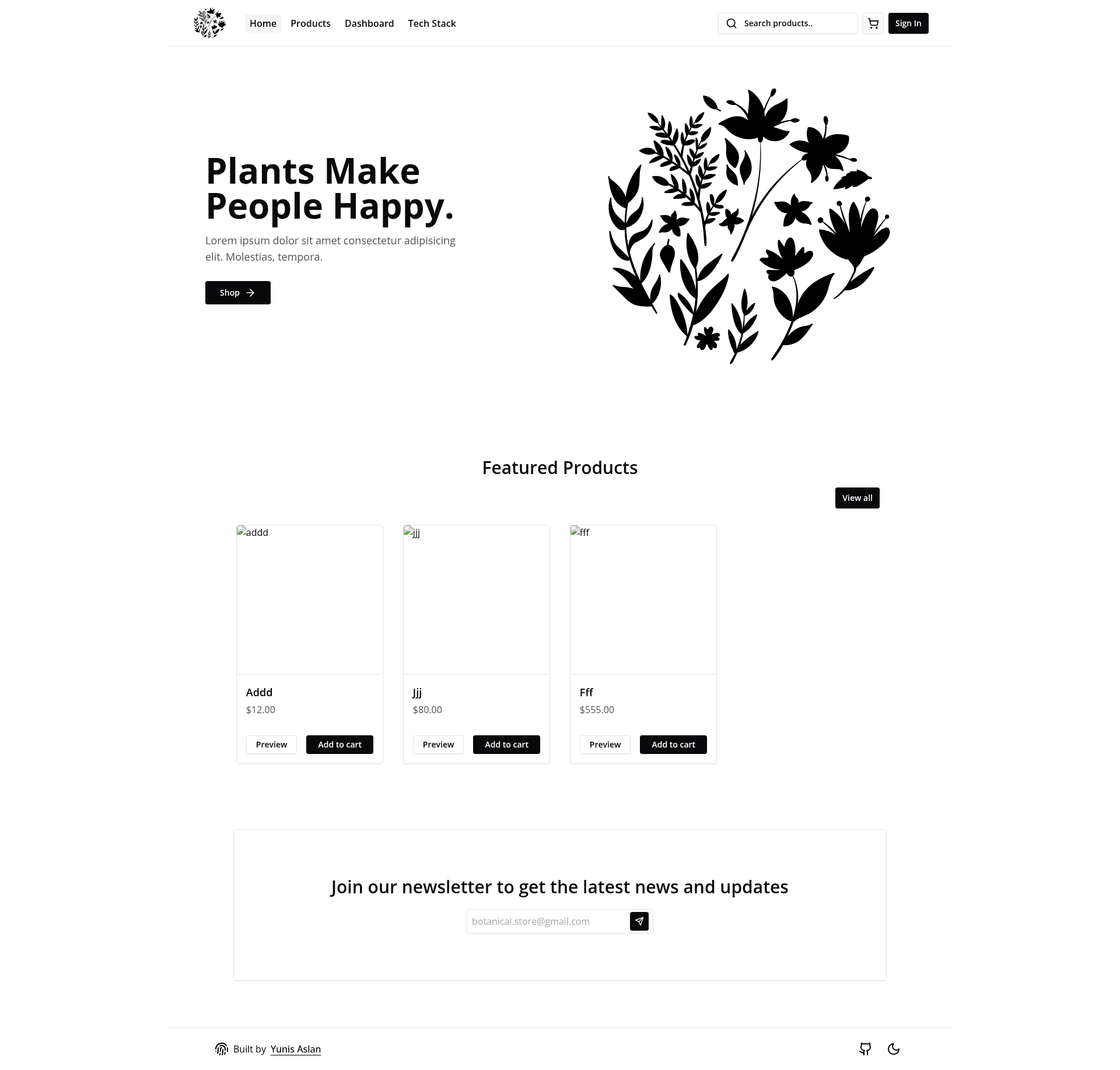
Botanical Store is an open-source e-commerce starter built with the Next.js App Router, React 18, TypeScript, Tailwind CSS, and Firebase, designed to demonstrate modern full-stack patterns for building a storefront.
What is Botanical Store?
Botanical Store is a full e-commerce project template that runs on Next.js and uses Firebase for its database and storage. As input, it accepts product data stored in Firebase and user actions such as searching, filtering, adding to cart, and managing inventory through a dashboard. As output, it produces a responsive storefront, cart flow, and admin table for CRUD operations. The project is authored by Yunis Aslan and published as an open-source repository on GitHub.
Key Features
- Next.js App Router — Uses the
/appdirectory with Server and Client Components, layout groups, routing, and pages for a modern file-based structure. - Data Fetching and Server Actions — Demonstrates data fetching, revalidating, caching, and the experimental Server Actions feature.
- Cart and Persistence — Includes add-to-cart functionality that stores selected items in localStorage, alongside pagination, search, sorting, and filter controls.
- CRUD Dashboard — Provides a dashboard table where admins can create, read, update, and delete records.
- Firebase Backend — Stores data and files in Firebase, with image uploads handled by react-drop-zone.
- Form Handling — Builds validated forms with react-hook-form and Zod schemas.
- State Management — Uses Zustand for global state across the app.
- Styling and Theme — Styles all components with Tailwind CSS and supports dark/light mode through next-themes.
- Progressive Web App — The app is installable as a PWA.
Who is it for?
- Next.js developers — Use it as a reference for App Router patterns, server actions, and data fetching strategies.
- E-commerce builders — Start with a ready-made storefront and dashboard instead of building product catalog and cart logic from scratch.
- Full-stack learners — Study how Firebase integrates with a React/Next.js front end, including image uploads and real-time data.
- Startup teams — Customize the Tailwind-styled UI and Firebase schema to launch a plant or botanical store quickly.
What can you do with Botanical Store?
- Store owners: List botanical products with images, prices, and descriptions, and manage inventory from the dashboard.
- Developers: Implement custom filters, sorting, and search for product catalogs, and persist cart state across sessions with localStorage.
- Designers: Modify the Tailwind theme to rebrand the storefront, and toggle dark mode via next-themes.
How does Botanical Store work?
- Clone the repository from GitHub with
git clone https://github.com/YunisAslan/Botanical-Store.git. - Install dependencies using pnpm with
pnpm install. - Copy
.env.exampleto.envand fill in your Firebase configuration values. - Start the development server with
pnpm run dev.
FAQ
Is Botanical Store free to use?
Yes, the project is open source and available on GitHub under a public repository. You can clone, modify, and deploy it for your own use without licensing fees.
What backend does Botanical Store use?
It uses Firebase for both the database and file storage. Image uploads are handled on the client with react-drop-zone and then stored in Firebase Storage.
Does Botanical Store include authentication?
The README does not list authentication as a feature, so you may need to add it yourself if your store requires user accounts.
Can I use Botanical Store with my own product catalog?
Yes, the store reads product data from Firebase, so you can populate the database with your own items. The dashboard CRUD operations let you manage those records.
Is Botanical Store a Progressive Web App?
Yes, the project includes PWA support, meaning it can be installed on supported devices and offer an app-like experience.