Template details
Bulletin
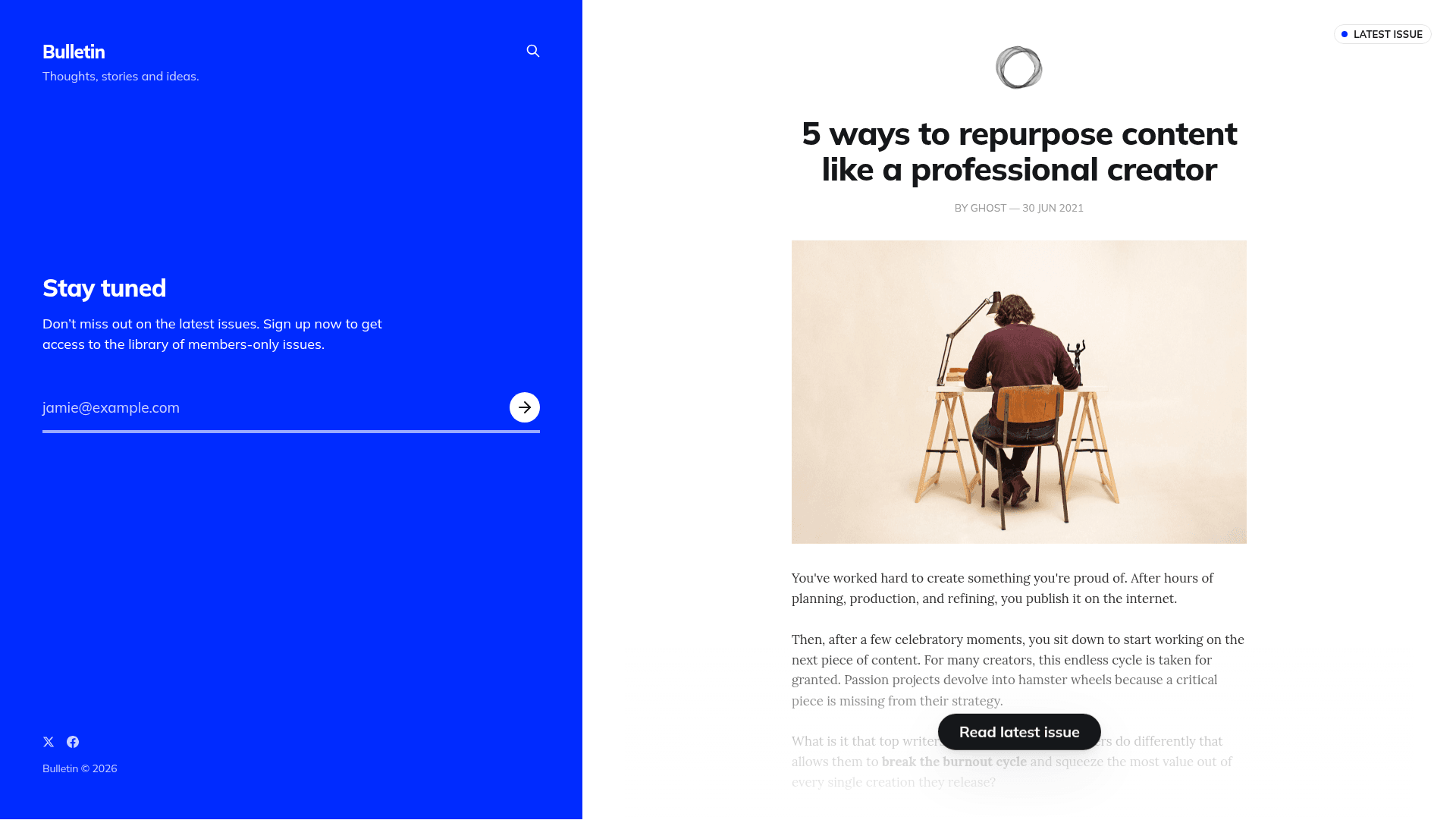
A minimal newsletter theme for Ghost that splits the homepage into a subscriber-capture section and a latest-issue excerpt.
About this template
Bulletin is a minimal newsletter theme for the Ghost publishing platform that splits its homepage into an email-subscriber capture panel and a latest-issue preview.
What is Bulletin?
Bulletin is an open-source Ghost theme created by the Ghost Foundation and released under the MIT license. It takes the content from your Ghost publication and renders it as a two-column homepage: the left-hand section uses a punchy background color to focus on capturing new email subscribers, while the right-hand section shows an excerpt from the latest issue you've published. A live demo is available at bulletin.ghost.io. The repository is synced automatically with the TryGhost/Themes monorepo, where all official Ghost themes are developed.
Key Features
- Two-column homepage — the landing layout is split into a subscriber-focused left panel and a right panel previewing the newest issue.
- Minimal newsletter focus — the theme is intentionally slim, prioritizing email capture over a full blog layout.
- Standard Ghost theme — install via Ghost's Design settings and use with whatever subscription and member features your Ghost site already has.
- MIT licensed — you can use, modify, and ship it without licensing fees.
- Gulp/PostCSS build pipeline — styles live in /assets/css/ and are compiled automatically to /assets/built/ using Gulp and PostCSS, which polyfills future CSS specs.
- Theme translations — translation files can be edited or contributed via the instructions in the TryGhost/Themes theme-translations README.
- Official maintenance — it is part of the TryGhost/Themes monorepo, meaning it receives updates alongside other official Ghost themes.
Who is it for?
- Ghost publishers who want a dedicated newsletter landing page rather than a traditional blog layout.
- Independent journalists or creators who publish a regular issue and need to convert visitors into subscribers.
- Developers building custom Ghost newsletters who want a minimal, MIT-licensed starting point they can restyle with the provided Gulp workflow.
What can you do with Bulletin?
- Email list growth: place the subscriber capture in the prominent left column with a bold background to drive signups.
- Issue promotion: show an excerpt of your latest published issue on the right side to give visitors a reason to subscribe.
- Custom styling: fork the theme and use pnpm dev to recompile CSS changes, then package a new zip with pnpm zip.
- Translation: contribute localized strings for your audience using the theme-translations workflow in the monorepo.
How does Bulletin work?
- Download the theme zip from the repository (or clone the repo).
- Log into your Ghost admin and go to Design settings to upload the zip file.
- For development, install Node, pnpm, and Gulp globally, then run pnpm install and pnpm dev to edit files in /assets/css/. The build compiles to /assets/built/, and the pnpm zip task packages the theme into dist/bulletin.zip.
FAQ
Is Bulletin free?
Yes. Bulletin is released under the MIT license, so it is free to download, modify, and use in commercial projects.
Does Bulletin work with Ghost(Pro)?
Yes. It is a standard Ghost theme and can be uploaded through the Design settings on any Ghost installation, including Ghost(Pro) hosted sites.
How do I customize the colors and styles?
Edit the CSS files under /assets/css/, then run pnpm dev to rebuild the compiled assets in /assets/built/. After that, re-package the theme with pnpm zip to get a fresh uploadable archive.
Where can I see Bulletin in action?
A live demo is hosted at bulletin.ghost.io, showing the two-column subscriber-capture layout.