Template details
c00d Astro Directory
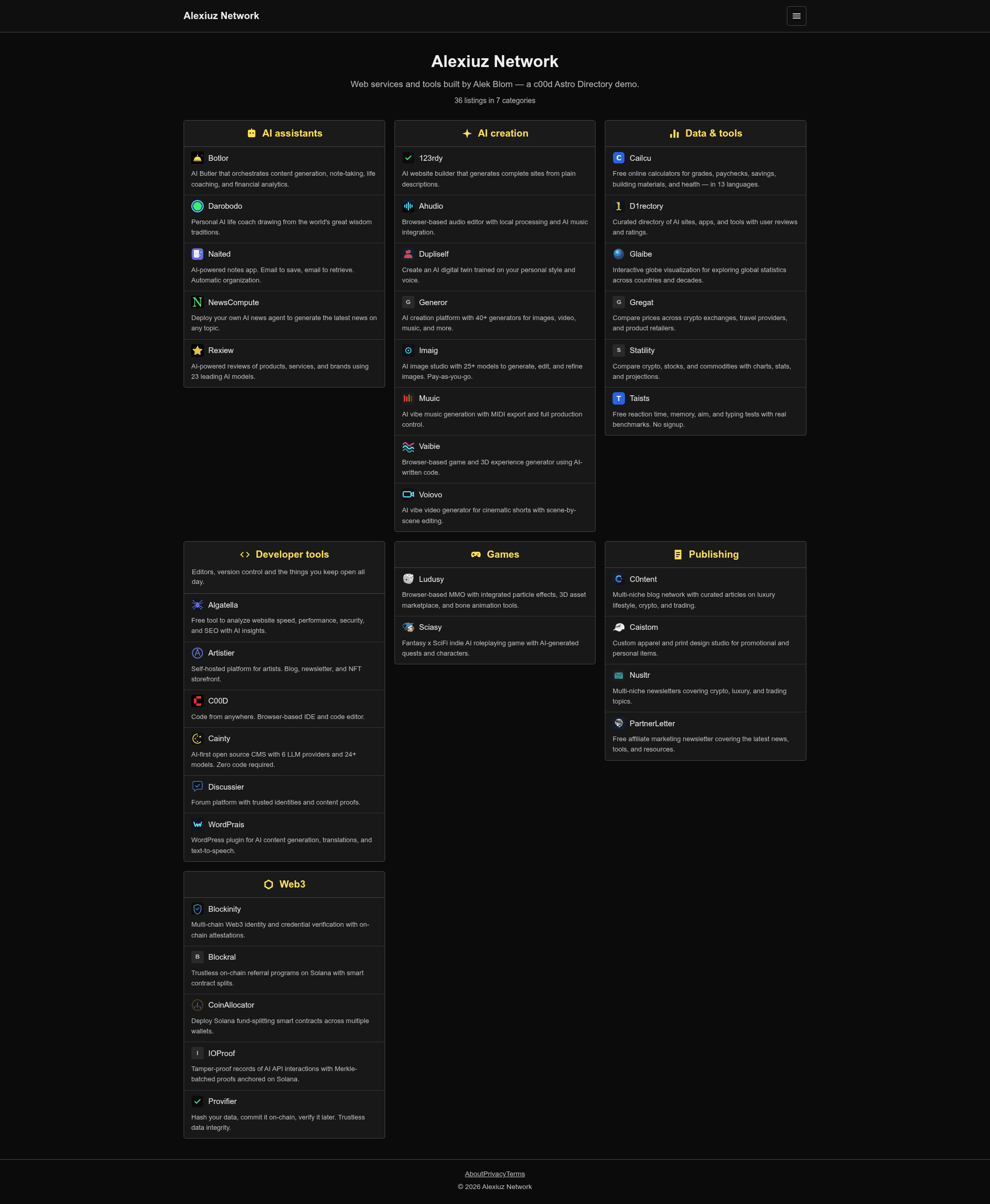
A ranked link directory as a static Astro site with category boxes, ratings, per-category pages, and client-side search, building from local JSON or a live API.
About this template
c00d Astro Directory is a free, MIT-licensed static website template built with Astro that produces a ranked link directory from local JSON files or a live c00d Directory API.
What is c00d Astro Directory?
c00d Astro Directory is a static-site template built with the Astro framework that generates a ranked link directory: a home page with category boxes of listings, rating-based sorting, per-category pages, per-listing detail pages, a sitemap, and Open Graph metadata. It takes content either from local JSON files shipped with the project (one file per listing and one per category) or from a live c00d Directory API when the DIRECTORY_API environment variable is set, and outputs a fully static dist folder that can be deployed to any static host. The template is authored by Alek Blom (visible in the degit repository path alekblom/c00d-astro-directory) and is MIT licensed. It is part of a c00d Directory family that also includes a PHP app, a WordPress theme, and a Joomla component, all sharing the same stylesheet and URL structure.
Key Features
- Local JSON content (default) — Ships with one JSON file per listing and per category under
src/content/listings/andsrc/content/categories/; edit and rebuild to publish changes. - Live API mode — Set the DIRECTORY_API environment variable to build from a c00d Directory API instead; collections fetch at build time and outbound links route through the directory's click counter.
- Client-side search — The full listing index ships as JSON for in-browser search; fine for a few hundred listings and a few kilobytes, but the API mode is recommended past a few thousand.
- Ratings with null handling — Each listing has a rating field that may be null; unrated listings still appear, sorted last rather than vanishing.
- Category boxes and detail pages — The home page shows category boxes of listings, with separate pages for each category and each listing.
- Fully static output — Browsing, categories, ratings, detail pages, sitemap, and Open Graph are all static; deploy
dist/to Netlify, Vercel, Cloudflare Pages, GitHub Pages, or a bucket. - Shared design tokens —
src/styles/app.cssholds the design tokens as CSS variables; the same stylesheet is used across the PHP, WordPress, and Joomla editions, so a rebrand carries across all of them. - Configurable —
src/consts.tssets the title, tagline, and listings-per-box;astro.config.mjslets you set the productionsitefor correct canonical URLs and sitemap generation.
Who is it for?
- Directory owners and curators who want a lightweight, database-less link directory and are comfortable editing JSON files and rebuilding the site.
- Developers building custom directories who need a static front end over a c00d Directory API so visitors can submit entries and clicks are tracked server-side.
- Small communities or niche sites that want a categorized, rated list of resources, deployed for free on a static host.
- Users migrating between c00d editions — because the URL structure and stylesheet are shared with the PHP, WordPress, and Joomla versions, moving between them preserves existing links.
Use cases
- Community resource hubs: organize tools, articles, or websites into category boxes with ratings so visitors can browse per category.
- Sponsored or curated directories: run API mode so people can submit listings and the directory counts outbound clicks instead of leaking them.
- Personal link pages: maintain a categorized, rated bookmark listing with local JSON and deploy to GitHub Pages at no cost.
How does it work?
Run npx degit alekblom/c00d-astro-directory my-directory, install dependencies with npm install, and start the dev server with npm run dev. Edit the JSON files for listings and categories, then build the static site with npm run build. For API mode, set the DIRECTORY_API environment variable to a c00d Directory URL with its JSON API enabled; the build will fetch content at build time instead of reading local JSON.
Pros and cons
- Pro: Works out of the box with local JSON; no external services required for the default setup.
- Pro: The same front end can switch to a live API without code changes.
- Pro: MIT license allows free use and modification.
- Con: Static builds do not handle submissions or click counting on their own; they need API mode or an external form service.
- Con: Client-side search index grows with the number of listings; past a few thousand, the API mode is recommended.
FAQ
Does c00d Astro Directory support user submissions?
In local JSON mode, no — there is no server to write to. Use API mode with a c00d Directory backend that has the JSON API switched on, or point a form at a service like Formspree.
How does search work?
Search runs entirely in the browser. The full listing index ships as JSON alongside the site, which is fine for a few hundred listings (a few kilobytes). For directories past a few thousand listings, the API mode is recommended.
Can I deploy it for free?
Yes. The build produces a static dist folder that can be deployed to free static hosts like Netlify, Vercel, Cloudflare Pages, or GitHub Pages.
Is click tracking included?
In local JSON mode, outbound links go straight out. In API mode, links route through the directory's click counter so the server can count clicks.
What URL structure does it use?
Categories are served at /c/ followed by the category slug, and listings at /l/ followed by the listing slug — the same structure used by the sibling PHP, WordPress, and Joomla editions.