Template details
SR Studio
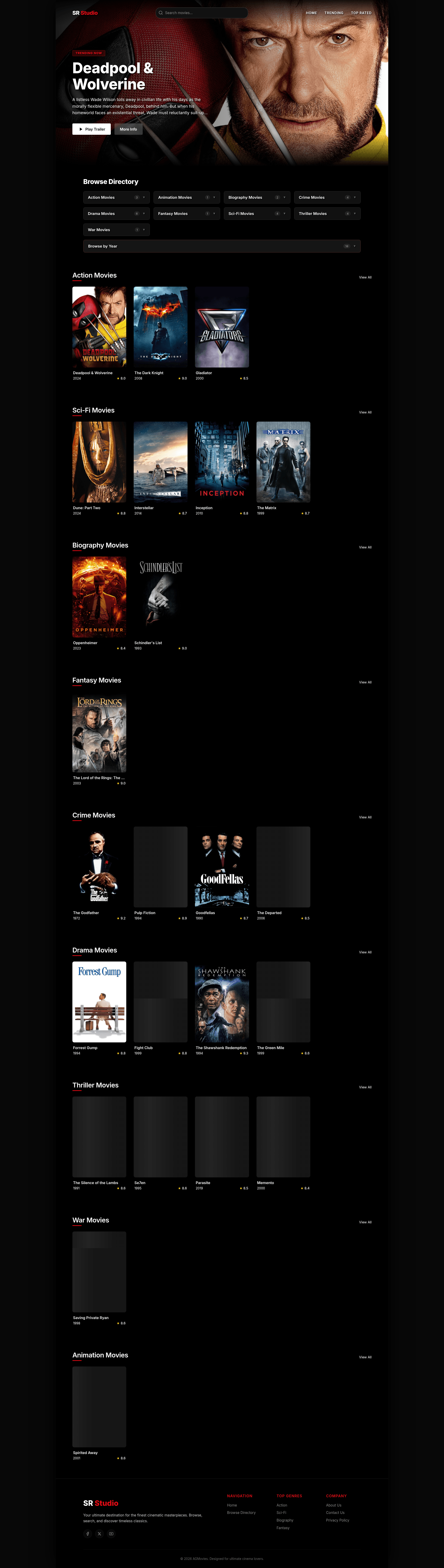
A premium dark cinematic Astro theme for film studios, movie directories, and cinema enthusiasts with glassmorphic design and instant search.
About this template
SR Studio is a premium dark cinematic theme built on the Astro framework, purpose-made for film studios, curated movie directories, and cinema enthusiasts. It takes a central JSON database of movie objects and generates a fully responsive static site with instant search, category pages, and dynamic detail pages.
What is SR Studio?
SR Studio is a static site theme built on Astro that creates a movie directory website with dynamic category and detail pages. It consumes a central JSON database (src/data/movies.json) containing movie objects with fields such as title, year, rating, description, category, director, cast, duration, image URLs, and trailer URL, and automatically generates both index listings and dynamic detail pages for each entry. The theme outputs a dark cinematic site with glassmorphic cards, glowing gradients, and an interactive client-side search dropdown. The repository is hosted on GitHub under the name sr_stodio / SR_Stodio.
Key Features
- Instant Search Dropdown — An interactive client-side live-filtering movie search engine built into Header.astro that filters the JSON database as the user types, with no server round trips.
- Glassmorphic Storytelling — Premium narrative and philosophy layouts styled inside About.astro using translucent backgrounds, backdrop blur, and fine border strokes defined in the theme's CSS tokens.
- Pure-CSS Floating-Label Form — A contact portal in Contact.astro with floating labels, custom vector SVG icons, and an interactive frontend green success toast that appears on submission.
- Dynamic Tabbed Legal Center — A sidebar-driven document navigator in Policy.astro that switches between Privacy, Terms, and Cookies content blocks using CSS fade keyframes, all bundled into one page.
- Interactive Multi-Column Footer — Footer.astro contains navigation columns, dynamic genre directories generated from movie categories, and glowing social handles for Facebook, X (formerly Twitter), and YouTube.
- Data-Driven Architecture — All movie content lives in
src/data/movies.json; adding or editing a movie object automatically creates its category listing and detail page at build time, thanks to Astro's static generation. - Cinematic Design Tokens — The theme uses an accent color of neon red (#e50914) with deep black (#000000) and obsidian (#111111) backgrounds; fonts are Inter and Outfit, making the visual identity easy to rebrand by editing CSS variables.
Who is it for?
- Film studios — Use SR Studio to present a portfolio of films or trailers with rich detail pages that show cast, director, rating, and duration, all linked from a genre-filtered catalog.
- Curated movie directory owners — Build a searchable index of films in any niche by populating the JSON database with custom entries; the instant search and category pages make browsing effortless.
- Movie enthusiasts and content creators — Publish a personal cinema blog or watchlist site with a premium dark aesthetic, including trailer embeds via the trailerUrl field and full-screen background images.
- Astro developers — Use the theme as a starting point for a fully data-driven static site; it demonstrates dynamic routing, component composition, and JSON-driven content modeling in under a dozen files.
What can you do with SR Studio?
- Create a movie database site: Populate movies.json with your own catalog entries and the theme generates a directory with category listing pages and individual movie detail pages automatically.
- Rebrand the entire theme: Change the accent color via the --accent-color CSS variable, edit the logo in Header.astro and Footer.astro, and update global SEO titles in Layout.astro in just a few edits.
- Publish legal documents without a separate page per policy: Edit the three policy tabs (Privacy, Terms, Cookies) as static HTML inside Policy.astro, and users can switch between them via the sidebar without reloading.
- Build a contact gateway: The Contact.astro form uses floating labels and custom vector SVGs, and shows a green success toast on submission, so you can wire it to your own form handler or backend endpoint.
How does SR Studio work?
The theme is built on Astro's static site generation. After cloning the repository, run npm install at the root to install dependencies, then npm run dev to start a local development server at http://localhost:4321 with hot reloading. To add content, edit src/data/movies.json following the movie object structure, and the build process (npm run build) outputs a production-ready static bundle into ./dist/ that can be previewed locally with npm run preview.
FAQ
Does SR Studio require a CSS framework like Tailwind?
No. The theme uses hand-crafted CSS with custom properties, glassmorphic classes, and the Google fonts Inter and Outfit. The README does not list Tailwind, styled-components, or any other CSS framework as a dependency.
Can I use SR Studio for non-movie content?
Yes, the core is a JSON-driven directory. Replace the movie fields in src/data/movies.json with your own data model and adjust the dynamic templates in src/pages/movie/ to serve any catalog-style content, from products to case studies.
Does SR Studio include a demo or screenshot?
The README does not include a live demo link or screenshot. It only provides source code and setup instructions, so you will need to run the dev server locally to preview the theme.
How do I change the brand name and colors?
Edit the logo and text in Header.astro and Footer.astro, update SEO titles in Layout.astro, and change the accent color by modifying the CSS variable --accent-color (default neon red #e50914) and background colors in the component style tags.