Template details
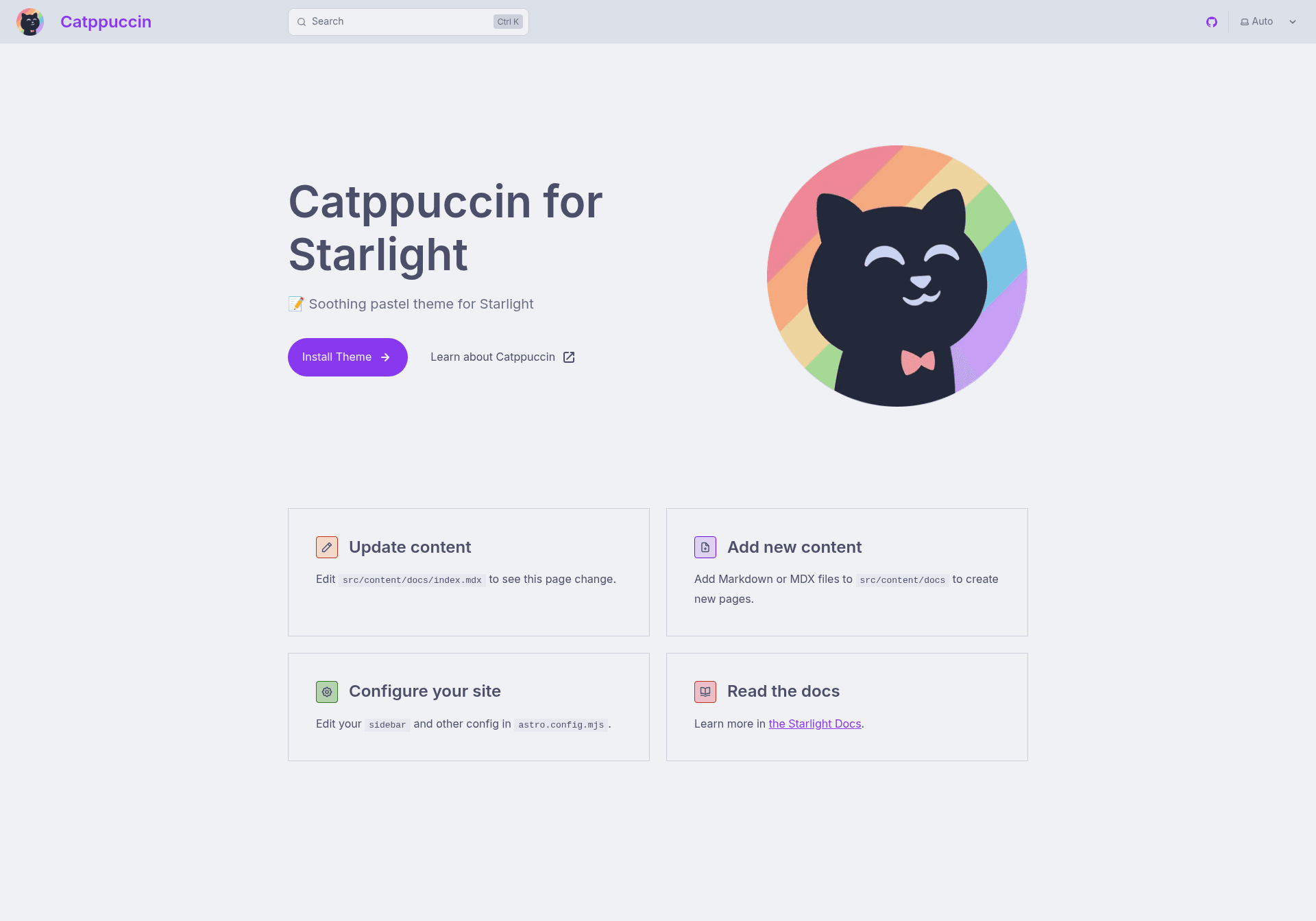
Catppuccin for Starlight
A soothing pastel theme for Astro's Starlight documentation framework.
About this template
Catppuccin for Starlight is a documentation theme plugin that applies the pastel Catppuccin color palette to Astro's Starlight documentation framework. This template is maintained by the Catppuccin Org and is distributed as an npm package named @catppuccin/starlight.
What is Catppuccin for Starlight?
Catppuccin for Starlight is a plugin for Starlight, the documentation site framework built on top of Astro. It takes a standard Starlight configuration and injects Catppuccin themes so your documentation pages render in one of four pastel color schemes. The plugin is installed from npm and added to the Starlight integrations array in a configuration file, producing a fully themed documentation site without manual CSS changes.
The theme package includes four built-in flavor variants — Latte (light), Frappé, Macchiato, and Mocha (dark) — each with the full Catppuccin accent palette. It is based on the Catppuccin design system and is released under the MIT license.
Key Features
- Four pastel flavors — Latte, Frappé, Macchiato, and Mocha give you a light option and three progressively darker options, all using Catppuccin's muted pastel palette.
- Light and dark customization — The plugin accepts optional settings for dark mode and light mode, letting you pick a flavor and an accent color for each; the README shows Macchiato and Latte paired with the Sky accent.
- Package manager support — Install with npm, pnpm, or yarn via
npm install @catppuccin/starlight,pnpm add @catppuccin/starlight, oryarn add @catppuccin/starlight. - Simple Starlight integration — Add
catppuccin()to the plugins array inside the Starlight configuration object, alongside other Starlight integrations. - Generated with whiskers — The theme files are regenerated with Catppuccin's whiskers tool, so updates follow the Catppuccin palette repository.
- Astro ecosystem compatible — Works as a plugin within an Astro project's Starlight setup, making it suitable for docs-heavy Astro sites.
Who is it for?
Documentation site maintainers who use Astro and Starlight can adopt Catppuccin for Starlight to give their docs a cohesive pastel look. Astro developers who want to brand a knowledge base or API reference with a custom accent color can use the dark and light flavor options. Catppuccin enthusiasts building a documentation site can keep their project visually consistent with other Catppuccin-themed tools and applications.
What can you do with Catppuccin for Starlight?
- Setup a themed docs site: Replace the default Starlight styling by installing the package and adding the plugin to your Starlight config so every documentation page uses the Catppuccin palette.
- Match light and dark preferences: Configure separate flavors for light and dark mode, for example Mocha for dark and Latte for light, and choose accent colors like Sky to control links and highlights.
- Rebuild themes after updates: Run the included build steps (
pnpm installandpnpm build) to regenerate theme files with whiskers if you are modifying or contributing to the theme itself.
How does Catppuccin for Starlight work?
The README documents a three-step workflow: first, install the @catppuccin/starlight package with your preferred package manager. Second, import the plugin and add catppuccin() to the plugins list inside your Starlight configuration. Third, optionally pass an object with dark and light settings to choose a flavor and accent for each mode.
FAQ
Is Catppuccin for Starlight free?
Yes, the project is licensed under the MIT License, and the npm package can be installed and used without cost. The README shows a license badge pointing to the MIT license in the Catppuccin repository.
What is Starlight?
Starlight is a documentation site framework built on top of Astro. Catppuccin for Starlight is a plugin designed specifically for that framework, so you need an existing or new Starlight project to use it.
Can I use Catppuccin for Starlight with plain Astro?
The plugin is built for Starlight's plugin system, not for standalone Astro sites. It is added to the Starlight integrations array, so it works only inside a Starlight-powered documentation project.
How do I change the accent color?
The optional configuration accepts an accent per flavor. The README example uses the Sky accent for both dark and light flavors, and the Catppuccin palette provides multiple accent options to choose from.