Template details
CelestialDocs
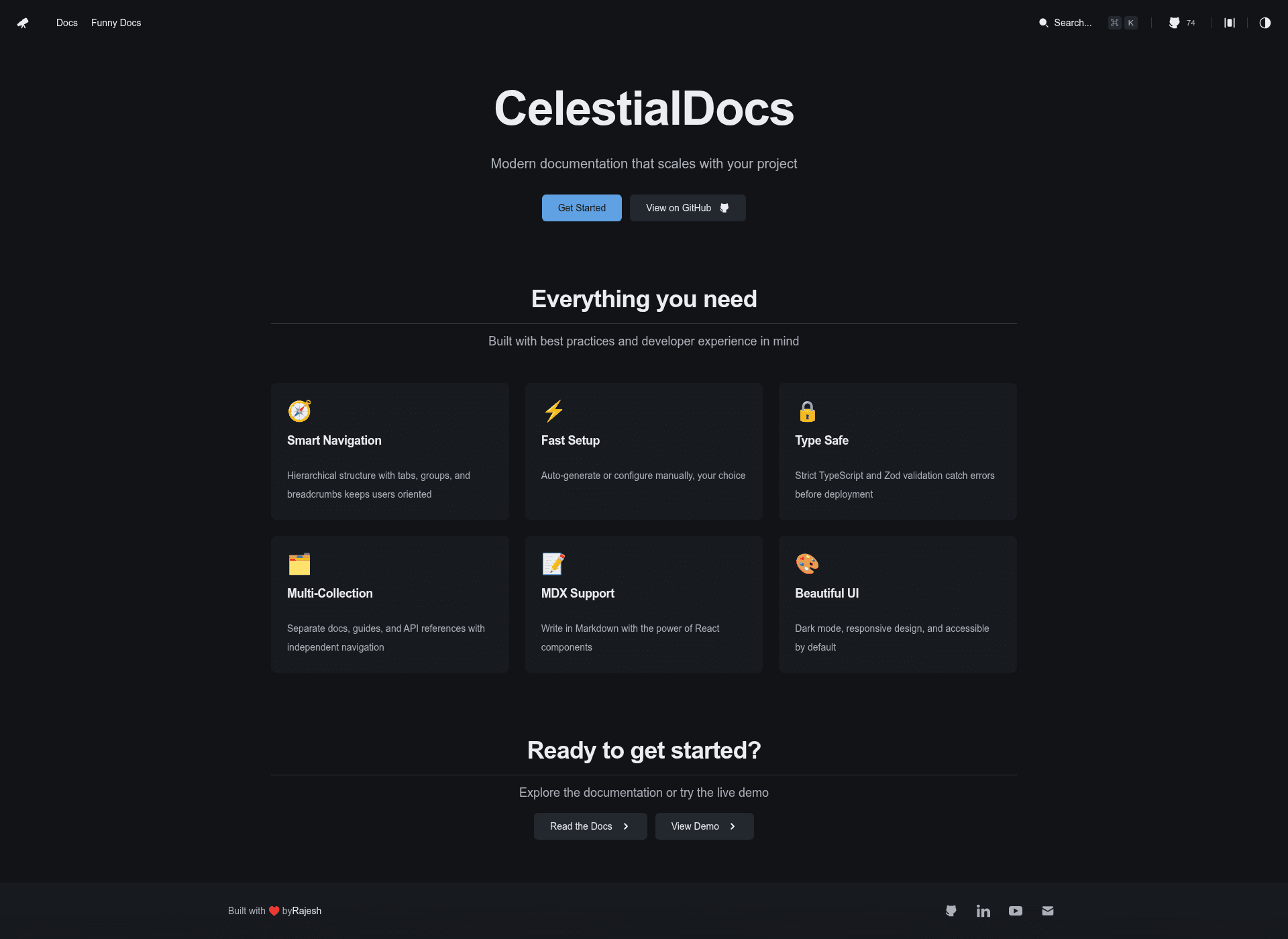
CelestialDocs is an open-source Astro documentation template that generates docs, blog, and product pages from Markdown with full source-code ownership.
About this template
CelestialDocs is an open-source documentation template built on Astro that ships a full docs site (with optional blog and product pages) from Markdown, giving you the entire source code to modify.
What is CelestialDocs?
CelestialDocs is a developer-friendly documentation platform and Astro template created by @HYP3R00T. It takes Markdown files from a content/ folder and a TypeScript config from data/config.ts, then generates a static site with structured navigation, search indexes, and auto-generated routes for documentation, blog, and product pages. Built as a static site generator (SSG), it runs on Astro and deploys to any static host or Node.js environment. The GitHub repository currently has 74 stars.
Key features
- Full source ownership — Cloning the repo gives you every line of code; no black-box NPM packages hide the logic, and you can modify the build, add custom integrations, or rewrite core functionality.
- Multi-collection architecture — Docs, blog, and product pages live in the same repo under separate routes (
/docs,/blog,/product) for a unified digital presence. - Framework-agnostic components — The UI is built with React, but Astro lets you drop in Vue, Svelte, Solid, or Vanilla JS components anywhere in the project.
- Design-system ready — Styling uses Tailwind CSS 4 and Shadcn UI; SVG icons are supported without complex setup, and the default look is accessible and consistent.
- Type-safe configuration — All site-wide settings live in
data/config.ts; the TypeScript compiler catches misconfigurations before the site builds. - Content-driven workflow — Add a Markdown file to
content/and the system generates its route, navigation entry, and search index automatically. - MDX support — Combine Markdown with JSX for richer component-driven documentation.
Who is CelestialDocs for?
- Developers — Configure the site once in
data/config.ts, extend the Astro components, and maintain documentation from a version-controlled content folder. - Technical writers — Write in Markdown without learning a full framework; the template's routing and navigation are generated automatically.
- Open-source maintainers — Keep docs, blog, and product landing pages in one repository while retaining complete control of the presentation.
What can you do with CelestialDocs?
- Project maintainers: Launch a production-ready documentation site with docs, changelog, and product overview pages all sourced from one content folder.
- SaaS founders: Build a single static site that combines a marketing "product" section, a blog for updates, and technical docs, all sharing one design system.
- Developers who need flexibility: Replace React components with Vue or Svelte islands, or customize the Tailwind theme to match a brand.
How does CelestialDocs work?
Start by cloning the repository and running pnpm install and pnpm dev; the dev server runs at http://localhost:4321. For production, run pnpm build to generate a static site. Content lives in content/ and configuration in data/config.ts. The project also offers pnpm check (lint/format via Biome), pnpm check:fix, and pnpm typecheck for validation.
Alternatives
Other documentation site generators include Docusaurus (React-based, with versioned docs) and VitePress (Vue-powered, minimal by default). CelestialDocs differentiates itself by combining multi-collection content (docs + blog + product) in a single repo with full source-code ownership and framework-agnostic component support.
FAQ
Is CelestialDocs free?
Yes, it is open source. You can clone the repository and use it for any project without paying a fee, and the author accepts GitHub Sponsorships to support further development.
What does CelestialDocs do?
It generates a static documentation website from Markdown files, including automatic navigation, search indexing, and route creation. The template supports separate sections for docs, blog, and product pages, all within a single Astro project.
What technologies does it use?
The template is built with Astro, uses React for the default UI, Tailwind CSS 4 for styling, and Shadcn UI for accessible components. It also supports MDX so you can embed interactive JSX in Markdown.
Can I use Vue or Svelte components?
Yes. Because the site is powered by Astro, you can add components written in Vue, Svelte, Solid, or plain JavaScript anywhere in the project, even while the existing UI remains React-based.
How do I get started?
Clone the GitHub repository, run pnpm install and then pnpm dev to start the local dev server at http://localhost:4321. From there, open data/config.ts to change site settings and add Markdown files to the content/ folder to create new pages.