Template details
Jekyll Flat API
A Jekyll theme for API documentation inspired by Unsplash's API design.
About this template
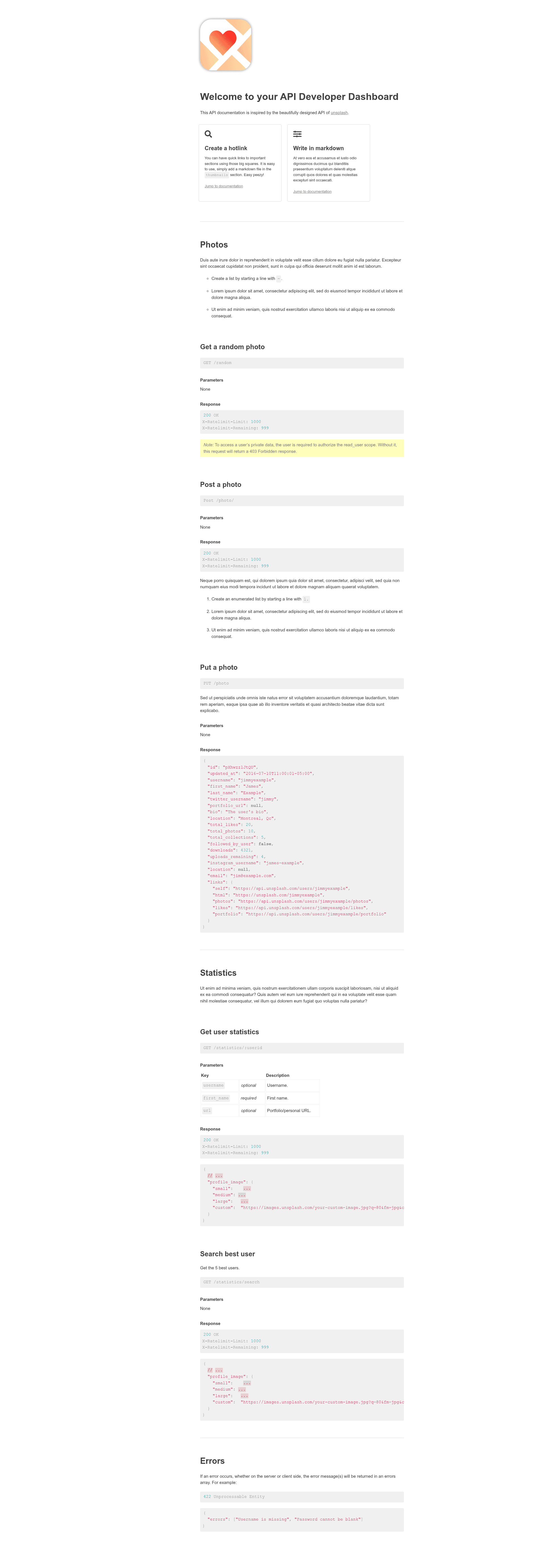
Jekyll Flat API is a Jekyll theme for publishing API documentation, modeled after Unsplash's API documentation design. It turns Markdown files placed in the _documentation directory into a static documentation site with a sidebar navigation, section leaders, thumbnails, and a customizable status link.
What is Jekyll Flat API?
Jekyll Flat API is a Jekyll theme that converts Markdown files into a navigable API reference website. It takes content structured in the _documentation folder and outputs a static HTML site that runs on any Jekyll installation, including GitHub Pages. The theme is inspired by the API documentation of Unsplash, and a live demo can be viewed at https://jekyll-theme-api-documentation.github.io.
Key Features
- Section leaders — Markdown files with
front: truein their front matter become section leaders in the navigation bar, and can be ordered using anorder:tag. - Permalink inheritance — Files with
front: falsemust have a permalink that includes the section leader's permalink, preserving the hierarchy in the URL structure. - Thumbnails — Add small square tiles at the top of the page by setting
thumbnail: truein a Markdown file's front matter; you can add as many as you like. - Customizable homepage — The top image and main title are edited in
_includes/home.html. - Navbar API status link — The URL displayed in the navbar is configured in
_includes/nav.html, so you can point to a status page. - Color variables — The colors are controlled by variables at the top of
_sass/layout.scss, so restyling doesn't require hunting through every rule. - Flexible folder structure — The
_documentationfolder can contain any number of subfolders to organize endpoints, resources, or versions.
Who is it for?
- API developers who ship public APIs and want a clean, familiar documentation layout similar to Unsplash's docs.
- Open-source maintainers who need a lightweight, Jekyll-based docs site that can be deployed directly to GitHub Pages.
- Technical writers who prefer writing in Markdown and want a simple way to structure reference docs with section leaders and permalinks.
What can you do with Jekyll Flat API?
- Publish API reference docs by writing Markdown files in
_documentationand runningjekyll serverlocally or building for production. - Organize endpoints by resource — create a folder per resource (e.g., photos) and set a leader file to control navigation ordering.
- Add visual navigation cues — mark certain pages as thumbnails to give readers quick links at the top of the documentation.
- Customize branding — replace the top image, title, and API status URL directly in the include files without touching layout files.
How does Jekyll Flat API work?
Start by cloning or copying the theme, then run jekyll server to serve the site locally. Add your documentation as Markdown files inside _documentation, using front: and order: front matter to define navigation. The theme automatically arranges the sidebar and renders a static site that can be deployed to GitHub Pages or any static host.
FAQ
Do I need to know Jekyll to use this theme?
You need a basic understanding of Jekyll front matter and directory structure. The theme itself handles the layout; you only write Markdown and set a few tags like front, order, and thumbnail.
Can I use nested folders for API resources?
Yes, the _documentation folder supports any number of subfolders, and each subfolder can contain Markdown files. A file with front: true acts as the section leader for that folder.
How do I change the colors?
Open _sass/layout.scss and edit the color variables at the top of the file. Those variables control most of the visual palette.
Where do I set the API status URL?
Edit _includes/nav.html and change the href value to point to your status page.
Does the theme include a demo?
Yes, a live demo is available at https://jekyll-theme-api-documentation.github.io, mirroring the Unsplash-style design.