Template details
Christmas Email Template
Free responsive HTML email template for Christmas promotions and newsletters, with table-based layout and inline CSS.
About this template
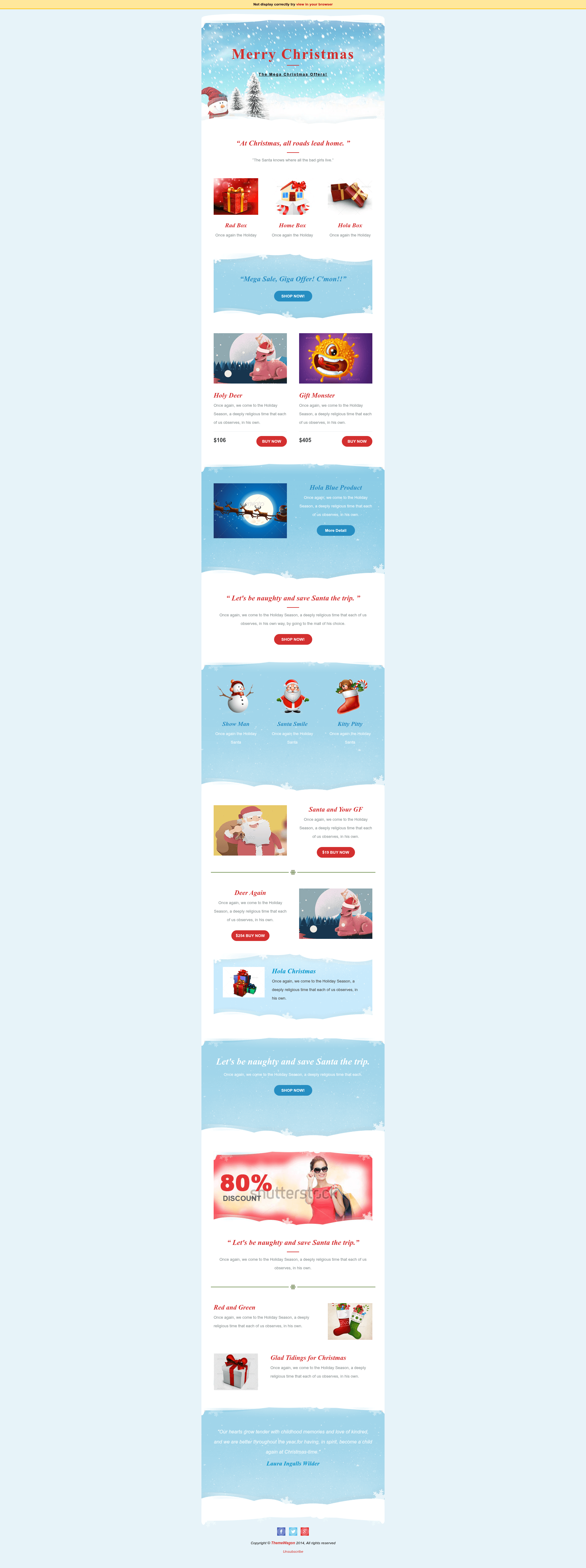
Christmas Email is a free, responsive HTML email template from ThemeWagon that lets you build on-brand Christmas newsletters and promotional emails using table-based HTML and inline CSS.
What is Christmas Email?
Christmas Email is a free HTML5 & CSS3 email template designed solely for Christmas marketing communications. It was published by ThemeWagon and created by Technext Limited, and it is delivered as a download from the ThemeWagon catalog. The template takes product images, promotional copy, and links as inputs and produces a branded promotional email using table-based HTML and inline CSS, which are the compatibility standards for email clients. A live preview is available at themewagon.github.io/christmas-email, and the template page notes it is free for both personal and commercial use. The listed version is 1.2, and the download counter shows over 1,500 downloads.
Key Features
- Responsive layout — the email adapts to all device sizes, as the page states "will work on all kinds of devices".
- Table-based HTML with inline CSS — the template is built with tables and in-line CSS, making it compatible with email clients that ignore modern CSS.
- HTML5 & CSS3 — the template uses contemporary markup and styling standards.
- FontAwesome and Google Fonts — integrated icon and typography frameworks are listed in the template's framework metadata.
- Well-commented valid HTML — the code is documented and validated, making it easier for you to edit.
- 100% customizable — you can add your own product images and text, or build your own blocks using the table layout.
- Free for personal and commercial use — no license fee is charged, but the ThemeWagon credit link must remain in place unless you donate.
Who should use Christmas Email?
- E-commerce businesses — send promotional Christmas sale emails to your customer list and drive holiday sales.
- Marketing teams — create a branded seasonal newsletter for your campaign without building an email from scratch.
- Small business owners — quickly customize the email with product images and offers, then send it to your subscribers.
- Individuals — the page also suggests sending "wonderful emails to your friends and family" during the holidays.
What can you do with Christmas Email?
- Promote a Christmas sale — announce discounts or special offers with product images and call-to-action buttons in a styled layout.
- Send holiday newsletters — distribute seasonal updates or announcements to your mailing list.
- Personal holiday greetings — use the template to send a festive message to friends and family, as the product description suggests.
How does Christmas Email work?
To customize the template, download the files from ThemeWagon and open the HTML in any code editor. Replace the placeholder product images and text with your own content, and then send the HTML file through your email service. The documentation and well-commented code help you make adjustments without needing to redesign the layout.
Pricing
The template is free for personal and commercial use. There is no payment required to download or use it, but you are asked to keep the ThemeWagon credit link in the template unless you make a donation.
Pros and cons
- Pros: free, responsive, well-commented, table-based structure for email compatibility, uses FontAwesome and Google Fonts.
- Cons: the credit link must remain unless you donate; the design is specifically Christmas-themed and may need significant changes for other campaigns.
FAQ
Is Christmas Email really free?
Yes, the template is free for personal and commercial use. You can download it from ThemeWagon without paying, but the license requires you to keep the ThemeWagon credit link in the email unless you choose to donate.
Do I need coding skills to use this template?
Basic knowledge of HTML and CSS will help because customization involves editing the HTML file directly. The code is well-commented and documented, so people with some experience can modify it on their own.
Which email clients does it work with?
Because it uses tables and inline CSS, it is designed to work across all kinds of devices, and the compatibility list includes Chrome, Edge, Firefox, Mobile, Opera, and Safari.
Does it work with my email marketing service?
The template is a plain HTML file, so it can be used with most email marketing platforms that accept custom HTML, as long as you paste the code into their editor. The page does not specify integration with any particular email service.