Template details
Symposium
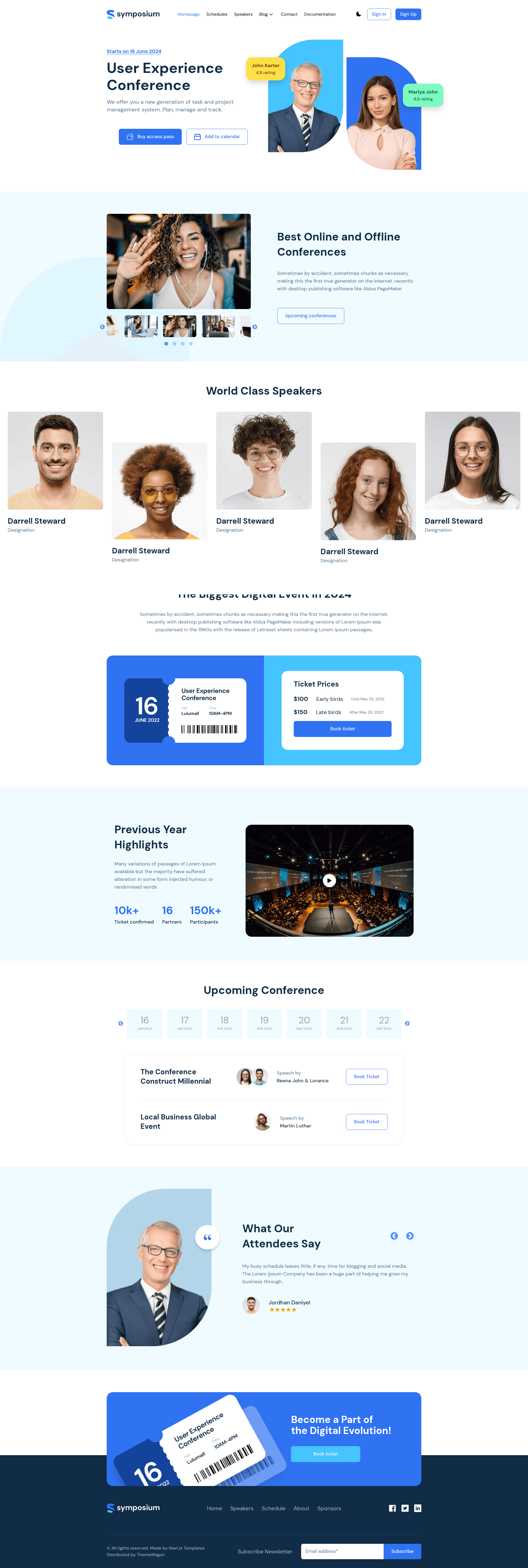
Free multipage event website template built with Tailwind CSS v4.0.0, Next.js, and React for conferences and webinars.
About this template
Symposium is a free, multipage event website template built with Tailwind CSS v4.0.0, Next.js, and React, designed to promote events, conferences, and webinars. Published on ThemeWagon by the author Get Next.js Templates, it ships as version 1.0.0 with more than 7 pre-built pages, all demo images, and the required libraries and plugins. The template is open source, can be used in commercial projects, and comes with lifetime free updates.
What is Symposium?
Symposium is a page-speed-optimized event website template that runs on the Next.js framework with React and Tailwind CSS v4.0.0. It takes a standard multipage event-brochure structure — home, blog list, blog detail, and supporting pages — and outputs a fully responsive, SEO-friendly website with light and dark modes. The design includes a sticky top navigation bar, hero header, dropdown menu bar, geolocation, contact form UI, newsletter subscription form UI, banner, sliders, and a YouTube video player. ThemeWagon lists compatibility with Chrome, Edge, Firefox, Opera, Safari, Android, iPhone, and iPad.
Key Features
- Tailwind CSS v4.0.0 — Entire styling system built on the latest Tailwind CSS release, enabling utility-first customization without writing custom CSS.
- Light & dark modes — Built-in theme toggle so visitors can switch between light and dark color schemes.
- Sticky top navigation bar with dropdown menu — Persistent navigation that remains visible on scroll, with a collapsible burger menu for mobile screens.
- YouTube video player — Embedded video component for showing event promos or speaker sessions directly on the page.
- Geolocation & Google Maps — Location-aware UI and map integration for showing event venues, tagged under the Google Map framework.
- Contact form UI & newsletter subscription form UI — Ready-made form components for attendee inquiries and email list capture.
- Blog pages (list view and details view) — Multipage blog section for posting event news and updates.
- Testimonial section, sliders, and CTA buttons — Pre-built content blocks for social proof, carousel content, and conversion prompts.
Who should use Symposium?
Event organizers building a promotional website for a conference, meetup, or webinar. Developers who want a clean, SEO-friendly Next.js codebase that can be customized with Tailwind utility classes. Marketers who need a fast-loading landing experience with newsletter capture and contact forms. The template is also suitable for agencies that design event sites for clients, since it is open source and free to use in commercial projects.
What can you do with Symposium?
- Conference organizers: Stand up a multi-page event site with a hero header, speaker/testimonial sections, and a venue map via Google Maps integration.
- Webinar hosts: Embed a YouTube video player for trailers or replays and collect registrations through the newsletter and contact form UIs.
- Event bloggers: Publish event-related articles using the included blog list and detail views, with social media icons to share posts.
- Startups and agencies: Quickly prototype or ship a branded event page, using the light and dark modes and sticky navigation to match client branding.
FAQ
Is Symposium free?
Yes. Symposium is a free website template distributed by ThemeWagon under an open-source license — you can use it in commercial projects and receive lifetime free updates. No payment or subscription is required to download it.
What's included in the download?
The download includes more than 7 pre-built pages, all demo images, and the libraries and plugins required to run the template. This includes the Tailwind CSS, React, and Next.js dependencies listed under "Library & Plugins".
Which frameworks does Symposium use?
Symposium is built with Next.js and React on the front end, styled with Tailwind CSS v4.0.0. The template's framework tags also list Google Map support. It is intended for developers comfortable with the Next.js app or pages structure.
Does Symposium have dark mode?
Yes, Symposium includes light and dark modes, selectable by the visitor. The template also includes on-hover effects and a back-to-top button as part of its UI toolkit.
What browsers and devices are supported?
ThemeWagon lists compatibility with Chrome, Edge, Firefox, Opera, and Safari, as well as mobile, Android, iPhone, and iPad. The template uses a mobile-first design and is described as fully responsive.