Template details
Eventre
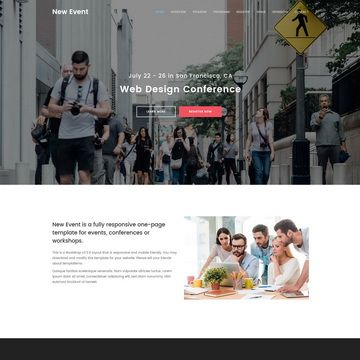
Eventre is a free Bootstrap 4 template for event, conference, and meetup websites with 18 ready-made pages.
About this template
Eventre is a free Bootstrap 4 template by Themefisher for building event, conference, and meetup websites, shipping with 18 ready-made HTML pages that cover the full lifecycle of an event site from announcement to recap.
What is Eventre?
Eventre is a static HTML template built on Bootstrap v4.5.3 and jQuery, designed specifically for event, conference, and meetup websites. It takes typical event content — schedule, speakers, sponsorship tiers, pricing, gallery images, and news — and organizes it into a multi-page website with a consistent visual style. The template is developed by Themefisher and released under the MIT license for the code, so you can use it for commercial projects without paying licensing fees.
Key Features
- 18 ready-made pages — includes Home 1, Home 2, About, Schedule, Speakers, Speaker Details, Gallery, Gallery Two, Sponsors, Pricing, Testimonials, FAQ, News, News Left Sidebar, News Right Sidebar, News Single, Contact, and 404 pages.
- Bootstrap v4.5.3 — the template is built on the Bootstrap grid and components, making it responsive across desktop, tablet, and mobile viewports out of the box.
- Gulp-based build workflow — includes a package.json with scripts that let you install dependencies with npm install, run a local dev server with npm run dev, and generate a production-ready theme folder with npm run build.
- Third-party plugin integrations — bundles Slick for carousels, Shuffle for filterable galleries, SyoTimer for countdown timers, Magnific Popup for lightbox images, and Font Awesome Free for icons.
- Two home page layouts — Home 1 and Home 2 give you different starting points for the landing page, so you can pick the arrangement that matches your event brand.
- News and blog sections — multiple news layouts (left sidebar, right sidebar, single post) let you publish updates, announcements, and post-event recaps without leaving the template.
- Google Fonts — typography is loaded from Google Fonts, and you can swap font families by editing the linked stylesheet.
Who is it for?
Eventre is aimed at people who need a professional-looking event website quickly without writing custom CSS or JavaScript from scratch. Conference organizers can set up a schedule, speaker bios, and ticket pricing pages; meetup groups can announce their next gathering and share photo galleries; festival planners can display sponsors and faq sections. The template is also a practical starting point for web developers who want to customize an event site and then hand it over to a non-technical client.
What can you do with Eventre?
- Event organizers: publish an event landing page with countdown timer, schedule, speaker line-up, and pricing in a single cohesive site.
- Conference planners: build a dedicated speakers section with individual speaker detail pages to highlight talks and bios.
- Community groups: set up a news or blog area with sidebars to post updates before and after the event.
- Sponsor coordinators: showcase sponsors with the dedicated Sponsors page and link out to sponsor websites.
How does Eventre work?
To use Eventre, download the source from the GitHub repository in the README. For basic changes, edit the HTML and CSS files directly in the theme folder and open index.html in a browser. For advanced customization, install Node.js and the Gulp CLI, run npm install, then npm run dev to get a live-reloading preview, and finally npm run build to output a clean theme folder you can deploy.
FAQ
Is Eventre free to use?
Yes, the code is released under the MIT license, so you can use, modify, and redistribute it for free, including in commercial projects. The demo images have their own licenses and are only included for preview purposes.
What do I need to run Eventre locally?
You need a web browser for the basic HTML version. For the Gulp workflow, install Node.js from nodejs.org and the Gulp CLI globally with npm install --global gulp-cli, then run npm install and npm run dev inside the project folder.
Does Eventre require a backend?
No, Eventre is a static HTML template. All pages are plain HTML, CSS, and JavaScript, so you can host the final theme folder on any static web server, such as Netlify, GitHub Pages, or a typical Apache/Nginx host.
Which browsers does Eventre support?
Because it is built on Bootstrap v4.5.3, Eventre supports the same browsers as Bootstrap 4, including current versions of Chrome, Firefox, Safari, and Edge, plus Internet Explorer 10 and 11 with the appropriate polyfills included in Bootstrap.
Can I change the images and colors?
Yes, images are regular image files you can replace with your own, and colors and fonts can be edited in the CSS file. The template uses Google Fonts, so you can change the font family by editing the font link in the HTML.