Template details
Christmas Event Website Template
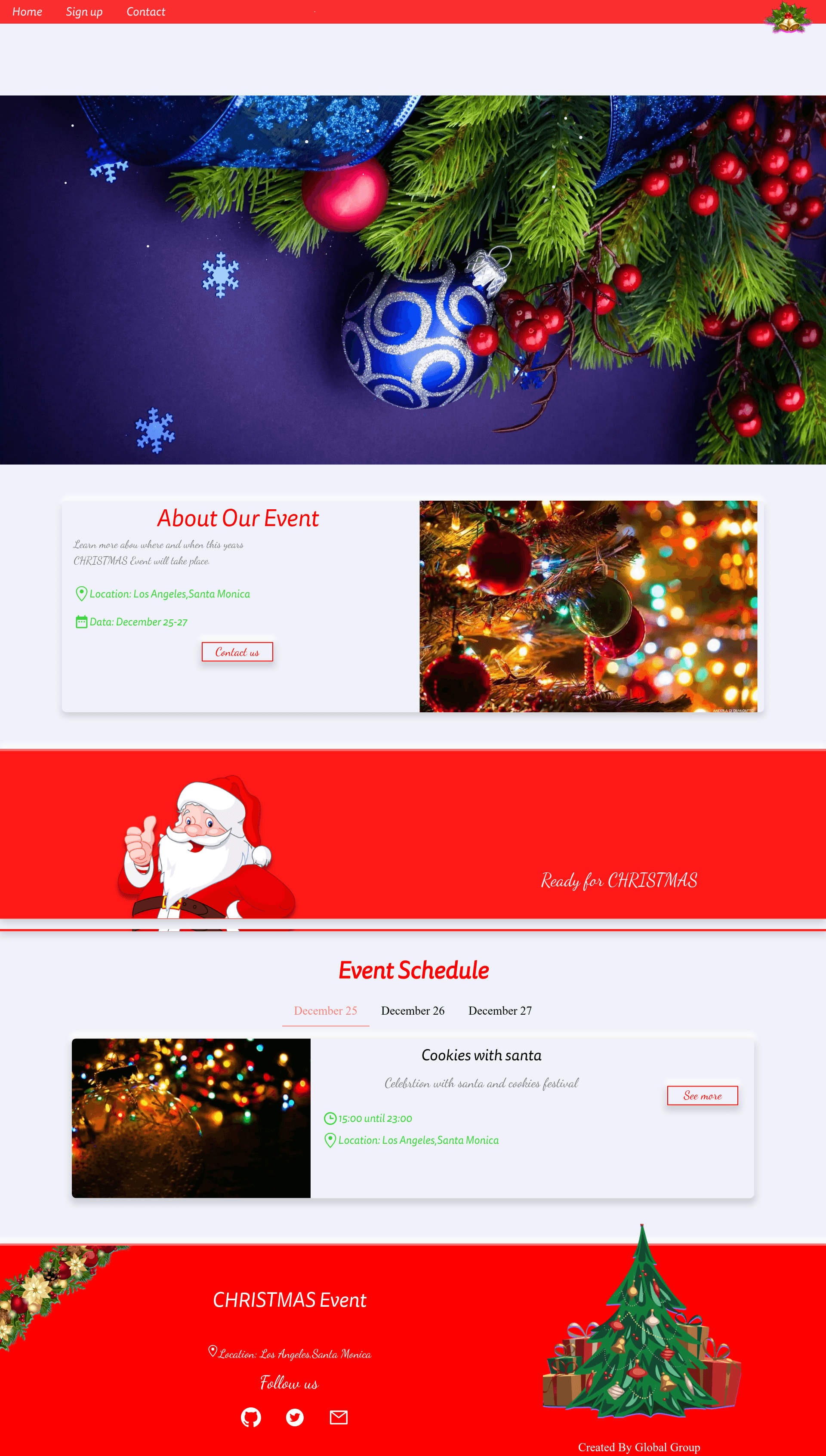
Christmas-themed event website template built with Next.js, featuring parallax scrolling, snowfall effects, and Chakra UI.
About this template
Christmas Event Website is a free, open-source website template built with Next.js and Chakra UI, designed for creating Christmas-themed event pages with snowfall animation, parallax scrolling, and a marquee ticker. The project is published on GitHub by the Globalgroup16 developer account and includes a live demo deployed on Netlify at christmasevent.netlify.app.
What is the Christmas Event Website template?
The Christmas Event Website template is a Next.js source-code project that provides a ready-made, festive front page for holiday events. It takes the repository files as input, which developers copy directly into an existing Next.js app, and produces a themed, animated landing experience for events such as Christmas markets, parties, or seasonal promotions. The template runs on the Next.js React framework and is demonstrated on Netlify, with dependencies managed via npm.
Key Features
- Next.js framework — Built on Next.js, so pages are server-rendered, SEO-friendly, and can be deployed to Netlify, Vercel, or any Node.js host.
- Chakra UI styling — Uses Chakra UI as the component library, giving the template accessible, themeable React components and a consistent design system.
- Parallax scrolling — Integrates react-scroll-parallax to create layered depth movement as users scroll through the event page.
- Snowfall animation — Includes react-snow-fall to render realistic falling snow across the entire page, reinforcing the winter theme.
- Marquee ticker — Uses react-fast-marquee to display a scrolling ribbon of text or logos, suitable for event announcements or sponsors.
- Responsive window-size hook — Adopts react-hook/window-size to adapt layouts to different viewport widths, improving responsiveness on mobile and desktop.
- Live demo — A working instance is hosted at https://christmasevent.netlify.app/, allowing you to preview the animations and layout before copying the code.
- Easy integration — The README instructs users to simply copy the template files into their own Next.js app, making it a fast starting point for holiday projects.
Who is it for?
The template suits developers who need a Christmas-themed landing page without building animations from scratch, event organizers who want a quick promotional site for a Christmas celebration, and Next.js learners seeking a real-world example combining Chakra UI with popular React animation libraries. Because the setup is a file-copy operation, it also fits designers who work with a developer to customize a seasonal microsite.
What can you do with it?
- Event organizers: Promote a Christmas market, party, or fundraiser with an animated landing page that includes snowfall, parallax sections, and a marquee for announcements.
- Front-end developers: Use the template as a reference to learn how react-scroll-parallax, react-snow-fall, and react-fast-marquee integrate within a Next.js project.
- Seasonal campaign managers: Rebrand the demo with your own logo and copy to launch a limited-time holiday campaign quickly, using the existing Chakra UI theme for consistent styling.
How does the template work?
The README provides a single installation step: copy the template files into your existing Next.js application. After copying, the components, styles, and hooks from the repository become part of your project, and the Christmas-themed page can be customized and deployed to a hosting service like Netlify.
FAQ
Is the Christmas Event Website template free?
Yes, the source code is publicly available on GitHub under the Globalgroup16 account, and the repository metadata indicates it is a free template with no licensing fee.
What framework and libraries does it use?
It is built with Next.js, uses Chakra UI for styling, and includes react-scroll-parallax for scrolling effects, react-snow-fall for the snowfall animation, react-fast-marquee for ticker content, and react-hook/window-size for responsive behaviour.
How do I deploy the template?
After copying the files into a Next.js app, you can deploy the project to any platform that supports Next.js, such as Netlify, Vercel, or a Node.js server. The repository includes a live Netlify demo for reference.
Does the template include a live preview?
Yes, a live demo is available at https://christmasevent.netlify.app/, showing the snowfall, parallax, and marquee effects in action.
Can I use this for a non-Christmas event?
The theme is Christmas-specific, but because the code is structured as a standard Next.js page, you can remove or replace the seasonal content and animations to adapt it for other winter or holiday events.