Template details
Hugo Conference
A Hugo theme for building conference and event websites with speakers, schedule, sponsors, and Google Maps.
About this template
Hugo Conference is a Hugo static-site theme for building conference and event websites from a single config.yml file, based on the conf-boilerplate theme by BrazilJS Foundation and released under the MIT license.
What is Hugo Conference?
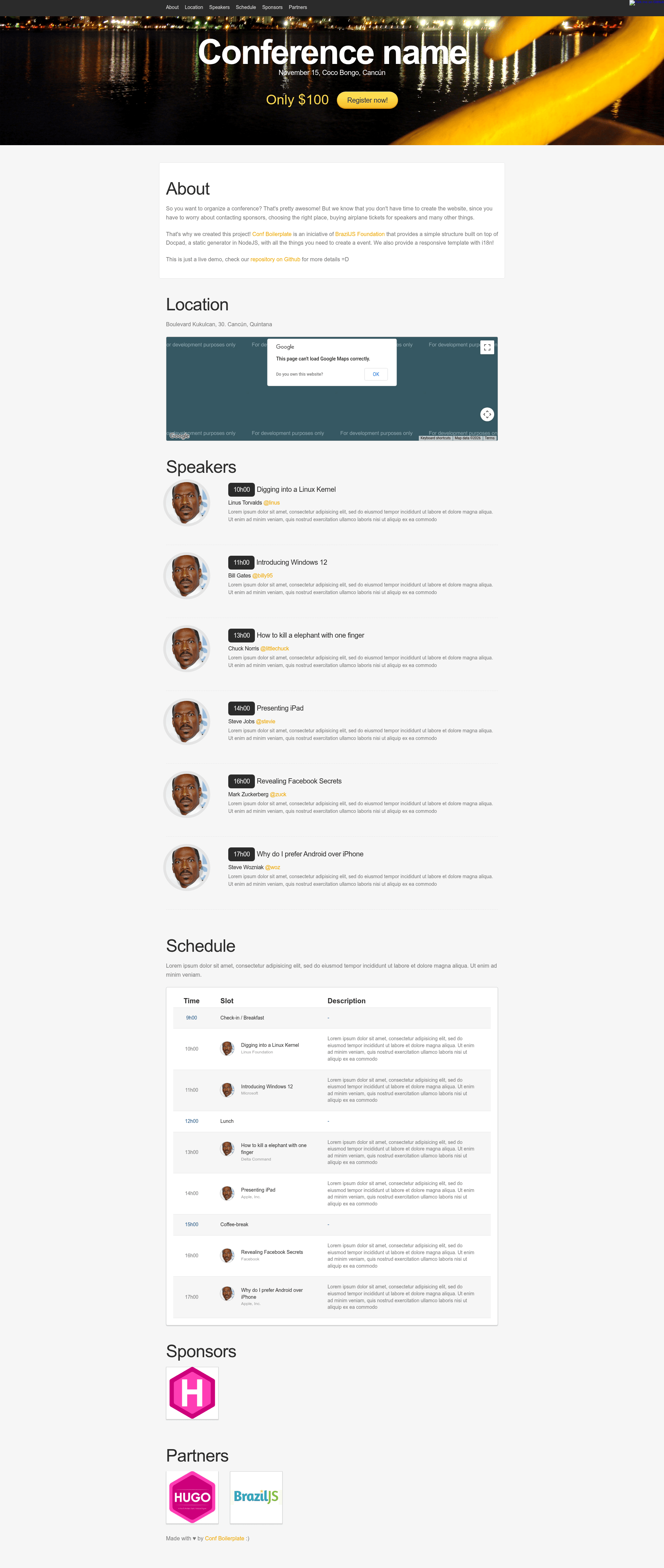
Hugo Conference is a theme for the Hugo static site generator that turns a YAML configuration file into a multi-section event website. You provide event details in config.yml; the theme renders sections for About, Location, Speakers, Schedule, Sponsors, and Partners. The project is a port of the conf-boilerplate theme originally made by BrazilJS Foundation and its contributors, and it is maintained by the author jweslley on GitHub.
Key Features
- Six ready-made sections — About, Location, Speakers, Schedule, Sponsors, and Partners come built into the theme, so you only need to fill in data.
- Google Maps integration — the Location section embeds a map through the Google Maps JavaScript API; you set your API key in the
GoogleMapsKeyparameter insideconfig.yml. - Single-file configuration — all site information (event name, dates, speakers, schedule items, sponsor and partner logos) lives in one
config.yml, with a warning to updatebaseurlbefore deployment. - Example site included — the
exampleSitedirectory contains a workingconfig.ymlyou can copy to start immediately. - Hugo-native workflow — you build the site with Hugo commands like
hugo server --watch, and the output is a static site ready to host anywhere. - MIT licensed — the code is free to reuse and modify, as specified in the repository LICENSE file.
Who is Hugo Conference for?
Conference organizers who need a working event site quickly, and communities already using Hugo, are the primary audience. Developer and tech-community groups can match the theme to their existing static-site workflow. Non-profit and community-run events can use its sponsor and partner sections to acknowledge financial backers without building a custom page.
What can you do with Hugo Conference?
- Event organizers: publish an event homepage with an about section, schedule, speaker bios, sponsors, and partners by editing one YAML file.
- Community meetups: set up a local meetup site in minutes and display the location on Google Maps for attendees.
- Open-source foundations: reuse the MIT-licensed code as a starting point for event microsites, and change the layout as needed.
How does Hugo Conference work?
You start by installing Hugo, creating a new site with hugo new site my-conf, and cloning the theme into the themes directory. After removing the default config and copying themes/hugo-conference/exampleSite/config.yml into the root, you can run hugo server --watch and begin editing config.yml to see changes live.