Template details
Classimax
Free Bootstrap classified ads website template with 20+ HTML pages, a user dashboard, and MIT license.
About this template
Classimax is a free Bootstrap classified-ads website template by Themefisher that ships with over 20 ready-to-use HTML pages for listing, storefront, blog, and user dashboard flows.
What is Classimax?
Classimax is a static HTML template built on Bootstrap v4.5 and jQuery 3.5.1, designed for building classified-ad and directory websites. It takes no backend input — you customize the HTML and CSS files inside the theme folder and deploy the resulting static pages. Developed by Themefisher, the template is released under the MIT license and has been downloaded more than 11,500 times.
Key Features
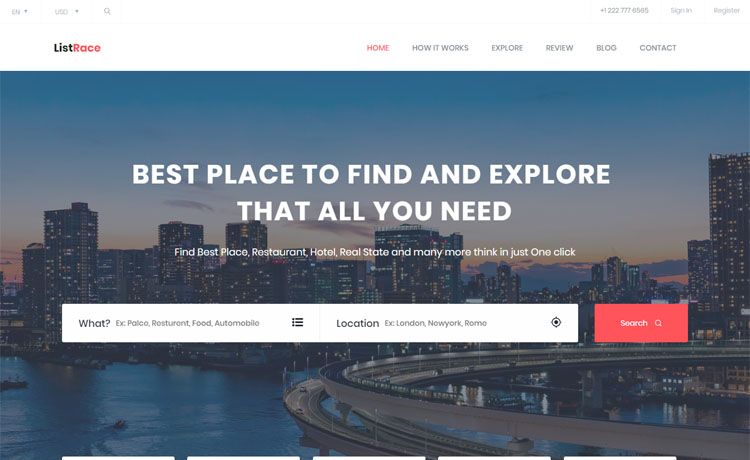
- 20+ ready-made pages — Includes homepage, 404, about us, ad listing, category, ad list view, package, store, single product, user profile, dashboard, dashboard archived ads, dashboard favourite ads, dashboard my ads, dashboard pending ads, blog, blog details, login, register, terms condition, and contact.
- Responsive design — The layout adapts to desktop, tablet, and mobile viewports, as shown in the live preview and screenshots.
- Gulp development workflow — Front-end tooling via
npm run devfor live-reload preview andnpm run buildfor a production-readythemefolder. - Third-party plugin stack — Bundles Bootstrap v4.5, jQuery 3.5.1, Google Fonts, Font Awesome Free, Nice Select, Slick, Raty-Fa, and Tether.
- Documentation and demo — Official docs at docs.themefisher.com/classimax and a live preview at demo.themefisher.com/classimax.
- MIT licensed code — Code is free to use commercially; demo images are not included in the license.
Who is it for?
Classimax is aimed at developers and small teams who want a free head-start on a classified-ads or directory site. It suits freelancers who need to deliver a static listing site quickly, startups prototyping an ad marketplace, and business owners who want a self-hosted classified portal without a CMS. It also works for agencies building storefront or dashboard page collections that can be reused across client projects.
What can you do with Classimax?
- Launch a classified-ads portal — Use the homepage, category, ad listing, and ad list view pages to present listings with categories, filters, and detail views.
- Add a store section — The store and single product pages let you sell or feature products alongside the classified listings.
- Give users a dashboard — The dashboard pages cover my ads, favourite ads, pending ads, and archived ads, so logged-in users can manage their submissions.
- Publish a blog — The blog and blog details pages are ready for posting articles and FAQs.
How does Classimax work?
Download the source from GitHub, then choose the basic or advanced path. For basic usage, edit the HTML and CSS files in the theme folder and open index.html in a browser. For advanced usage, install Node.js and Gulp CLI, run npm install and npm run dev for a live-reloading local preview, then npm run build to generate a production build in the theme folder.
Pricing
Classimax is completely free. The code is released under the MIT license, so you can use it for personal or commercial projects without paying a fee.
FAQ
Is Classimax free?
Yes, Classimax is free to download and use. The code is licensed under MIT, meaning commercial use is allowed without payment. The demo images have their own licenses and are not permitted for redistribution.
What pages are included in Classimax?
The template includes 21 pages: homepage, 404, about us, ad listing, category, ad list view, package, store, single product, user profile, dashboard, dashboard archived ads, dashboard favourite ads, dashboard my ads, dashboard pending ads, blog, blog details, login, register, terms condition, and contact.
Do I need a backend to use Classimax?
No, Classimax is a static HTML template. It runs without a server or database; you only need to edit the HTML and CSS files and host them anywhere that serves static files.
How do I install Classimax?
Download the zip from GitHub and unzip it. For a quick start, open the theme folder and edit the source files. For a Gulp-based workflow, install Node.js and Gulp CLI, run npm install and npm run dev, then npm run build for production.
Can I use the images in the demo?
No, the images are for demonstration only and have their own licenses. Themefisher does not grant permission to redistribute them, so you should replace them with your own assets.