Template details
Cool Concise Jekyll Blog Theme
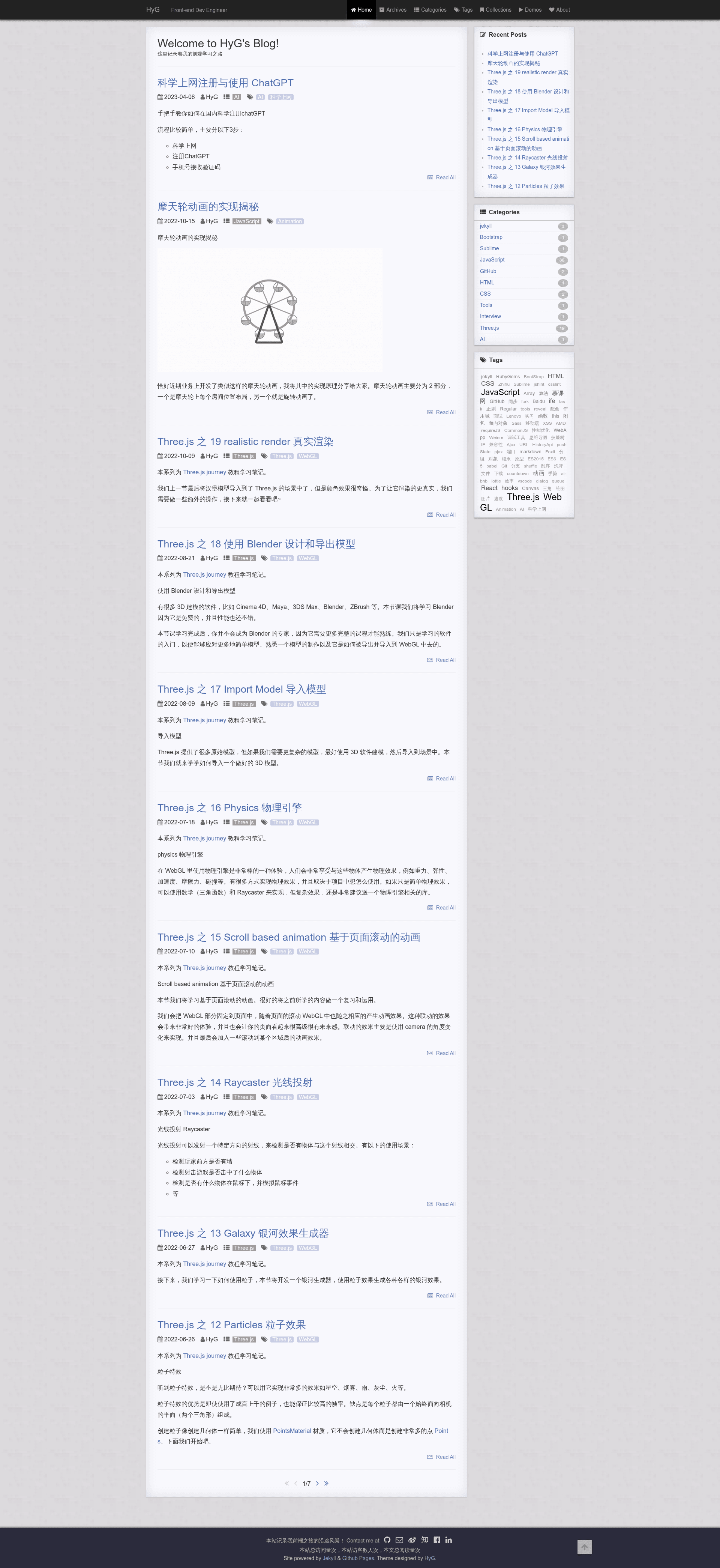
A minimalist Jekyll blog theme with excerpts, archives, tags, Disqus/Duoshuo comments, Google Analytics, and mobile support.
About this template
Cool Concise Jekyll Blog Theme is a free, MIT-licensed Jekyll theme for personal blogs, created by front-end developer HyG (Gaohaoyang) and distributed on GitHub.
What is Cool Concise Jekyll Blog Theme?
Cool Concise Jekyll Blog Theme is a static-site blog theme built for Jekyll 3.x, taking Markdown posts from a _posts folder and generating a blog with an index page, year-based archives, category and tag pages, and a separate collection/demo page. It was rewritten from scratch in v2.0.0 based on Jekyll 3.1.2, and it removes jQuery and Bootstrap in favor of lightweight custom CSS and JavaScript. The theme is maintained by HyG and the repository is hosted at gaohaoyang.github.io.
Key Features
- Post excerpts on the index page — the home page shows the first 5 posts as excerpts, cut by a configurable
excerpt_separator(default is four newlines), with a "read more" link to the full post. - Category, tag, and archive pages — the theme includes dedicated pages that group posts by year, by category, and by tag, with a tag cloud and category list in the sidebar of the index page.
- Built-in comment systems — supports both Disqus and 多说 (Duoshuo) comments; you enable one by setting its
short_namein_config.yml. - Post sidebar table of contents — on post pages, the contents list is fixed to the right side and gains its own scrollbar when it exceeds the viewport height.
- GitHub-flavored Markdown code blocks — because the theme targets Jekyll 3.x, you can write fenced code blocks with triple backticks and the site's syntax highlighter handles them; MathJax is optional per post via a
mathjax: truefront-matter flag. - Traffic analytics — Google Analytics and Baidu Tongji are supported by entering your tracking ID in
_config.yml; a busuanzi page-view counter can also appear in the footer. - Mobile adaptation and responsive demo page — the layout is responsive for phones, and the demo/collections page uses the Masonry JavaScript library for a waterfall layout.
- Extra navigation details — a "light shadow" highlight on the active navbar item, a back-to-top button, and next/previous post links at the bottom of each article.
Who is it for?
Cool Concise Jekyll Blog Theme is aimed at developers and technical writers who already use (or want to use) Jekyll and GitHub Pages and prefer a no-build, Markdown-based writing workflow. It suits personal bloggers who want a lightweight theme without pulling in a large front-end framework, and it also fits front-end developers who like to customize a theme's HTML and CSS directly — all common code is extracted into includes such as comments.html. The detailed README walks through installation, configuration, and deployment steps, so it also works for Jekyll beginners who are willing to install Ruby and run jekyll s locally.
What can you do with it?
- Personal blogging: publish Markdown posts in
_postswith YAML front-matter (layout, title, date, categories, tags, optional author and mathjax), and the theme automatically builds an index, archive, and tag pages for you. - Collecting links or a demo gallery: the Collections page accepts Markdown-formatted links so you can curate favorite articles or showcase projects; the demo page renders those in a Masonry waterfall layout.
- Running a bilingual or China-based site: the theme ships with both 多说 (Duoshuo) and Disqus comment options as well as Baidu Tongji and Google Analytics, so you can deploy on GitHub Pages and still get local-style commenting and traffic stats.
- Experimenting with Jekyll theming: because the theme is MIT licensed and actively versioned with a changelog, you can fork it, modify
_config.yml, and reuse its layout and include structure as a starting point for your own Jekyll theme.
How does it work?
To get the blog running, you install Ruby and Jekyll, copy or fork the repository, edit _config.yml with your site title, URL, social links, comment short name, and analytics IDs, then write posts in _posts folder using Markdown with YAML front matter. You can preview everything locally with jekyll s, which starts a server at http://127.0.0.1:4000/, and after confirming the build, push the repository to GitHub. The theme requires no database or build step beyond Jekyll itself.
FAQ
Does this theme work with GitHub Pages?
Yes, the theme is designed to be deployed on GitHub Pages. The README's final step is to push the code to your GitHub repository, and it uses only standard Jekyll features that GitHub Pages supports (the theme was rewritten against Jekyll 3.1.2).
How do I switch between Disqus and Duoshuo comments?
In _config.yml, set only the comment short name you plan to use: put your Disqus short name in the disqus_shortname field or your Duoshuo short name in duoshuo_shortname field. The README notes that you should choose only one and leave the other empty.
Is the theme mobile-friendly?
The update log lists "mobile adaptation" as a feature in v2.0.0, and the page includes a mobile preview screenshot. The layout is responsive, and the table of contents gets a scrollbar when it exceeds the window height on smaller screens.
Is MathJax supported?
Yes, per-post MathJax is supported by adding mathjax: true to the post's YAML front matter. The README links to the MathJax project for configuration details, but no extra plugin is needed.
Can I customize the homepage sidebar?
The README says you can add an extra area to the right side of the index page by modifying index.html. Besides the built-in recent posts, categories, and tags areas, you can add your own widgets.