Template details
Create Next Stack
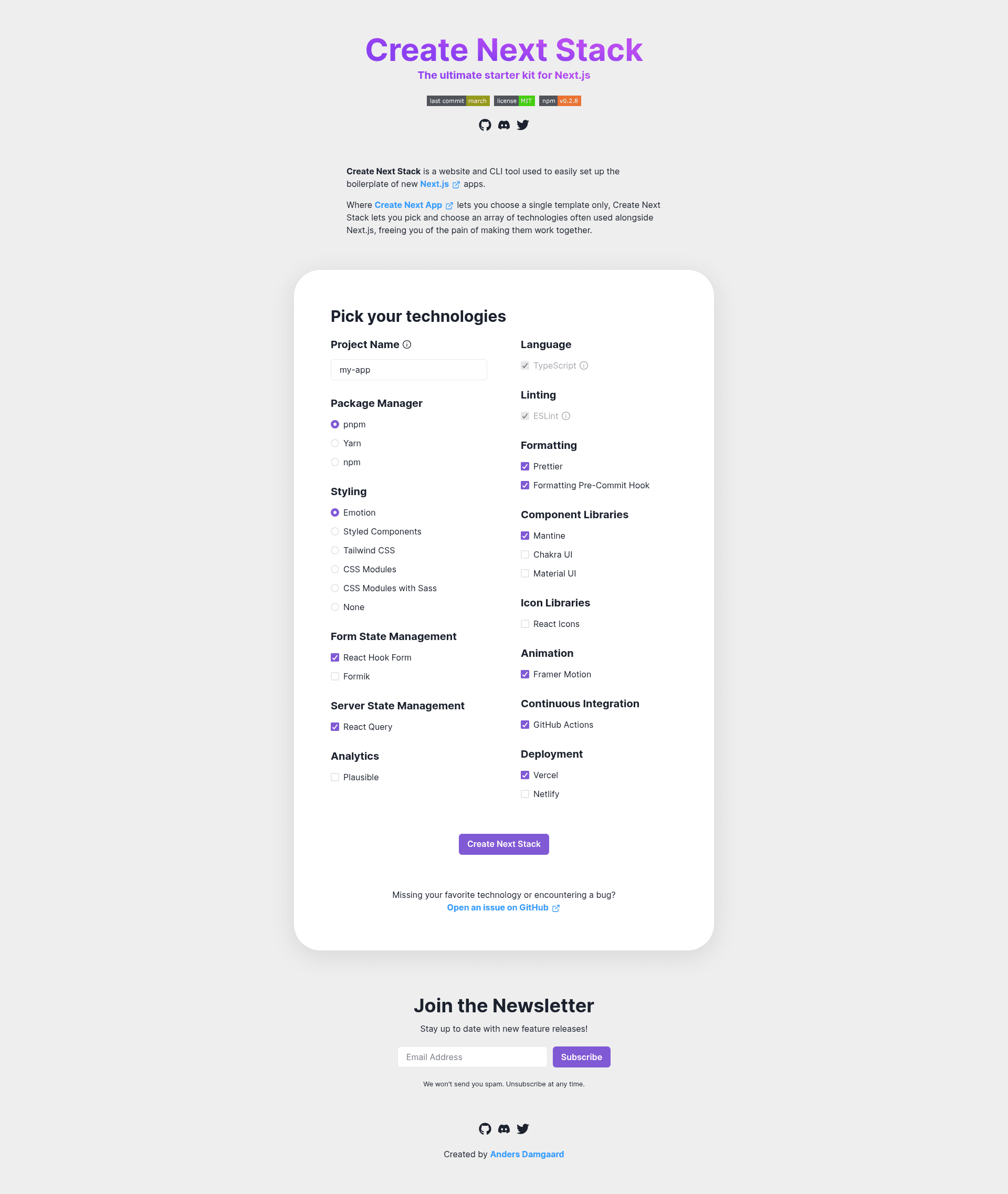
Create Next Stack is a website and CLI tool used to easily set up the boilerplate of new Next.js apps.
About this template
Create Next Stack is a free, open-source boilerplate generator and CLI tool that scaffolds a new Next.js app with your choice of companion technologies, saving you from wiring them together yourself.
What is Create Next Stack?
Create Next Stack is a website and command-line tool for setting up the boilerplate of new Next.js applications. It takes an app name and a set of feature flags as input and produces a working Next.js project with the selected technologies preconfigured. It runs on Node.js and is published on npm as an installable package, with a companion website at create-next-stack.com. The project is developed by akd-io, released under the MIT License, and its source code lives on GitHub at akd-io/create-next-stack.
Key Features
- Selectable technology stack — Choose from styling options (Emotion, Styled Components, Tailwind CSS, CSS Modules, or CSS Modules with Sass), component libraries (Mantine, Chakra UI, Material UI), form libraries (React Hook Form, Formik), animation (Framer Motion), icons (React Icons), server state management (React Query), ORM (Prisma), analytics (Plausible via next-plausible), and hosting (Vercel or Netlify).
- Multiple package managers — The required
--package-managerflag accepts pnpm, yarn, or npm, so the generated project uses your preferred tool. - Router selection — The
--routerflag chooses between the App Router (default) and the Pages Router, matching your Next.js routing preference. - Code-quality tooling — Flags add ESLint, Prettier, a formatting pre-commit hook via Husky and lint-staged, and a GitHub Actions continuous integration workflow.
- Required configuration flags — The CLI requires both
--package-managerand--stylingoptions, ensuring every generated project has an explicit package manager and styling method. - TypeScript and React support — Next.js with TypeScript and React are the foundation, with TypeScript listed among the supported technologies.
- Open-source license — The repository is MIT licensed, and contributions are welcome per the contributing guidelines.
Who is it for?
Create Next Stack is for developers who are starting a new Next.js project and want to avoid manually integrating common libraries. It suits frontend developers who prefer Tailwind CSS or Emotion but also need React Query for data fetching and Prisma for database access. It also helps teams that want consistent project scaffolding with linting, formatting, and CI already configured, and it is useful for developers who are comfortable with the command line and want to generate a project with a single command.
What can you do with it?
- Scaffold a styled Next.js app — Generate a project with Tailwind CSS and a component library like Chakra UI in one step.
- Set up a data layer — Combine Prisma with React Query to get a typed ORM and server-state management from the start.
- Add analytics and hosting — Include Plausible analytics and deploy to Vercel or Netlify without extra configuration.
- Create a CI workflow — Use the
--github-actionsflag to add a GitHub Actions continuous integration pipeline to the generated repository. - Enforce code quality — Turn on Prettier and a pre-commit formatting hook to keep commits clean from day one.
How does Create Next Stack work?
After installing the npm package, you run create-next-stack with an app name and flags. The command then generates a Next.js project in the specified directory, respecting the selected options such as the styling method and package manager. The help output, available via create-next-stack --help, lists all supported flags and their descriptions.
Pricing
Create Next Stack is free and open source. It is distributed under the MIT License, and there are no paid tiers or usage restrictions.
Alternatives
Create Next App, the official scaffolding tool from Vercel, offers a single template next to Create Next Stack's multi-technology selection. For projects that need Tailwind, Prisma, and other integrations, Create Next Stack is an alternative to composing those pieces manually after running Create Next App.
FAQ
Is Create Next Stack free?
Yes, Create Next Stack is free to use. The project is released under the MIT License, so you can use it for personal or commercial projects without cost.
What package managers does it support?
The CLI requires you to choose a package manager from pnpm, yarn, or npm using the --package-manager flag. The generated project will then use the selected manager for its scripts and dependencies.
Does it support the App Router and Pages Router?
Yes, the --router flag lets you select between the App Router and the Pages Router. The default is the App Router, which is the recommended option.
Which styling methods are available?
You can choose from Emotion, Styled Components, Tailwind CSS, CSS Modules, or CSS Modules with Sass. The styling method is a required flag, so you must specify one when generating a project.
Can I add a pre-commit hook?
Yes, you can add a formatting pre-commit hook by passing the --formatting-pre-commit-hook flag, which requires Prettier to be selected. This sets up Husky and lint-staged to format code before each commit.