Template details
CSV to HTML Table
Display any CSV file as a searchable, filterable, pretty HTML table — 100% JavaScript, no backend.
About this template
CSV to HTML Table is a 100% JavaScript template that converts any CSV file into a searchable, filterable, Bootstrap-styled HTML table in the browser. Created by Derek Eder, this open-source project (MIT License) reads a CSV from a local path and renders it with DataTables, so users get instant search, sorting, pagination, and column formatting without any server-side code.
What is CSV to HTML Table?
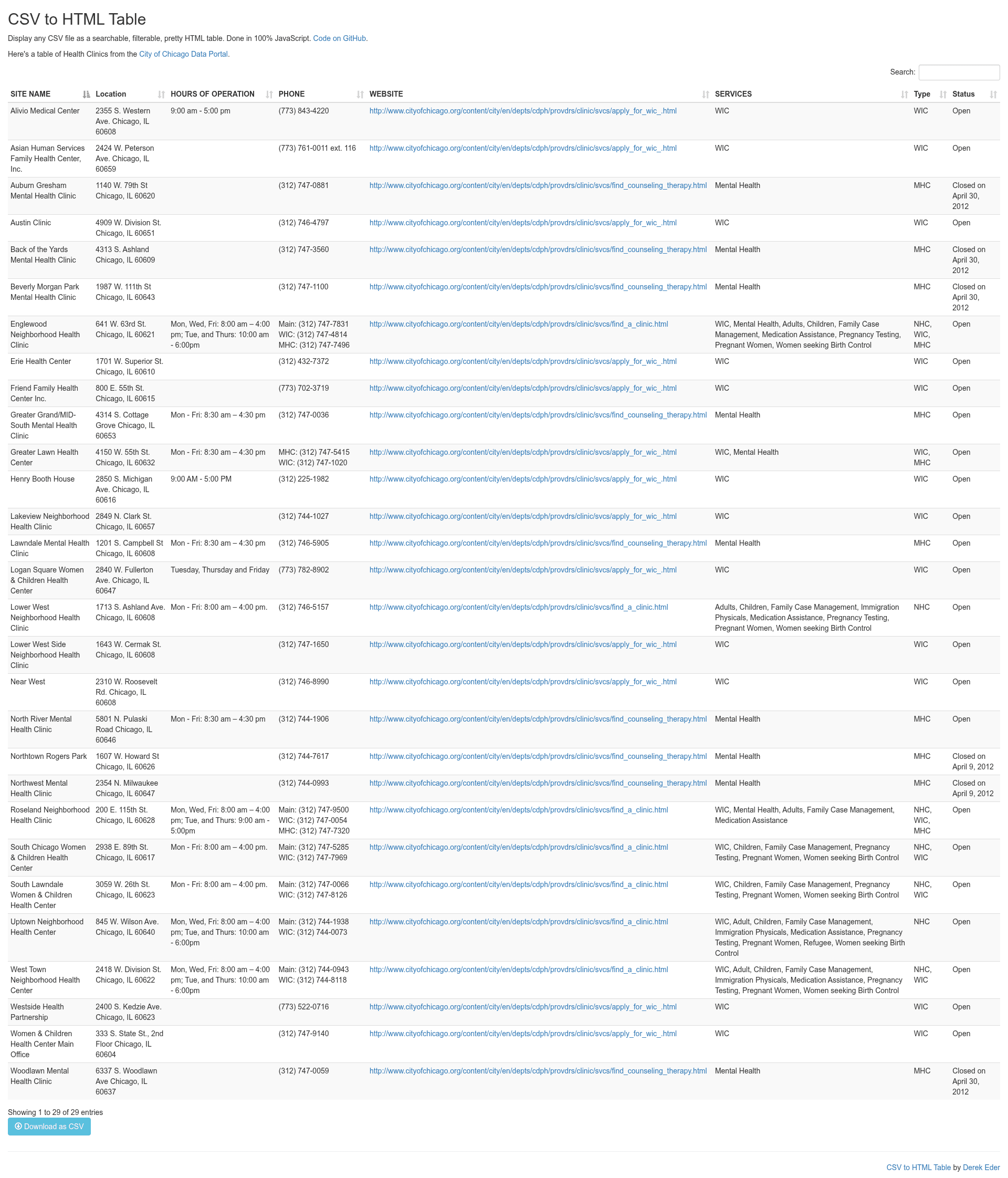
CSV to HTML Table is a client-side web template that displays the contents of a CSV file inside a DataTables-enhanced HTML table. You provide a path to a CSV file, an HTML container element, and optional configuration like separator, delimiter, and download behavior; the template handles the rest with jQuery and jQuery CSV parsing. It runs on any static web server, including GitHub Pages, and requires no build step or database. The project's public repository is maintained by Derek Eder and has 1760 stars.
Key Features
- 100% JavaScript front-end — Works entirely in the browser; no backend, API, or database setup is required.
- DataTables search, sorting, and pagination — Includes the full DataTables configuration object (
datatables_options) so you can enable paging, change page length, customize language, and more. - Custom CSV parsing — Uses the jQuery CSV library; set
separator,delimiter, and other parsing options through thecsv_optionsparameter. - Custom column formatting — Pass a list of column indexes and formatting functions via
custom_formatting; for example, turn a plain URL in column 4 into a clickable hyperlink. - Optional CSV download — Set
allow_download: trueto display a link that downloads the original CSV file. - Bootstrap 4 responsive design — The table inherits Bootstrap 4 classes for a clean, responsive layout on desktop and mobile.
- iframe embeddable — Once deployed, the table can be embedded in any website with a simple iframe tag.
Who is it for?
- Data publishers — Load a CSV in the data folder and publish a public, sortable dataset page, like the example showing Health Clinics in Chicago.
- Newsrooms and journalists — Embed a searchable table in an article via iframe so readers can filter data themselves.
- Developers — Quickly add a data-exploration component to a static site without writing backend code, then deploy to GitHub Pages using a single git push.
What can you do with CSV to HTML Table?
- Public data shows — Turn local government or NGO spreadsheets into a public-facing searchable table with no server maintenance.
- Embedded tables for articles — Use the iframe option to drop a live CSV table into WordPress or any CMS.
- Internal dashboards — Host the table on a shared web server to give team members a searchable view of a CSV export.
How does CSV to HTML Table work?
- Clone the repository and add your CSV file to the
data/folder. - Edit
index.htmland set options in theCsvToHtmlTable.init()function:csv_path,element,allow_download,csv_options,datatables_options, and optionalcustom_formatting. - Run locally with
python -m http.server(orpython -m SimpleHTTPServeron Python 2) and open localhost:8000. - Deploy by pushing the master branch to
gh-pagesfor GitHub Pages, or upload the folder to any web server.
FAQ
Why is my table not showing any data?
Open your browser's developer console and look for JavaScript errors. Common causes are an incorrect csv_path, CSV parsing options like separator that don't match your file, or the CSV file not being in the expected folder.
Can I change the field separator or quote character?
Yes. In the csv_options object, set separator to a character like a semicolon for European CSVs and delimiter to the quote character. These options are passed directly to the jQuery CSV library.
Can I embed the table on my own website?
Once deployed, you can insert the table into any webpage using an iframe. The README includes a sample iframe pointing at the hosted GitHub Pages table.
Is this template free to use?
Yes. CSV to HTML Table is open-source and released under the MIT License, so you can use, modify, and redistribute it freely, even for commercial projects.