Template details
Dark
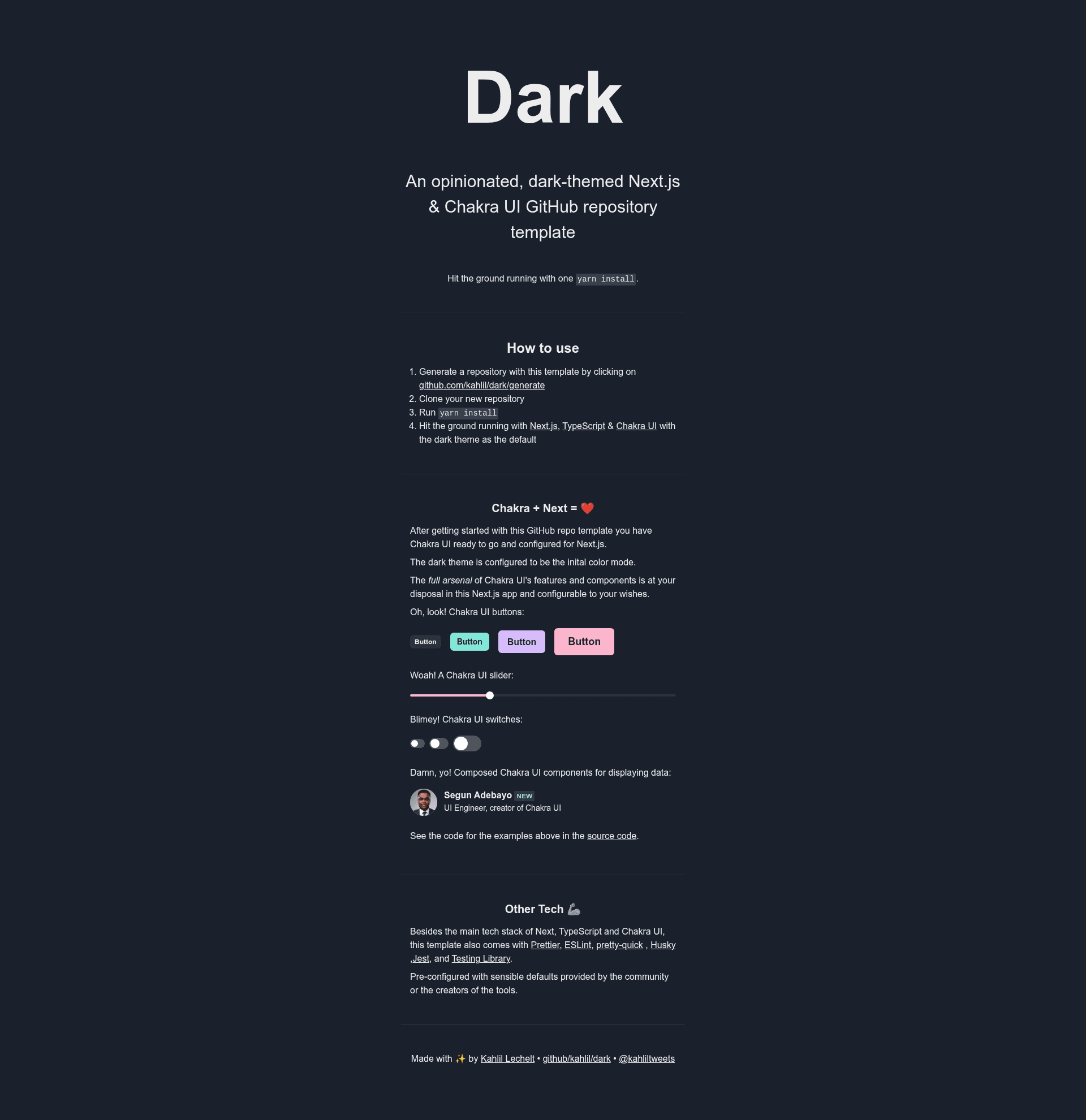
An opinionated, dark-themed Next.js & Chakra UI GitHub repository template.
About this template
Dark is an opinionated, dark-themed GitHub repository template by developer kahlil that scaffolds a new Next.js, Chakra UI, and TypeScript project with linting, formatting, testing, and git hooks preconfigured. Generate a repository from it, clone, run yarn install, and you have a working dark-themed app shell.
What is Dark?
Dark is a GitHub repository template (a boilerplate starter) built around Next.js and Chakra UI, with the dark theme set as the default. It takes a GitHub account and Yarn as inputs and produces a preconfigured web app project with TypeScript, Prettier, ESLint, pretty-quick, Husky, Jest, and Testing Library wired up. The template is authored by GitHub user kahlil, distributed under an MIT license, and has 42 stars on GitHub.
Key Features
- Dark theme by default — Chakra UI is configured so the dark theme is the default, meaning the starter renders dark out of the box without extra setup.
- Next.js framework — the project runs on Next.js, the React framework, which provides file-based routing and rendering out of the box.
- TypeScript included — the starter is written in TypeScript, with tsconfig and type checking set up.
- Chakra UI styling — all styling is handled through Chakra UI's component-based theme system, so there are no CSS framework files to manage.
- Prettier + ESLint — code formatting and linting are configured with community defaults.
- Husky + pretty-quick — a pre-commit git hook runs pretty-quick on staged files so commits stay formatted.
- Jest + Testing Library — a testing setup for unit and integration tests is included.
- One-command start — after
yarn install, the Next.js dev server command launches the project.
Who is Dark for?
- Web developers starting a new Next.js project get a ready-to-run dark-themed shell instead of wiring up Next.js, Chakra UI, and tooling by hand.
- Developers who want opinionated defaults get Prettier, ESLint, Husky, pretty-quick, Jest, and Testing Library configured with community-standard settings.
- Teams that prefer typed code get TypeScript set up from the first commit, so components and routes are type-checked.
What can you do with Dark?
- Launch a dark-themed web app quickly: generate a repository from the template, run
yarn install, and start building on a Chakra UI dark theme. - Enforce code quality from day one: Husky and pretty-quick format staged files on every commit, while ESLint and Prettier keep style consistent.
- Learn a modern React stack: the template's small, minimally configured codebase is a readable reference for how Next.js, Chakra UI, and TypeScript fit together.
How does Dark work?
The template's Getting Started flow has four steps: click the "Use this template" button on the repository page (or open github.com/kahlil/dark/generate) to create a new repository, clone that repository to your machine, run yarn install, and start the Next.js dev server.
Pros and cons
- Minimal configuration — tooling uses community defaults rather than heavy custom setup, per the README.
- MIT license — the template can be reused freely, including in commercial projects.
- Opinionated choices — the author explicitly describes the template as opinionated, so developers who prefer other defaults (for example Tailwind over Chakra UI) will need to swap them out.
FAQ
Is Dark free to use?
Yes. The repository is open source under an MIT license, and because it is a GitHub template, you can generate unlimited new repositories from it at no cost.
What tech stack does Dark include?
The README lists Next.js, Chakra UI, TypeScript, Prettier, ESLint, pretty-quick, Husky, Jest, and Testing Library. Most packages are minimally configured using the defaults recommended by each project's creators.
How do I create a project from the Dark template?
On the GitHub repository page, click the "Use this template" button in the top right, or visit github.com/kahlil/dark/generate directly. GitHub creates a new repository for you, which you then clone and install with yarn install.
Does Dark work with Yarn and Node version managers?
The author recommends Volta to manage Node and Yarn versions, and notes that if you use VS Code, you should enable format on save through Prettier and disable the built-in formatter.