Template details
Nuxt SaaS Template
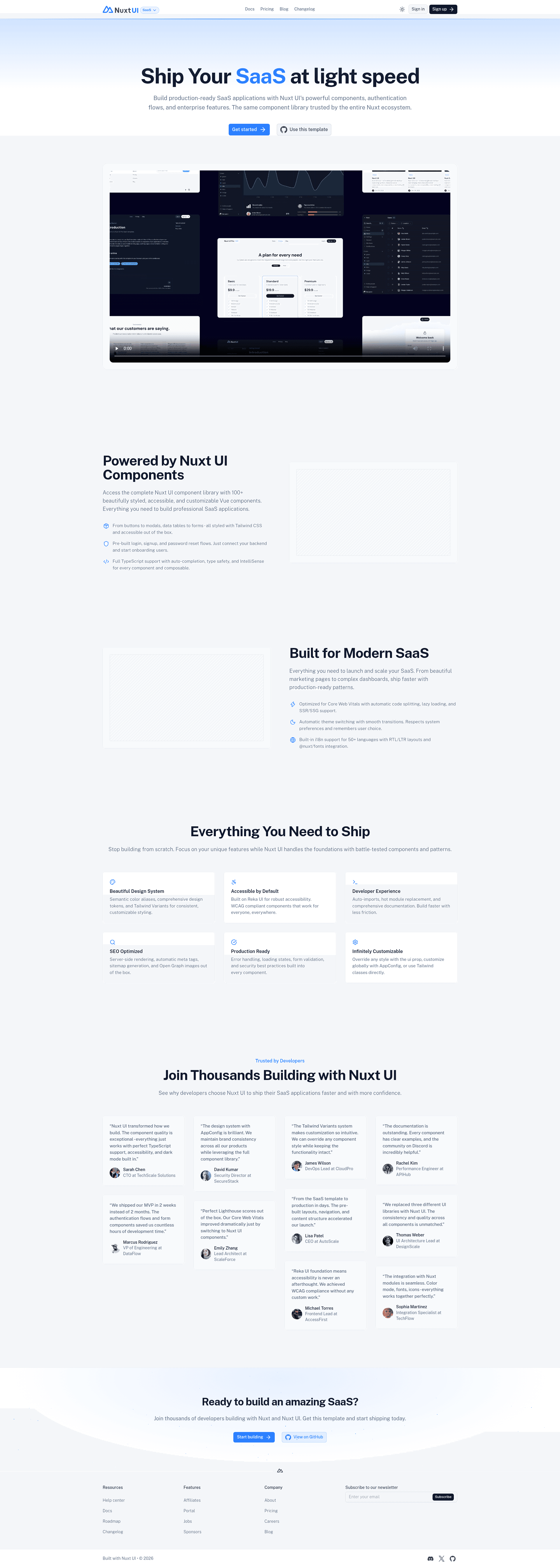
A fully built Nuxt SaaS template with landing, pricing, docs, and blog powered by Nuxt UI and Nuxt Content.
About this template
Nuxt SaaS Template is a boilerplate for launching a SaaS website, combining a landing page, pricing page, documentation, and blog in one Nuxt application built with Nuxt UI and Nuxt Content.
What is Nuxt SaaS Template?
Nuxt SaaS Template is a fully built starter project created by the Nuxt UI team and hosted at github.com/nuxt-ui-templates/saas. It takes a fresh Nuxt application and pre-populates it with the four marketing pages a SaaS product needs: landing, pricing, documentation, and blog. The template runs on the Nuxt ecosystem (Vue under the hood) and uses Nuxt UI for the component layer and Nuxt Content for Markdown-driven pages. A live demo is available at saas-template.nuxt.dev, and the template has 555 stars on GitHub.
Key Features
- Pre-built marketing pages — the landing, pricing, documentation, and blog pages are included out of the box, so you do not need to create them from scratch.
- Nuxt UI component styling — every page is assembled using Nuxt UI components, which give you Tailwind-based, themeable design tokens with light and dark mode support (both preview images are shown on the template page).
- Nuxt Content integration — the documentation and blog are powered by Nuxt Content, meaning they read Markdown files from a content directory instead of a separate CMS.
- CLI scaffolding — start a new project with
npm create nuxt@latest -- -t ui/saas, a one-line command that downloads the template and sets up the project structure. - One-click Vercel deployment — a Deploy with Vercel button clones the repository and creates a new Vercel project with the demo title, demo description, and demo image pre-filled.
- Renovate support — the README includes a Renovate GitHub app installation link so you can automate dependency updates for Nuxt and other packages.
- Standard Nuxt scripts — pnpm is used for
pnpm install,pnpm dev(development server on http://localhost:3000),pnpm build, andpnpm preview. - Live demo link — the template links to a public demo at https://saas-template.nuxt.dev/ so you can see the final output before deploying.
Who is it for?
- SaaS founders and developers who want a functional marketing site (landing, pricing, docs, blog) without writing layout and component code from scratch.
- Vue/Nuxt developers who want a reference project showing how Nuxt UI and Nuxt Content are used together in a real-world structure.
- Agencies building client SaaS websites who need a reusable starting point they can rebrand and extend for different products.
- Developers learning Nuxt Content who want to see Markdown files drive both documentation and blog pages within one app.
What can you do with Nuxt SaaS Template?
- Launch a marketing site quickly: replace placeholder content in the landing, pricing, docs, and blog sections with your own product details, then deploy.
- Customize the look: use Nuxt UI props and Tailwind utility classes to change colors, layout, and typography; light and dark themes are already supported.
- Deploy to Vercel in one click: use the Deploy with Vercel button to connect the repository to Vercel with demo metadata pre-filled.
- Keep dependencies updated: install the Renovate GitHub app to receive automated pull requests for package updates.
How does Nuxt SaaS Template work?
After scaffolding, you install dependencies with pnpm and start the development server on localhost:3000. The template's structure is built around Nuxt Content: pages such as docs and blog pull Markdown files from the content directory, while Nuxt UI provides the Vue components for layout, navigation, and page sections. Production builds run with pnpm build and can be previewed locally with pnpm preview.
FAQ
Is Nuxt SaaS Template free to use?
The template is open source and hosted in the nuxt-ui-templates GitHub organization. The README does not mention a paid license, and the live demo is publicly accessible.
How do I start a new project with this template?
Run npm create nuxt@latest -- -t ui/saas in your terminal to scaffold the project. After that, install dependencies with pnpm install and start development with pnpm dev, which serves the site at http://localhost:3000.
Does the template include a blog and documentation?
Yes. The blog and documentation pages are part of the template out of the box. They are powered by Nuxt Content, so you manage content through Markdown files rather than connecting a separate CMS.
Can I deploy to a host other than Vercel?
The template supports standard Nuxt deployment methods. The README links to the Nuxt deployment documentation at nuxt.com/docs/getting-started/deployment. The one-click Deploy with Vercel button is an easy integration, but the generated Nuxt app can be deployed to Node.js servers, static hosts, or serverless platforms.
Which package manager does the template use?
The README's Setup section uses pnpm for installing dependencies, running the dev server, and building for production. The commands shown are pnpm install, pnpm dev, pnpm build, and pnpm preview.