Template details
Developer Theme
Free Bootstrap 5 portfolio theme for developers to showcase projects and link to profiles.
About this template
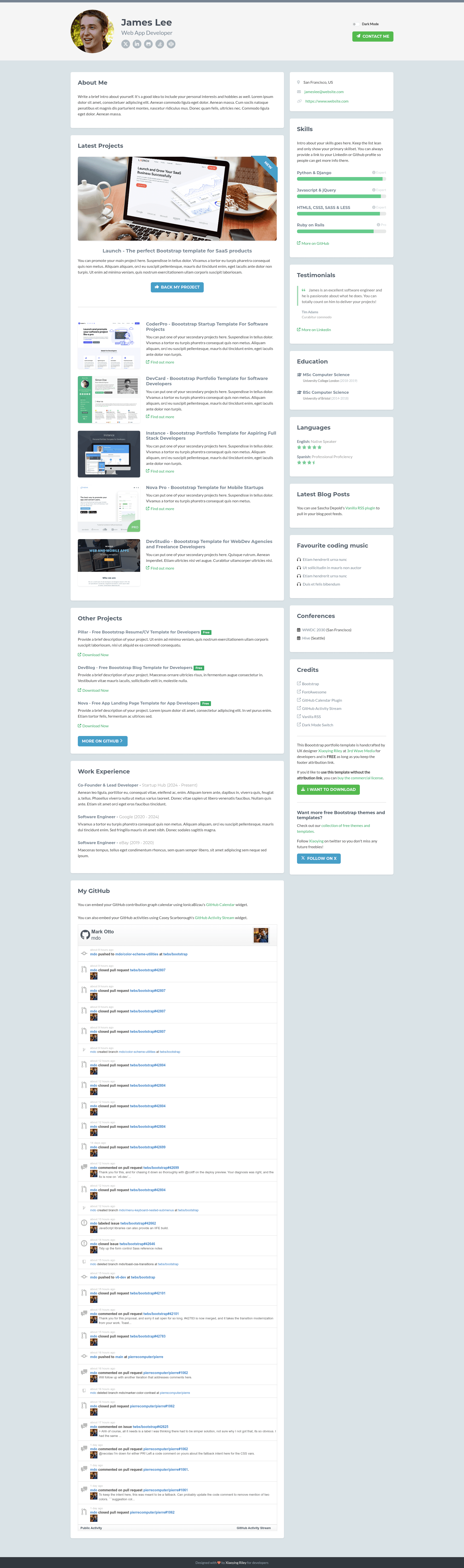
Developer Theme is a free Bootstrap 5 portfolio template built for developers to promote their work through a single-page personal hub. Designed by UX/UI designer Xiaoying Riley at 3rd Wave Media, it packages your projects, GitHub activity, blog feed, and social links into a responsive HTML site that you can customize and host anywhere.
What is Developer Theme?
Developer Theme is a free Bootstrap 5 HTML/CSS template that functions as a modular portfolio page for developers. It takes your profile information, project descriptions, GitHub contribution data, and RSS blog entries and renders them into a responsive single-page layout. The template runs as static HTML, so it needs no server-side setup and can be deployed on any static hosting service. It is authored by Xiaoying Riley and distributed through the 3rd Wave Media theme site, with the current version being Bootstrap 5 v3.2 from 2024-09-16.
Key Features
- Fully responsive layout — The single-page design adapts to mobile, tablet, and desktop breakpoints, so the portfolio reads well on any screen size.
- Light/Dark Mode — Includes both light and dark color palettes, allowing visitors to view the page in their preferred theme.
- Built on Bootstrap 5 — The template uses the Bootstrap 5 framework for its grid, components, and utility classes, giving you a familiar foundation to extend.
- SCSS source files included — All styling is delivered as source SCSS, so you can change colors, spacing, and other design tokens and recompile the CSS.
- FontAwesome icons — Social and feature icons come from FontAwesome, with the included set covering GitHub, LinkedIn, Twitter, and other common developer links.
- GitHub Activity Stream — A plugin pulls your recent GitHub activity and displays it on the page, turning your profile into a live log of contributions.
- GitHub Calendar Plugin — Another plugin renders your GitHub contribution graph, giving visitors a visual summary of your coding frequency.
- Vanilla RSS integration — The template can fetch and display posts from an RSS feed, so your latest blog articles appear on the portfolio automatically.
Who is it for?
- Software developers — Use the template to build a personal landing page that links to your GitHub, LinkedIn, and blog in one modular layout.
- Freelancers and consultants — Present a short portfolio of projects and client work, with a professional look that requires only static HTML deployment.
- Technical bloggers — Embed your RSS feed so the page always shows your most recent articles, drawing readers from your portfolio to your blog.
- Job seekers — Combine your resume-style project list, GitHub contribution graph, and social proof into a single link you can share with recruiters.
What can you do with it?
- Showcase project repositories — Display selected GitHub projects with descriptions and links, using the calendar and activity plugins to add live contribution data.
- Centralize your online presence — Replace a plain text resume or link-in-bio page with a styled hub that points to all your professional profiles and sites.
- Publish a lightweight portfolio — Deploy the static HTML onto any file server or static host without managing a backend or database.
- Customize the design — Edit the included SCSS variables to change colors and typography, then recompile to match your personal brand.
Pricing
Developer Theme is free to use as long as you keep the footer attribution link to the theme author. A commercial license that removes the attribution link is available for purchase through the 3rd Wave Media theme website; buying it also grants permission to use the template without the on-page credit. The free license does not allow reselling, sublicensing, or redistributing the template on its own.
FAQ
Is Developer Theme really free?
Yes, the free version is 100% free to use for personal or commercial projects provided you keep the footer attribution link intact. If you need to remove the attribution, you must purchase the commercial license from the theme website.
How do I customize the colors and styling?
The template ships with source SCSS files, so you can edit variables like colors and spacing, then recompile the CSS with your own Sass build process. This gives you control over the design beyond what a simple CSS override offers.
Does the template support dark mode?
Yes, a dark mode was added to the theme after the initial release. Visitors can switch between light and dark palettes, and the choice adapts the whole layout including GitHub activity widgets.
What integrations are included?
The template includes FontAwesome icons, a GitHub Activity Stream plugin, a GitHub Calendar plugin, and Vanilla RSS support. These let you embed recent commits, a contribution graph, and your latest blog posts without writing custom code.
Can I deploy this as a static site?
Yes, the template is plain HTML5/CSS3 with external plugins and requires no server backend. You can upload the files to any static host such as GitHub Pages, Netlify, or a traditional web server and it will run.