Template details
Discord Bot Website Template v3
A modern, responsive Tailwind CSS website template for Discord bots with command search, dark theme, and zero build dependencies.
About this template
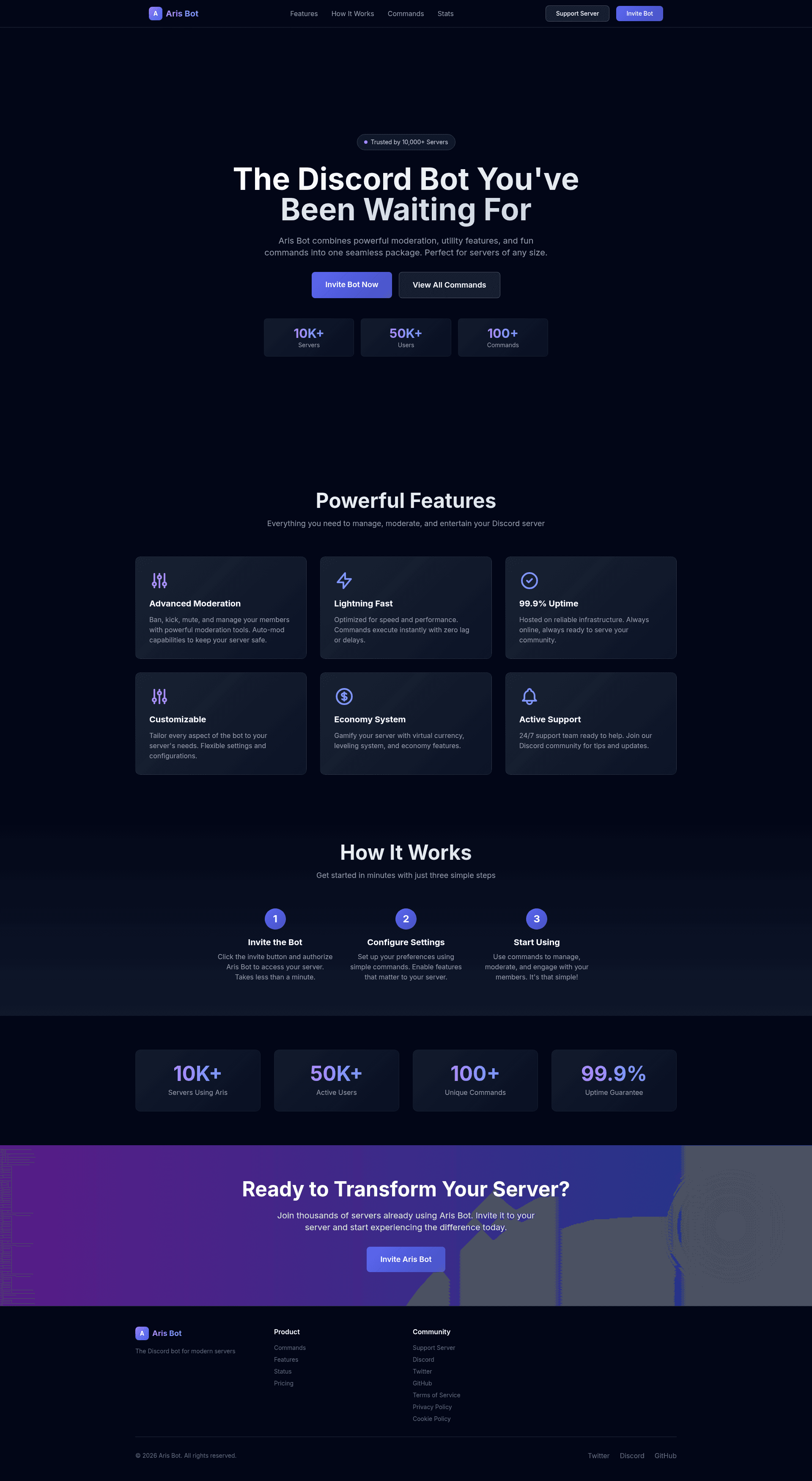
Discord Bot Website Template v3 is a free, MIT-licensed static website template for Discord bots, built with pure HTML, Tailwind CSS via CDN, and vanilla JavaScript, that gives bot creators a dark-themed two-page site — a home page and a commands page — out of the box.
What is Discord Bot Website Template v3?
Discord Bot Website Template v3 is a website template created by GitHub user Hadi-4100 for showcasing Discord bots. It takes basic bot information — bot name, command list, description, invite links, and social URLs — and turns it into a responsive, static website with no backend or build step. The template runs on any static file host, including GitHub Pages, Netlify, Vercel, cPanel, or FTP upload, and is distributed under the MIT License.
Version 3 is the current release; it replaced the Bootstrap-based v1 and v2 (Bootstrap + jQuery) with a Tailwind CSS and vanilla JavaScript stack. The file structure is minimal: src/index.html, src/css/main.css, and src/pages/commands.html.
Key Features
- Tailwind CSS via CDN — styling uses Tailwind CSS loaded from the CDN, which gives the template a small footprint and eliminates a build step; designers still tweak custom styles in
src/css/main.css. - Dark Discord-inspired theme — purple/blue gradients, dark background, hover effects, and smooth transitions create a look consistent with Discord's brand.
- Real-time command search — the commands page includes a search bar that filters command cards as you type, so visitors can instantly find a command.
- Four command categories — the commands page groups sample commands under Moderation, Utility, Fun, and Admin, each with description, usage example, and permission label.
- Responsive mobile-first layout — the site is designed mobile-first and the grid adapts to all screen sizes.
- Dynamic copyright year — JavaScript automatically updates the footer year, so the copyright line never goes stale.
- Semantic HTML and keyboard navigation — the markup is semantic and the design claims accessibility support, including keyboard navigation.
- Zero external dependencies — only Tailwind CSS and Google Fonts (Inter) are pulled from CDNs; there's no jQuery, no Bootstrap, no npm packages.
Who is it for?
- Discord bot developers — who need a professional-looking invite page without building one from scratch; they replace the demo bot name "Aris Bot" and adjust the invite/support links.
- Hobbyists and indie makers — who want a zero-build static site they can deploy to GitHub Pages or Netlify in a few minutes, without installing Node.js or configuring a framework.
- Open-source bot project maintainers — who can fork the MIT-licensed repo, have contributors edit HTML content directly, and keep documentation and landing page in one repository.
What can you do with Discord Bot Website Template v3?
- Bot creators: set your bot's name, replace the sample commands with your real command list, and update the invite URL — then upload the
src/folder to any hosting service to launch your bot's site. - Server owners: use the commands page as a searchable reference for your server's moderation and utility commands, grouped by category with permissions labeled.
- Portfolio projects: adapt the hero section, statistics dashboard, and how-it-works steps to present a side project or open-source tool with a Discord-style aesthetic.
How does Discord Bot Website Template v3 work?
Getting a live site takes three steps from the repository: clone the repo, edit the three files (src/index.html, src/css/main.css, src/pages/commands.html) with your bot's details, then deploy the src/ folder to any static host. Because the template is pure static HTML/CSS/JS, there is no local server or compilation step — the site works by opening index.html directly.
Pros and cons
- Pros: No build step and almost zero dependencies; each page gets a real-time command search; the MIT license permits free commercial and personal use.
- Cons: The template only ships two pages, so a blog or docs section must be hand-coded and linked manually; Tailwind and Google Fonts load from CDNs, so the layout depends on an internet connection unless the files are self-hosted.
Pricing
Free. The template is released under the MIT License with no mention of premium tiers or hidden costs — you can use, modify, and redistribute it, even in commercial projects.
FAQ
What files does the template include?
The src/ folder contains index.html (home page), css/main.css (custom styles), and pages/commands.html (commands page). That's the entire project structure.
Is Discord Bot Website Template v3 free?
Yes, it's MIT-licensed, meaning you can use, modify, distribute, and even sell it, as long as you keep the license file.
Does it need a build tool like Node.js?
No. The template uses plain HTML, Tailwind CSS via CDN, and vanilla JavaScript, so you can edit the files with any text editor and upload them directly to a host.
How is v3 different from v1 and v2?
v1 was built with Bootstrap, v2 used Bootstrap plus jQuery, and v3 replaced both with Tailwind CSS and vanilla JS. v3 also added the command search, dynamic copyright year, and a mostly dark, Discord-inspired design.