Template details
Fresh
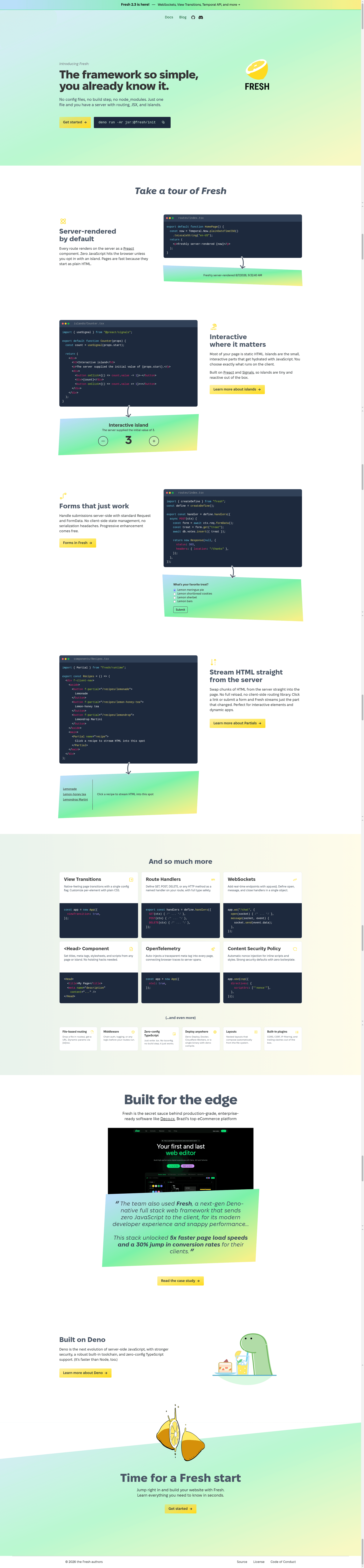
A next-generation web framework for Deno with island-based hydration and zero runtime overhead.
About this template
Fresh is a full-stack web framework for the Deno runtime that sends zero JavaScript to the browser by default and hydrates individual interactive "islands" only when needed. It is developed by the Deno team (the repository lives under denoland/fresh) and is designed to let you build server-rendered applications with TypeScript and Preact without any configuration or build step.
What is Fresh?
Fresh is a next-generation web framework built for speed, reliability, and simplicity, running entirely on the Deno runtime. It takes TypeScript and JSX source files in a file-system routed project and produces server-rendered web pages, with the option to selectively hydrate interactive components. Fresh is created and maintained by the Deno organization, and its documentation is hosted at usefresh.dev alongside an API reference on deno.land.
Key Features
- Island-based client hydration — Only the interactive parts of a page (the "islands") are hydrated on the client, minimizing JavaScript transfer while keeping full interactivity.
- Zero runtime overhead — No JavaScript is shipped to the client by default, so pages load with less overhead and faster initial paint.
- No configuration necessary — A new project works out of the box with sensible defaults, and deployment to Deno Deploy requires no configuration file.
- TypeScript support out of the box — TypeScript is built into the framework, so you can write typed code without setting up a separate compiler.
- File-system routing à la Next.js — Pages are created by placing files in a
routesdirectory, following a familiar routing pattern. - Preact-based rendering — Fresh leverages Preact for its component model, giving you a React-like developer experience with a smaller footprint.
Who is it for?
Fresh is for developers building web applications on the Deno runtime who want to send a minimum amount of JavaScript to the client. It is also suited for teams that prefer the React-like component API of Preact but want zero-configuration tooling, and for developers who want to deploy directly to Deno Deploy from a GitHub repository without setting up a separate server.
What can you do with Fresh?
- Build server-rendered web apps: Create pages using file-system routing and render them on the server, with optional interactive islands for client-side state.
- Scaffold a project quickly: Run
deno run -Ar jsr:@fresh/initto generate a new project, then start a development server on localhost:5173 withdeno task dev. - Deploy to the live internet: Push the project to GitHub, create a Deno Deploy project, and the app is served on a public subdomain automatically.
- Contribute to the ecosystem: Add your own site to the Fresh showcase by running
deno task screenshot [url] [your-app-name]and submitting a pull request.
How does Fresh work?
The getting started guide shows a straightforward workflow: install the Deno CLI, run the Fresh init script to scaffold a project, navigate into the newly created folder, and start the development server with deno task dev. To deploy, push the project to GitHub, create a Deno Deploy project, and select the repository — deployment happens with no configuration necessary.
FAQ
Does Fresh require Deno?
Yes, Fresh is built on the Deno runtime. You must install the latest Deno CLI before you can scaffold a project, and the development and deployment workflows are Deno-native.
Is Fresh free to use?
Fresh is an open-source framework hosted on GitHub under the Deno organization. You can use it freely and contribute following the contribution guidelines in the repository.
What JavaScript is sent to the client?
By default, none. Fresh uses island-based hydration, meaning only the interactive components you explicitly mark as islands are shipped as JavaScript. The rest of the page is server-rendered HTML.
Does Fresh work with React?
No, Fresh uses Preact, which is a lightweight React-compatible library. The component API is similar to React, but Fresh does not ship with React itself.
How do I deploy a Fresh application?
You can deploy to Deno Deploy by pushing your project to GitHub, creating a new Deno Deploy project, and selecting that repository. The app is then served on a public subdomain without further configuration.