Template details
MiniStore – Free Bootstrap 5 E-Commerce Website Template
Free single-page e-commerce website template built with Bootstrap 5.3.1, HTML5, and CSS3, featuring product sliders, hero carousels, and blog sections.
About this template
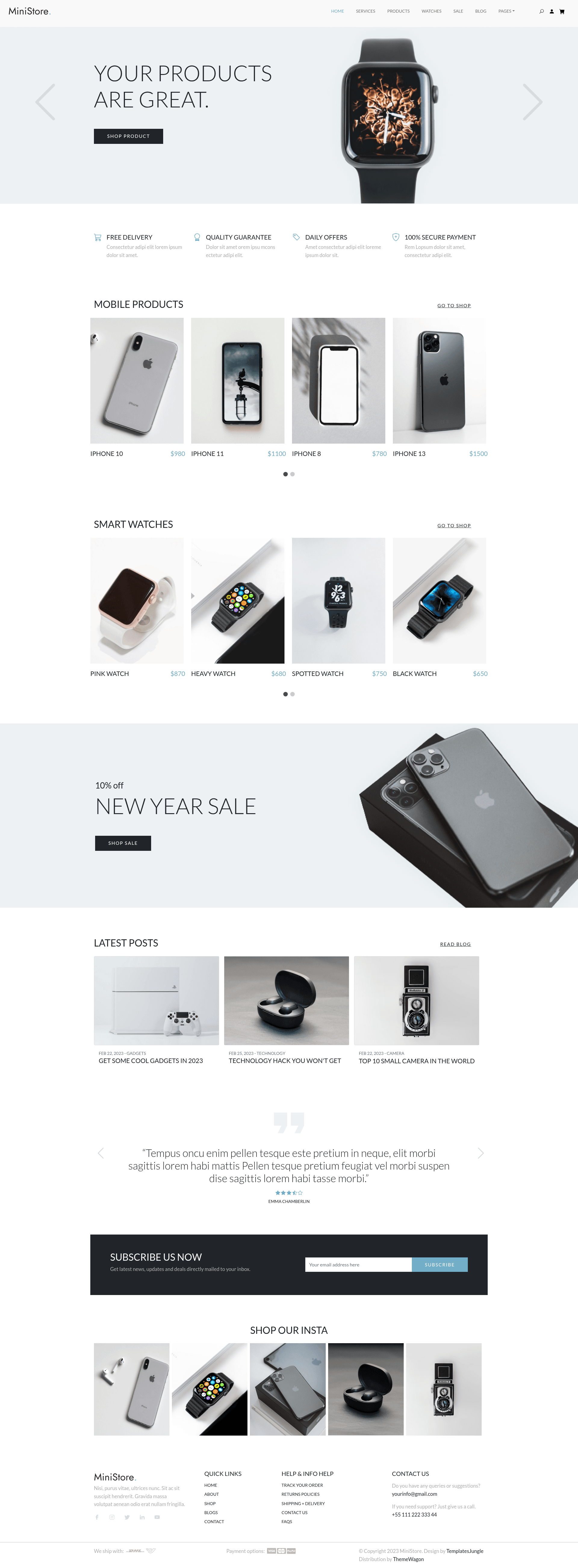
MiniStore is a free, single-page e-commerce website template built with Bootstrap 5.3.1, HTML5, and CSS3, designed to help small businesses and developers launch a responsive online storefront quickly.
What is MiniStore?
MiniStore is a free single-page website template from Templates Jungle, distributed on ThemeWagon, specifically built for e-commerce sites. It takes a single HTML page with Bootstrap 5.3.1, CSS3, and JavaScript source files as its codebase, and produces a complete storefront layout with hero carousel, product sliders, a sales banner, blog and testimonial sections, and a newsletter signup form. The template runs on any static web host or server that serves HTML, CSS, and JS files. It includes all demo images and depends on Bootstrap 5, Google Fonts, and jQuery for styling and interactivity.
Key Features
- Bootstrap 5.3.1 framework — Built on the latest version of Bootstrap, with HTML5 and CSS3, providing a modern responsive grid and pre-styled UI components.
- Hero header with carousels — The top of the page includes a hero image, header carousels, and call-to-action buttons for promotional messaging.
- Product sections with sliders — Two separate product display areas with sliders let you showcase items side-by-side, plus a banner section to highlight yearly sales.
- Blog and testimonial sections — Includes a blog section and testimonial sliders to add social proof and content to the single-page layout.
- Sticky top navigation and burger menu — The sticky navigation bar collapses into a burger menu on mobile, with dropdown support and on-hover effects.
- 100% responsive and cross-browser compatible — Works on Android, Chrome, Edge, Firefox, iPad, iPhone, Mobile, Opera, and Safari.
- Developer-friendly and SEO-friendly codebase — The code is well-commented, page-speed optimized, and structured cleanly to help with search engine rankings.
Who is it for?
MiniStore is for e-commerce startups that need a one-page storefront to display products and collect emails without a build process. It's also for front-end developers who want a clean Bootstrap 5 starting point to customize for client work, and for small business owners who want a professional online presence with a hero banner, product showcase, blog, and testimonials.
What can you do with MiniStore?
- Online retailers: Showcase products in two slider sections, highlight annual sales in the banner, and capture leads with the newsletter form.
- Freelance designers: Quickly prototype a responsive e-commerce layout using the bundled Bootstrap 5 and jQuery libraries, then hand off a clean codebase.
- Marketing teams: Publish blog posts and customer testimonials on the same scrollable page to build trust and drive conversions.
How does MiniStore work?
After downloading the ZIP from ThemeWagon, unzip the folder and edit the single HTML file, the linked CSS, and the JavaScript source files in any text editor. The template uses plain HTML with Bootstrap 5 and jQuery, so no npm install or build step is required — just upload the folder to a static web host to go live.
Pricing
MiniStore is free to download and use in commercial projects, and it includes lifetime free updates. The free license requires a credit link to the author, while premium templates like Sparrow offer no-attribution use, 24/7 support, and Figma files.
Alternatives
Sparrow is a premium Bootstrap 5 business website template from the same author, offering paid support, no attribution, and Figma design files. For other free options, ThemeWagon lists Esigned (Bootstrap 4 multi-page business template), EdgeCut (Bootstrap 4 landing page), and Carint (transportation service landing page).
FAQ
Is MiniStore free?
Yes, MiniStore is a free template. You can download it and use it in commercial projects without paying, and you receive lifetime free updates. The free license does require a credit link back to the author.
What technologies does MiniStore use?
MiniStore is built with Bootstrap 5.3.1, HTML5, CSS3, JavaScript, and jQuery. It also loads Google Fonts. The box includes one HTML page, all demo images, JavaScript source files, and library plug-ins.
How many pages does MiniStore include?
MiniStore is a single-page template. All sections — hero, products, sales banner, blog, testimonials, and newsletter — are arranged on one scrollable page, so there's only one HTML file to manage.
Can I customize MiniStore?
Yes. The template has a well-commented, developer-friendly codebase, so you can edit the HTML and CSS to change colors, text, images, and layout. Since it's static HTML, you can modify it with any code editor.
What browsers and devices are supported?
MiniStore is 100% responsive and compatible with Android, Chrome, Edge, Firefox, iPad, iPhone, Mobile, Opera, and Safari. The navigation collapses into a burger menu on smaller screens.