Template details
Financial Starter
High-performance multilingual website starter for financial teams, built with Astro and Storyblok, including financial report pages and PostHog A/B testing.
About this template
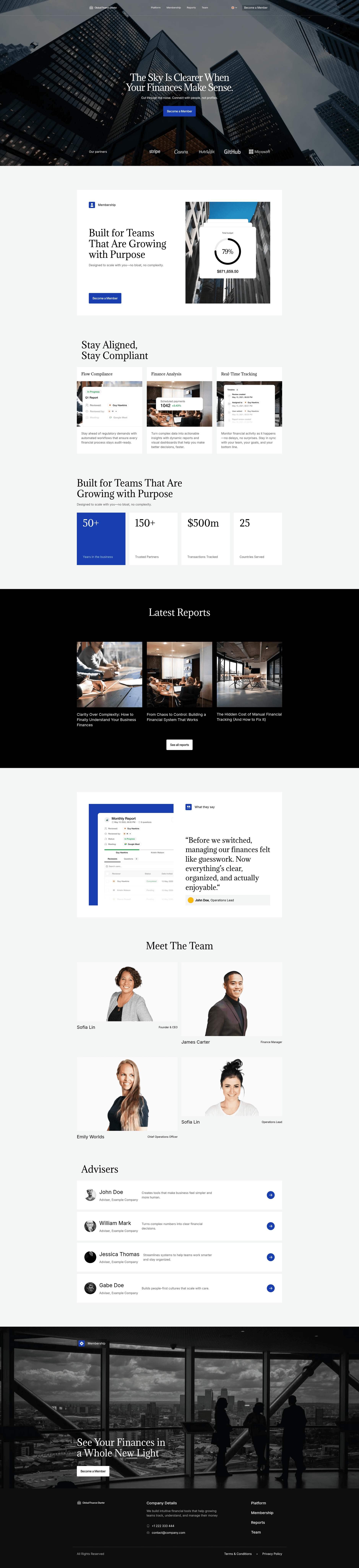
Financial Starter is a multilingual website starter template built on Astro v6 and Storyblok that gives financial teams a headless foundation for launching new brands, product pages, and campaign sites with static performance.
What is Financial Starter?
Financial Starter is a website starter template that combines the Astro v6 static site framework with Storyblok's headless CMS and Netlify's deployment platform, plus PostHog for analytics and A/B testing. It takes Storyblok content as input and generates a static, multilingual marketing website as output. The template ships with a modular content model that covers hero, features, stats, testimonials, and financial reports sections. The repository belongs to the bejamas GitHub organization, and the demo site is publicly accessible via Netlify.
Key Features
- Modular Content Model — Storyblok-based blocks for hero, features, stats, testimonials, and more, so editors can compose pages without touching code.
- Financial Reports — A built-in report content type and a report list page, tailored for publishing quarterly or annual financial results.
- Multilingual by Default — Language switching is included out of the box, with optional AI translation support for non-technical editors.
- Visual Editing — Storyblok's live preview and block-based editing lets content teams update pages in real time.
- SEO Ready — Metadata fields are available on every page, including Open Graph and other standard SEO settings.
- Optimized Performance — Static output from Astro, responsive images, and Core Web Vitals readiness give the site a fast page experience.
- A/B Testing — PostHog integration enables experiments; a separate demo branch shows PostHog A/B testing in action.
- Tech Stack — Built with Astro v6 and Tailwind CSS v4, deployed on Netlify, with Storyblok as the CMS and PostHog for product analytics.
Who is it for?
- Financial marketing teams — Launch landing pages or microsites for new products, reports, or campaigns without waiting on custom development.
- Fintech startups — Spin up a professional, SEO-friendly website in hours, then reuse the multilingual and A/B testing setup to iterate on messaging.
- Content editors — Manage page content visually in Storyblok, compose pages from blocks, and translate content through the built-in language switch.
- Developers — Fork the public repo, set environment variables for Storyblok and PostHog, and deploy to Netlify to extend the starter with custom components.
What can you do with it?
- Launch a brand site: Replace the demo content with your own Storyblok entries and publish a tailored financial brand page with a hero, stats, and testimonials.
- Publish financial reports: Use the built-in report content type to create earnings summaries, then display them on the report list page.
- Run experiments: Enable PostHog A/B testing from the separate demo branch, then compare variations of pricing or headline copy.
- Translate content: Switch languages through the default multilingual setup, or add AI-assisted translations to speed up localization.
How does it work?
The quick start is a six-step process: create a Storyblok account and a Space, clone the Storyblok Space, fork the repository, create a project on Netlify, set up environment variables (including STORYBLOK_TOKEN, STORYBLOK_PREVIEW, STORYBLOK_ENVIRONMENT, STORYBLOK_DEFAULT_LANG, and PUBLIC_POSTHOG_TOKEN), and deploy. Locally, you need Node.js and Bun; run bun install, copy the example environment file, and use bun dev to start the development server.