Template details
Flotiq Gatsby Event Starter
Gatsby 5 starter for event websites using Flotiq headless CMS, Tailwind CSS, and Flotiq's source plugin.
About this template
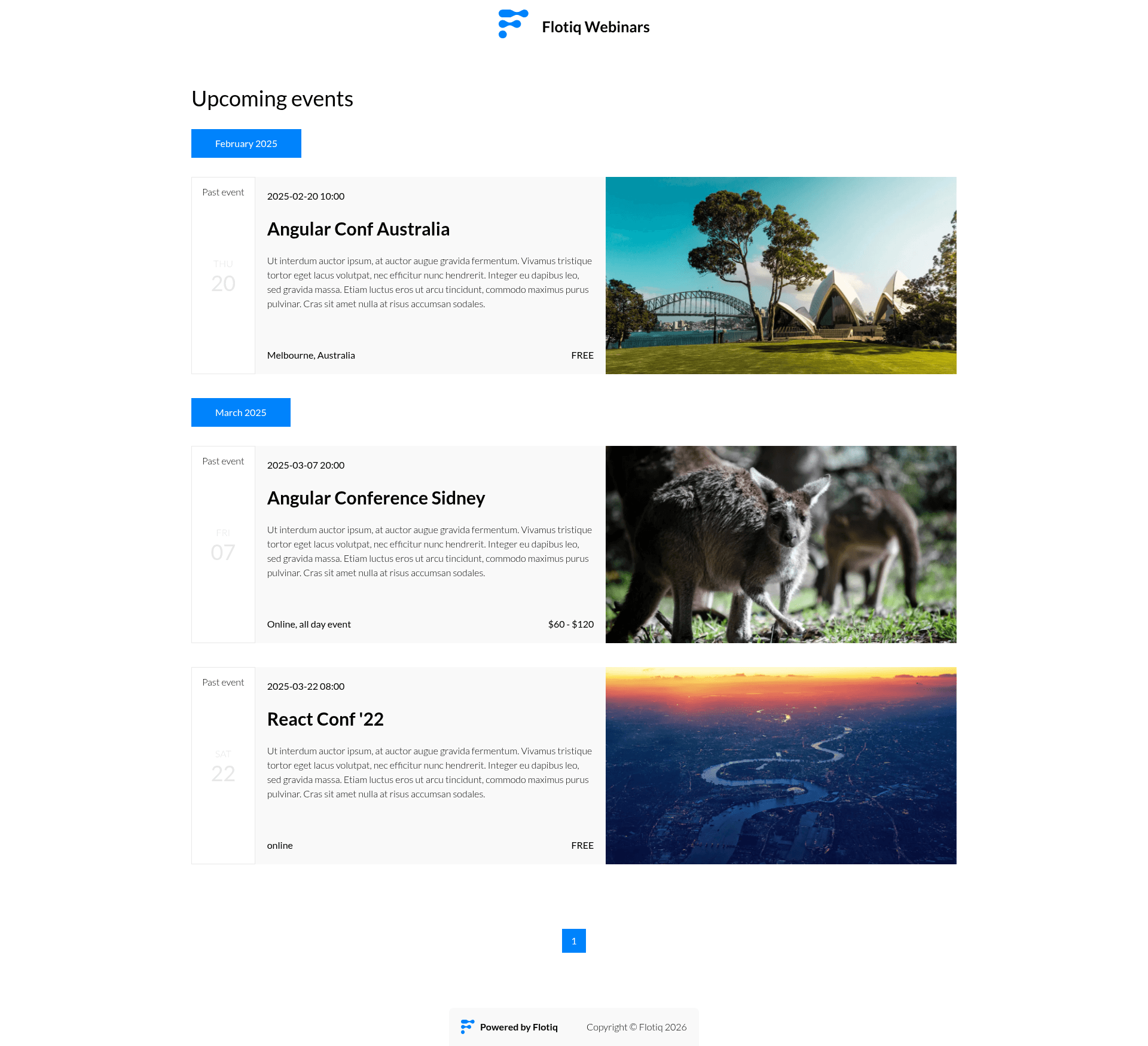
Gatsby starter for events with Flotiq source is an open-source Gatsby 5 boilerplate that builds a static event website by pulling content from the Flotiq headless CMS.
What is this template?
This is a starter project for Gatsby that creates a static event site, using Flotiq as the content source and Tailwind CSS for styling. It takes content types and event data from a Flotiq account via the gatsby-source-flotiq plugin and outputs a Gatsby-generated static site. The template is maintained by Flotiq and licensed under MIT.
Key Features
- Flotiq headless CMS integration — Uses the
gatsby-source-flotiqsource plugin to fetch content objects from Flotiq, and includes.flotiqdirectory with the necessary content type definitions for events. - Tailwind CSS styling — Utility-first CSS framework is pre-configured via
tailwind.config.js; global styles live insrc/style. - Flotiq components for React — Leverages the
flotiq-components-reactlibrary, a component set built to render Flotiq content objects with minimal setup. - One-command setup with Flotiq CLI — Running
flotiq startwith a project name, repository URL, and read/write API key clones the template, installs dependencies, sets up.env, imports example data, and starts the Gatsby development server. - Example data import — The
.flotiqdirectory contains four example event objects that can be imported with theflotiq importcommand. - Multiple one-click deployment targets — Deploy buttons are provided for Heroku, Netlify, and Cloudflare Workers, with configuration files
app.json,netlify.toml,wrangler.toml, andworker-index.js. - Content rebuild workflow — Because Gatsby generates static pages from CMS content, rerunning
gatsby developis required after content object changes; content type changes requiregatsby clean. Hosting plugins for Gatsby Cloud and Netlify are available to automate rebuilds. - Development tooling — Includes ESLint, Prettier, and standard Gatsby configuration files (
gatsby-config.js,gatsby-node.js,gatsby-browser.js).
Who is it for?
This starter is aimed at developers who want a ready-made event website backed by a headless CMS, and Flotiq users who want to jumpstart a Gatsby project without boilerplate setup. It is also useful for agencies or freelancers delivering event-based sites for clients with a clear content editing workflow, and for teams evaluating Flotiq as a CMS for static site generation.
What can you do with this template?
- Event organizers: Create a public schedule page that pulls event listings from Flotiq; content editors can update events through the Flotiq editor and trigger a site rebuild.
- Gatsby developers: Use the starter as a learning reference for combining Gatsby 5, a source plugin, and Tailwind CSS in a single project.
- Flotiq users: Quickly prototype an event site with example content already imported, then replace the sample data with real events.
How does it work?
The quickest path starts with the Flotiq CLI: install it globally, then run flotiq start [projectName] https://github.com/flotiq/flotiq-gatsby-event-2.git [flotiqApiKey]. This command clones the repository via gatsby new, installs npm dependencies, writes the API key into the .env file, imports four example events into your Flotiq account, and launches gatsby develop at localhost:8000. For manual setup, copy the .env.development file with your Flotiq API key, optionally import data with flotiq import .flotiq [flotiqApiKey], then run gatsby develop. During development, edits to templates like src/templates/index.js hot-reload in the browser.
Pros and cons
- Pros: The template is MIT-licensed; includes example content, multiple deployment presets, and a CLI-driven setup that reduces manual configuration.
- Cons: Static generation means content changes require a rebuild (manual
gatsby buildor a rebuild service), and content type changes requiregatsby clean; the project requires Node.js 18.0.0 or higher.
Pricing
The template itself is free and open source under the MIT license. Flotiq, the CMS used, is a separate product; its pricing is not described on this page, but Flotiq offers developer accounts with API keys for testing.
FAQ
What Node.js version do I need?
The project works on Node.js version 18.0.0 or higher, as required by Gatsby 5.
How do I deploy this starter to Netlify?
Use the one-click Deploy to Netlify button on the GitHub README, which connects the repository and builds the site. Netlify builds run gatsby build and the netlify.toml configuration is included.
Can I use my own Flotiq content with this starter?
Yes. Add your read/write API key to the .env.development file (as GATSBY_FLOTIQ_API_KEY), and the source plugin will fetch the content types and objects defined in your Flotiq account. The template's .flotiq directory defines the event content types it expects.
What should I do after updating data in Flotiq?
Rerun gatsby develop for local updates, or run gatsby build for a production rebuild. If you perform a content type definition change, you must run gatsby clean first. Hosting-specific Flotiq plugins for Gatsby Cloud and Netlify can automate rebuilds.
What does the example data include?
Importing the .flotiq directory adds four example objects to your Flotiq account, which populate the event site's sample listings.