Template details
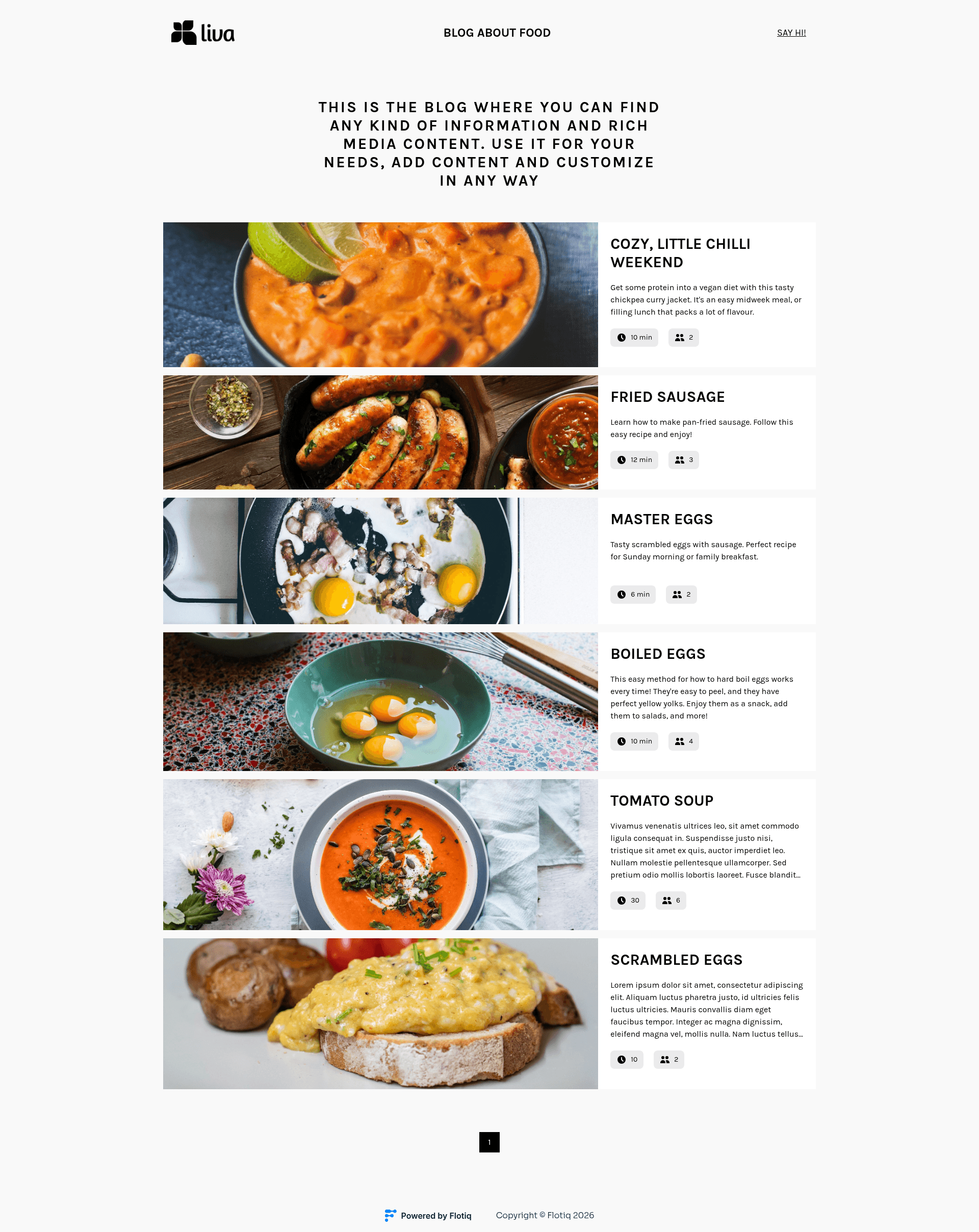
Flotiq Gatsby Recipe 1
Gatsby 5 starter for a recipe website with Flotiq headless CMS and Tailwind CSS.
About this template
Flotiq Gatsby Recipe 1 is a Gatsby 5 starter that produces a recipe website backed by the Flotiq headless CMS and styled with Tailwind CSS. It is a boilerplate project that connects Flotiq content objects to Gatsby's GraphQL layer and includes ready-made deployment setups for Heroku, Netlify, and Cloudflare Workers.
What is Flotiq Gatsby Recipe 1?
Flotiq Gatsby Recipe 1 is an open-source Gatsby starter that creates a static recipe website using Flotiq as the headless CMS and Tailwind CSS for styling. It accepts a Flotiq API key plus an optional Google Analytics measurement ID through environment variables, and it renders recipe content managed in the Flotiq editor into Gatsby pages. The project is maintained by Flotiq and is licensed under the MIT license, with source code available on GitHub.
Key Features
- Gatsby 5 foundation — Built with Gatsby 5, so Node.js version 18 or higher is required to run the development environment.
- Flotiq headless CMS integration — Uses the
gatsby-source-flotiqplugin to fetch content, and the Flotiq editor at editor.flotiq.com to manage recipes, ingredient lists, and instructions. - Tailwind CSS styling — Utility-first styling is configured through
tailwind.config.js, with global styles insrc/styleand component classes used throughout templates. - Flotiq React components — The
flotiq-components-reactlibrary provides pre-built components designed to match Flotiq content objects, included in thesrc/componentsdirectory. - One-command quick start — Running
flotiq startfrom the Flotiq CLI clones the repository, installs npm dependencies, writes the.env.developmentfile, imports four example content objects, and launchesgatsby develop. - Example content import — The
.flotiqdirectory defines the required content types, andflotiq import .flotiq [apiKey]adds four example recipe objects to a fresh Flotiq account. - Multiple deployment targets — One-click deploy buttons are available for Heroku, Netlify, and Cloudflare Workers, with per-platform config files like
netlify.toml,static.json, andwrangler.toml. - Structured source layout — The
srcfolder separates assets, components, layouts, pages, sections, global style, and templates, making it clear where static pages and generated page templates live.
Who is it for?
Flotiq Gatsby Recipe 1 suits developers and content teams that want a working Gatsby + headless CMS setup without building from scratch. Food bloggers can manage recipes in Flotiq and publish a styled site. Front-end developers learning Gatsby can study how a source plugin feeds content objects into GraphQL queries. Agencies can use the Flotiq CLI to spin up client projects with sample data and deploy them to Netlify or Cloudflare quickly.
What can you do with Flotiq Gatsby Recipe 1?
- Food content creators: Add recipes through the Flotiq editor, then rebuild the Gatsby site to publish updated ingredient lists, instructions, and metadata.
- Gatsby learners: Inspect
src/templates/index.js,gatsby-node.js, and the GraphiQL explorer atlocalhost:8000/___graphqlto see how recipe content is queried and rendered. - Rapid prototyping: Use the Flotiq CLI command to generate a new project with example data in one step, then customize the Tailwind theme and templates.
- Production site operators: Configure webhooks or Flotiq plugins for Gatsby Cloud and Netlify so content saves trigger automatic rebuilds.
How does Flotiq Gatsby Recipe 1 work?
The quickest path uses the Flotiq CLI: install it with npm install -g flotiq-cli, then run flotiq start [projectName] https://github.com/flotiq/flotiq-gatsby-recipe-1.git [flotiqApiKey]. This command clones the template, installs dependencies, populates .env.development with the API key, imports four example objects, and starts the development server. For manual setup, copy the environment variable structure, run flotiq import .flotiq [apiKey] to add sample data, and start with gatsby develop.
FAQ
What is Flotiq Gatsby Recipe 1?
Flotiq Gatsby Recipe 1 is a starter template for building recipe websites with Gatsby 5, the Flotiq headless CMS, and Tailwind CSS. It includes example content types, pre-built components, and deployment configurations so you can start with a full project rather than an empty boilerplate.
What Node version is required?
The starter requires Node.js version 18 or higher because it is built on Gatsby 5. Running an older Node version will cause installation or build errors, so upgrade your local Node environment before using the template.
How do I import example data?
After cloning the repository, run flotiq import .flotiq [flotiqApiKey] with a read-and-write API key. This adds four example recipe objects to your Flotiq account. This step is optional if you used the flotiq start CLI command, which imports the data automatically.
How do I update content?
Content is managed in the Flotiq editor. Since Gatsby generates static pages, you must rebuild the site after changing content objects: rerun gatsby develop in development or gatsby build in production. If a content type definition changes, run gatsby clean first. For automated rebuilds, Flotiq provides plugins for Gatsby Cloud and Netlify, or you can configure a webhook.
Where can I deploy this starter?
The README includes one-click deploy buttons for Heroku, Netlify, and Cloudflare Workers. Heroku uses app.json, Netlify uses netlify.toml, and Cloudflare Workers uses wrangler.toml plus worker-index.js. The Cloudflare Workers deployment uses a starter API key; you can replace it by adding a secret named GATSBY_FLOTIQ_API in your GitHub repository.