Template details
flowbite-mcp
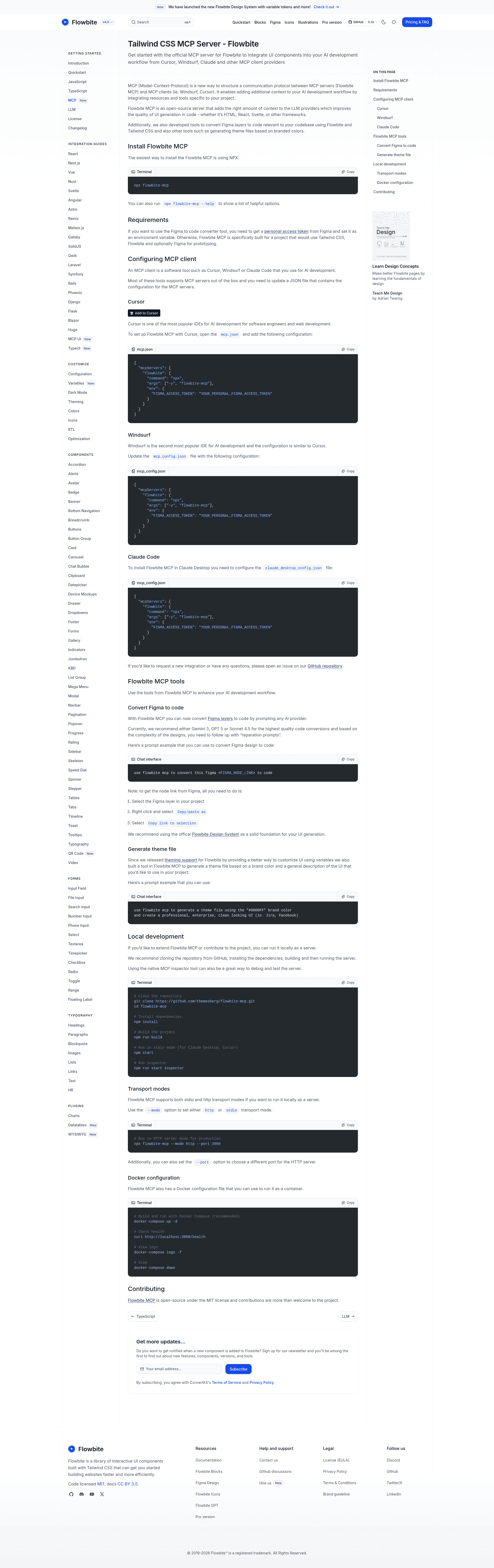
Official MCP server for Flowbite that gives AI assistants access to Tailwind CSS components, theme generation, and Figma-to-code conversion.
About this template
Flowbite MCP is an official Model Context Protocol (MCP) server built by the Flowbite team (themesberg) that lets AI assistants like Claude, Cursor, and Windsurf read Flowbite's Tailwind CSS component library and generate UI code directly in their own interface. It exposes 60+ component resources, a theme generator that produces custom Tailwind theme configurations from any hex color, and a Figma-to-code tool that converts Figma node URLs into working code. The server runs on Node.js, is distributed on npm as flowbite-mcp, and supports both stdio and HTTP transports with a Docker setup for production.
What is flowbite-mcp?
Flowbite MCP is an open-source MCP server that connects MCP-capable AI clients to the Flowbite component library. Its core function is giving an AI assistant access to component documentation and code snippets so it can generate Tailwind CSS UI without browsing the Flowbite website. It takes a request from the assistant (for example, create a navbar) or a Figma node URL as input, and produces the corresponding component markup or themed CSS as output. The project is written in TypeScript, licensed under MIT, and maintained under the themesberg GitHub organization.
What makes flowbite-mcp stand out?
- 60+ UI component resources — The server surfaces markdown documentation for Flowbite's UI elements, forms, typography, and plugins directly to the AI model.
- Theme generator tool — Feed it any brand color (hex) and it outputs a custom Tailwind theme configuration.
- Figma to code tool — A Figma node URL becomes reusable code; enable it with a personal access token via the FIGMA_ACCESS_TOKEN environment variable.
- Dual transport support — Standard I/O for local desktop and CLI clients, plus an HTTP Streamable transport for production multi-client deployments.
- Docker production setup — Includes a Docker Compose configuration with a /health endpoint for health checks and easy scaling.
- Client configuration examples — Ready-made JSON configs for Claude Desktop, Cursor, Windsurf, and Glama.ai are included in the README.
- Active roadmap — Planned additions include Flowbite Pro blocks integration with license authentication, component search/filtering, and real-time component preview generation.
Who should use flowbite-mcp?
- AI-assisted front-end developers — Use Claude, Cursor, or Windsurf to generate Flowbite components like navbars, modals, and forms without leaving the editor.
- Design-to-code engineers — Paste a Figma node URL and get starter code for that specific design element instead of rebuilding it by hand.
- Product teams building branded designs — Turn a single company hex color into a complete Tailwind theme file instead of manually defining CSS variables.
- Teams hosting MCP infrastructure — Run the HTTP mode behind Docker Compose so multiple clients share one server with health monitoring.
Use cases
- Indie developers: prompt the assistant for a Flowbite pricing section or hero and have the component code appear in the chat for direct copy-paste.
- Designers on Figma: convert a specific node (button, card, or layout) into code by pasting the node URL into an MCP client; the Figma tool requires a personal access token.
- Brand/design-systems teams: convert a brand hex color into a drop-in Tailwind theme file and reuse it across projects.
How does flowbite-mcp work?
Installation is one command: npx flowbite-mcp. After adding the server to your MCP client's config file (such as claude_desktop_config.json), the client connects via stdio by default; for HTTP mode run node build/index.js --mode http --port 3000 to serve at http://localhost:3000/mcp. The only required environment variable is FIGMA_ACCESS_TOKEN, and it is needed only when Figma-to-code is enabled.
FAQ
Does flowbite-mcp cost anything?
The server is open source under the MIT license and published as an npm package. The repository page lists no paid tiers, and the Flowbite component library offers free components.
Do I need a Figma account to use flowbite-mcp?
Only for the Figma-to-code tool. Every other feature — reading the 60+ component resources and the theme generator — works without credentials. The Figma tool needs a personal access token set as FIGMA_ACCESS_TOKEN.
What MCP clients are supported?
The repository includes configuration examples for Claude Desktop, Cursor, Windsurf, and Glama.ai. Any MCP client that can run an npx command or connect to a Streamable HTTP endpoint can use it.
Can it generate full pages or only components?
It exposes component-level resources, so it generates individual UI elements rather than complete multi-page layouts. To build a full page, you combine several component requests within the same conversation.