Template details
Formation
macOS setup script for front-end development, installing tools, apps, and customizations via Homebrew.
About this template
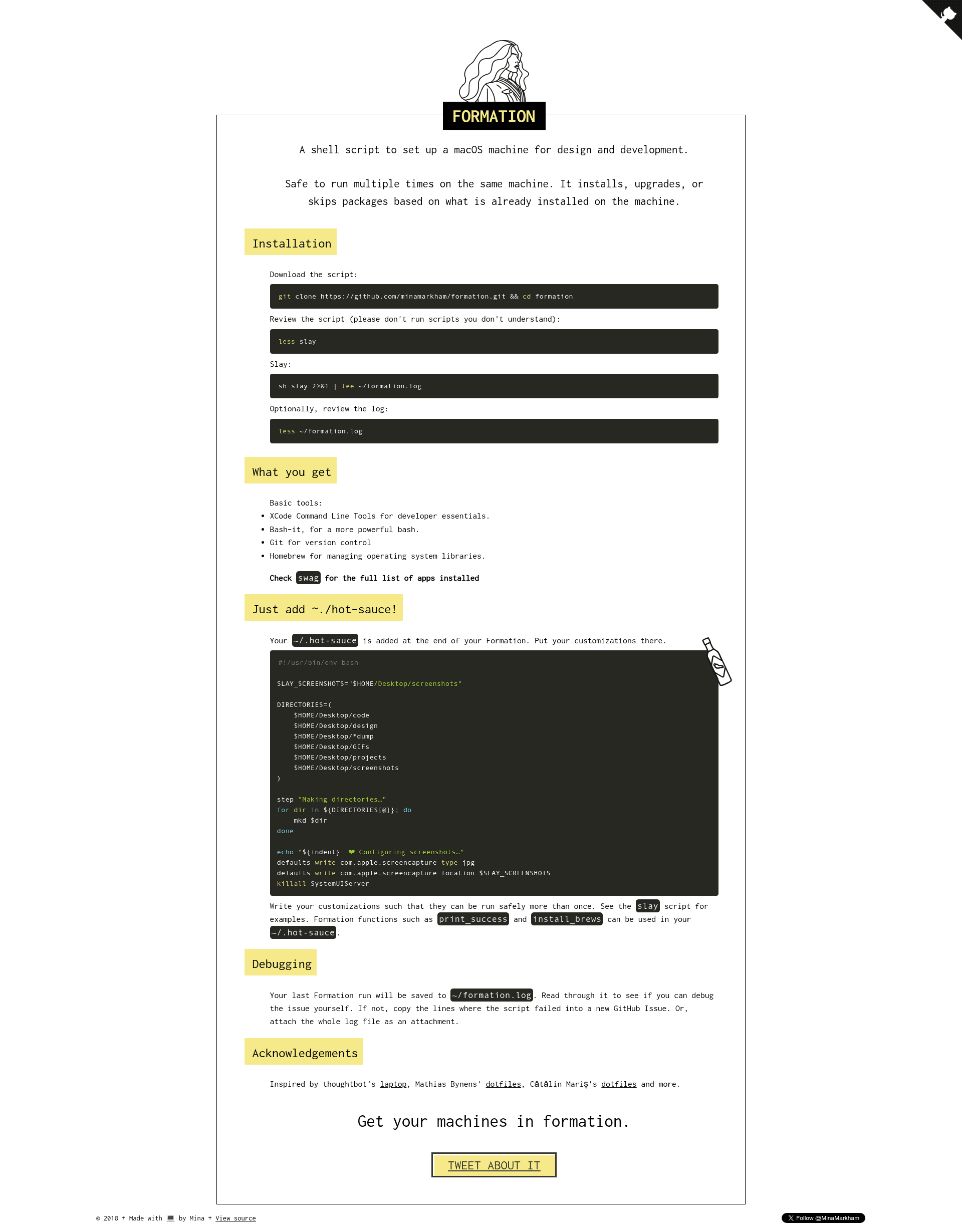
Formation is a shell script that automates the setup of a macOS laptop for front-end design and development, installing and configuring dozens of tools and applications from the command line. This free, open-source project by Mina Markham lives on GitHub with over 1,700 stars, and its main script, slay, can be run safely multiple times by detecting what is already installed and then installing, upgrading, or skipping packages accordingly.
What is Formation?
Formation is a shell script that configures a macOS laptop for front-end development and design by automating the installation of development tools, package managers, CLI utilities, and desktop applications. It is maintained by Mina Markham and is available as a free, open-source GitHub repository. The script runs from the command line, detects the current machine state, and installs, upgrades, or skips each package as needed, using Homebrew and Homebrew Cask under the hood.
Key Features
- Idempotent setup — Safe to run multiple times; the script checks for existing installations and only installs missing or outdated items, so you can re-run it regularly to keep your machine up to date.
- Customization hook — A
~/.hot-saucefile is sourced at the end of the run, allowing you to add your own directories, fonts, symlinks, and other configuration using helper functions likestepandlink. - Comprehensive app selection — Installs 50+ applications across productivity (Alfred, Fantastical, Things), development (Visual Studio Code, iTerm, Dash), design (Sketch, Affinity Designer, Sip), communication (Slack, Bear, Ulysses), utilities (1Password, Dropbox, ExpressVPN), and more.
- Package manager coverage — Sets up NVM for managing Node.js versions, Rbenv for Ruby versions, and Yarn for JavaScript packages.
- CLI tooling — Includes asciinema for terminal recording, Hugo for static sites, ImageMagick for image processing, Hub for GitHub, and Vagrant for virtual environments.
- Logging and transparency — Each run is streamed to
~/slay.logviatee, so you can review exactly what was executed.
Who is it for?
- Front-end developers setting up a new Mac or refreshing an old one, who want a battle-tested script that installs Node, Git, Homebrew, and dozens of coding tools without manual steps.
- Designers and creative developers who need tools like Sketch, Affinity Photo, and ImageOptim, and want them installed consistently across machines.
- Developers who rebuild machines frequently — the idempotent script lets you re-run it safely at any time, and the custom
~/.hot-saucefile preserves your personal setup preferences.
What can you do with Formation?
- Automate a full machine setup — After cloning the repo, review the
slayscript withless slay, then run./slay 2>&1 | tee ~/slay.logto install everything from Xcode tools to browsers in one go. - Customize your dotfiles — Place a
~/.hot-saucescript to create directories, install fonts, or set up symlinks; the script runs at the end of every Formation execution. - Keep a laptop updated — Run the script regularly to trigger upgrades of already-installed packages, since the script installs, upgrades, or skips based on the current machine state.
How does it work?
- Clone the repository and review the
slayscript to understand what it does. - Run
./slaywith output piped toteeso a log is saved to~/slay.log. - The script installs the Xcode Command Line Tools, Homebrew, then proceeds through package managers, CLI tools, and Cask applications.
- At the end, it sources
~/.hot-saucefor personal customizations. - Quit and relaunch Terminal to finish the setup; the whole process typically takes under 20 minutes.
Pros and cons
- Pros: Free and open source; idempotent; covers a wide range of tools; customizable; includes a log for transparency.
- Cons: It's geared toward Mina Markham's personal preferences, so you should review the script before running; a known issue is that Homebrew Cask may not recognize apps installed outside of Cask, which can cause failures if an external app is present.
Alternatives
- thoughtbot's laptop — another popular macOS setup script that focuses on a leaner set of developer tools.
- Mathias Bynens' dotfiles — a collection of configuration files and setup scripts, which Formation credits as inspiration.
FAQ
Is Formation free?
Yes, Formation is free software. The repository license permits redistribution under the terms specified in the LICENSE file.
What does Formation do?
Formation installs a curated set of macOS development tools and apps: it sets up Xcode Command Line Tools, Homebrew, package managers like NVM and Rbenv, CLI utilities, and dozens of GUI applications spanning design, development, productivity, and more. It also sources a personal customization script at the end.
Can I customize what gets installed?
Yes. The main list of apps is in the swag file in the repository, which you can edit to your taste. Additionally, any custom commands placed in ~/.hot-sauce will run at the end of the setup.
Is it safe to run Formation?
The project advises against running the script unless you understand what it does. It installs system-level tools and many applications, so you should review the slay script first. A known issue is that Cask may not recognize apps installed outside Homebrew Cask, which could cause the script to fail.