Template details
MiroTalk WEB
Self-hosted open-source WebRTC SaaS and room scheduler for creating and managing scheduled MiroTalk video meeting rooms.
About this template
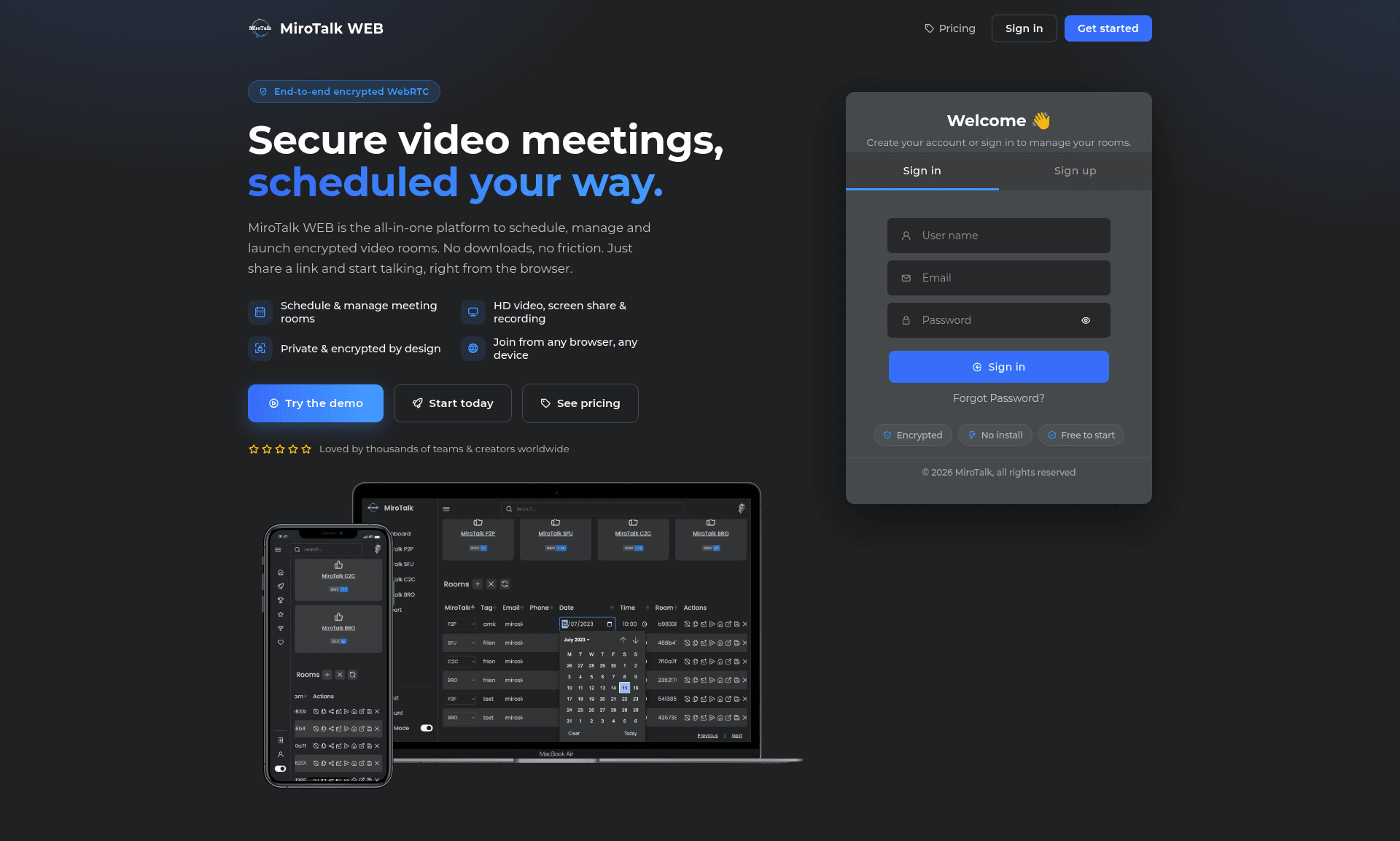
MiroTalk WEB is a self-hosted, open-source WebRTC platform that schedules, manages, and organizes video meeting rooms across all MiroTalk instances, with a personal dashboard for accounts, email invitations, and Stripe-powered SaaS mode.
What is MiroTalk WEB?
MiroTalk WEB is a self-hosted, open-source WebRTC room scheduler and manager distributed under the AGPLv3 license. It provides a personal dashboard where registered users create accounts, schedule meetings for any MiroTalk version (SFU, P2P, BRO, C2C, WEB, CME, ADM), and send invitations via email or shareable links. The application runs on a Node.js backend with MongoDB, starts from npm scripts, and is available as a Docker image from Docker Hub. It is built by Miroslav Pejic and the open-source community.
What makes MiroTalk WEB stand out?
- Personal dashboard — registered users get an account area to create, schedule, and manage video meeting rooms.
- Multi-instance scheduling — schedule rooms for any MiroTalk version, not just WEB, from the same interface.
- Email and link invitations — send invites via email or generate shareable links for participants.
- Stripe SaaS mode — set SAAS=true in your .env to gate room creation behind Monthly or Lifetime subscriptions; requires an Extended license for commercial resale.
- Docker deployment — official image on Docker Hub; deploy with docker-compose and the provided templates.
- Local or cloud MongoDB — run a Dockerized local MongoDB or connect to MongoDB Atlas via .env credentials.
- REST API — documented interface for integrating with other systems.
- Configurable setup — customize behavior with .env and backend/config.js.
Who should use MiroTalk WEB?
- Self-hosters who want to run their own video meeting scheduler on a dedicated server, using Docker Compose or npm.
- Enterprises and organizations that need a private room-scheduling layer for internal WebRTC meetings.
- Developers who want to extend the REST API, modify configuration, or contribute to an AGPLv3 codebase.
- SaaS operators who plan to sell meeting room access and need built-in Stripe billing.
What can you do with MiroTalk WEB?
- Event coordinators: create scheduled meeting rooms and send email invitations automatically to participants.
- IT administrators: deploy MiroTalk WEB on a cloud VPS with Docker and point it at any MiroTalk instance.
- Product teams: run a paid meeting service using the built-in Stripe subscriptions without building billing from scratch.
How does MiroTalk WEB work?
From the quick start: clone the repository, copy .env.template to .env and backend/config.template.js to backend/config.js, run npm install, start MongoDB with npm run mongo:up, and launch with npm start. For Docker, copy docker-compose.template.yml to docker-compose.yml, pull the image, and run docker-compose up. The app listens on http://localhost:9000. A live demo is available at https://webrtc.mirotalk.com with credentials Username: demo, Email: demo@gmail.com, Password: Demo@123.
Pricing
MiroTalk WEB is free and open-source under the AGPLv3 license. Running it in SaaS mode — reselling access or operating it as a paid service — requires an Extended license purchasable on CodeCanyon, with Monthly and Lifetime Stripe plans available out of the box. Specific prices are not listed on the repository page.
FAQ
Is MiroTalk WEB free?
Yes, MiroTalk WEB is free to use and self-host under the terms of the AGPLv3 license. You can clone the repository, run it with npm or Docker, and modify it as long as modifications remain free and publicly available.
What do I need to run MiroTalk WEB?
You need Node.js, MongoDB (either a local Docker container or a cloud instance such as MongoDB Atlas), and optional Docker Compose for containerized deployment. Copy the .env and config templates, install dependencies, and start the app on port 9000.
Can I accept payments with MiroTalk WEB?
Yes. Set SAAS=true in your .env to enable Stripe-powered subscriptions. Two plans come preconfigured: Monthly (recurring) and Lifetime (one-time). For commercial resale you must purchase an Extended license from CodeCanyon.
Does MiroTalk WEB work with other MiroTalk apps?
Yes. It schedules rooms for any MiroTalk version, including SFU, P2P, BRO, C2C, WEB, CME, and ADM, making it a central scheduler for the entire MiroTalk suite.
Is there a live demo?
A live demo runs at https://webrtc.mirotalk.com. The demo account uses Username: demo, Email: demo@gmail.com, Password: Demo@123.