Template details
Frosti
A clean, elegant, and fast static blog template! 🚀 Developed with Astro
About this template
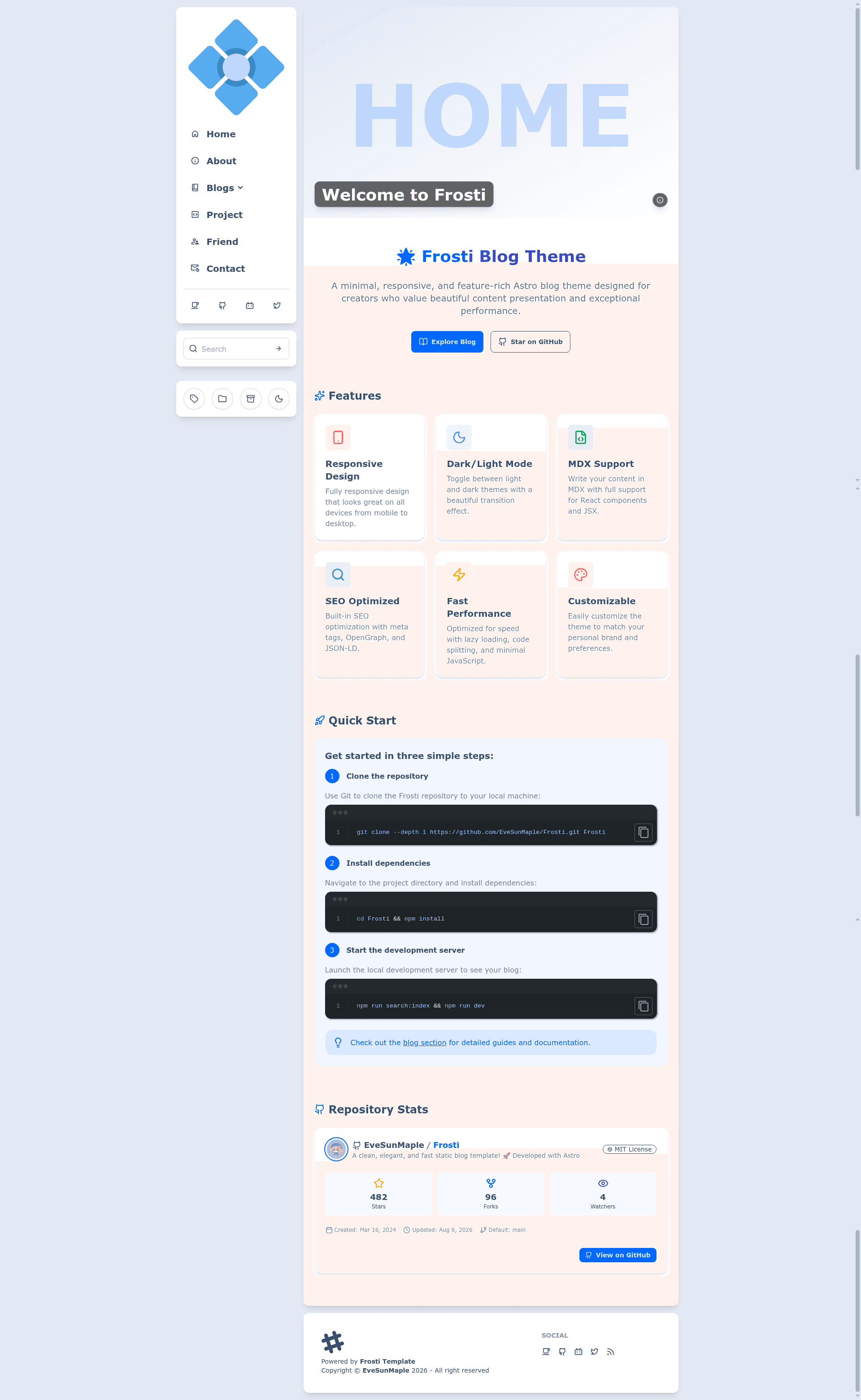
Frosti is a static blog template built on Astro that generates a fast, SEO-friendly personal blog with configurable light/dark themes, client-side search via Pagefind, RSS feeds, and a YAML-driven configuration workflow.
What is Frosti?
Frosti is an open-source blog template developed by EveSunMaple. It takes YAML configuration and Markdown article frontmatter as input and outputs a fully static blog with no backend or database. The template is built on the Astro framework, styled with Tailwind CSS and daisyUI, and uses Shiki for code block theming. It supports light and dark modes, with default daisyUI themes "winter" and "dracula", and includes a multi-language interface system.
Key Features
- Light/Dark mode — Toggle between light and dark themes using daisyUI, with defaults "winter" for light mode and "dracula" for dark mode.
- High performance and SEO — Astro produces static HTML with semantic markup, contributing to fast loads and search engine visibility.
- View transition animations — Uses Astro's ClientRouter to animate transitions between pages.
- Client-side search — Integrates Pagefind; run
pnpm run search:indexto generate the search index before development or production builds. - Responsive design — Layout adapts across devices using Tailwind CSS and daisyUI utilities.
- RSS feed support — Automatically generates an RSS feed for published articles.
- YAML configuration — Edit
frosti.config.yamlto set site title, description, language, menu items, social links, and footer content. - Frontmatter-driven articles — Posts require
title,description, andpubDate; optional fields includeimage,categories,tags,badgefor pinning posts, anddraftto hide an article.
Who should use Frosti?
- Personal bloggers — Publish a clean, fast blog by writing Markdown files with frontmatter and deploying the static output to any hosting service.
- Developers — Customize the Astro project, adjust Tailwind and daisyUI themes, extend the i18n translations, or integrate additional components.
- Content writers — Focus on writing and get automatic RSS, search, dark mode, and article pinning without dealing with server-side code.
- Open-source contributors — Fork the repository, modify the theme, and submit changes through GitHub issues and pull requests.
Use cases
- Indie writers: Start a personal blog with article pinning by adding a
badge: Pinfield in frontmatter, keeping featured posts at the top. - Multilingual teams: Add a new language in
src/i18n/translations.yamland setsite.languagein the config to present interface text in multiple languages. - Developers adding comments: Follow the Waline tutorial from the project's blog to integrate a comment system, using the provided SCSS stylesheet at
src/styles/waline.scssto match the site theme. - Design-conscious developers: Swap daisyUI themes by editing the
theme.lightandtheme.darkvalues in the config file.
How does Frosti work?
Frosti operates as a static site generator. After cloning the repository, install pnpm, run pnpm i for dependencies, then run pnpm run search:index to build the Pagefind index, and start with pnpm run dev. An update script frosti.update.sh clones the latest official repository, overwrites files per .updateignore, deletes removed files, cleans empty folders, and reinstalls dependencies.
Pricing
Frosti is free to use and open source. There are no paid tiers or subscription costs; you only pay for static hosting if you choose a commercial provider.
FAQ
Is Frosti free?
Yes, Frosti is an open-source template hosted on GitHub. You can clone, modify, and deploy it as your own blog without paying license fees.
Does Frosti support dark mode?
Yes. Frosti includes a light/dark theme toggle built on daisyUI. By default, light mode uses the "winter" theme and dark mode uses "dracula", both changeable in frosti.config.yaml.
What frontmatter fields are required for articles?
Each Markdown post must include title, description, and pubDate. Optional fields are image, categories, tags, badge, and draft. Setting badge to Pin pins the post, and draft: true hides it from the article list.
How do I update Frosti?
Run bash frosti.update.sh in the project directory. The script clones the latest Frosti release, safely updates your files while respecting .updateignore, deletes files removed upstream, cleans leftover directories, and runs pnpm to refresh dependencies.