Template details
Hyde
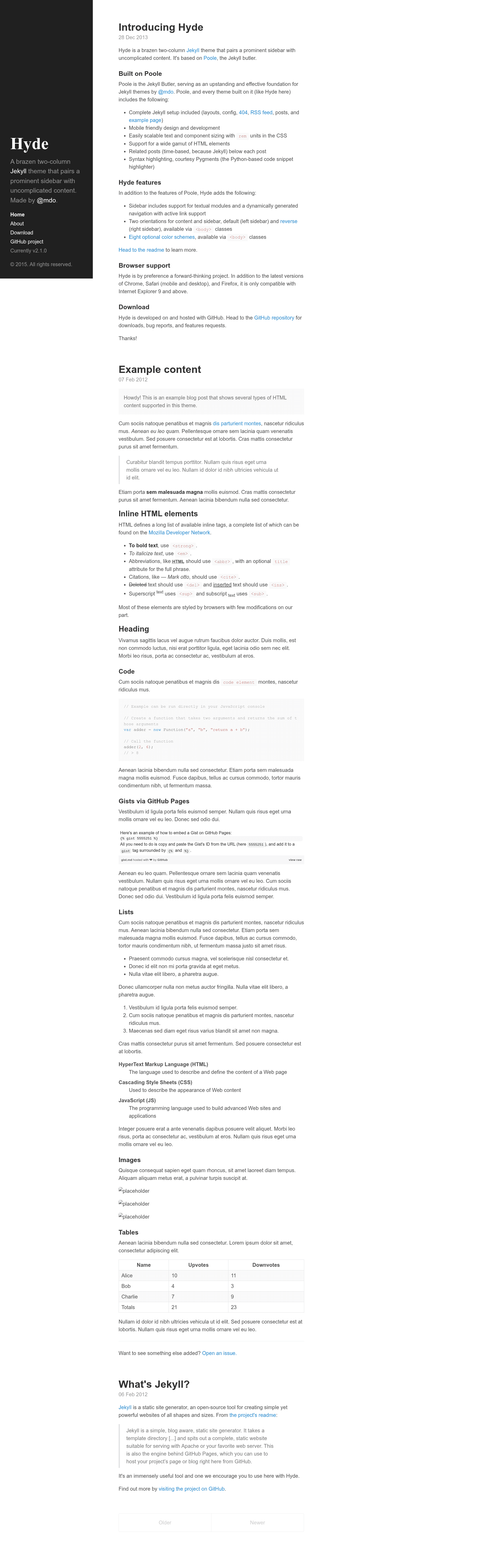
A brazen two-column Jekyll theme with a prominent sidebar, built on Poole.
About this template
Hyde is a two-column Jekyll theme that pairs a prominent sidebar with uncomplicated content, built on the Poole starter kit and maintained by Mark Otto.
What is Hyde?
Hyde is a free, open-source theme for Jekyll, the static site generator, that provides a two-column layout: a persistent sidebar on the left and a content area on the right. It takes standard Jekyll content pages and renders them with an HTML layout defined by the theme's templates and CSS. The theme is built on top of Poole, a Jekyll setup that already includes the basic pages and styles, so you download it, add your content in Markdown or HTML, and run the Jekyll server. Mark Otto, the creator of Bootstrap, authored Hyde and open-sourced it under the MIT license; the repository has gathered more than 3,700 GitHub stars.
What makes Hyde stand out?
- Sidebar menu — Assign each Jekyll page the
pagelayout in front matter to create a list of navigation links in the sidebar; the theme automatically excludesindex.htmlso the first link is always Home. - Sticky sidebar content — By default the sidebar content is affixed to the bottom via the
.sidebar-stickyclass; removing this class makes the content flow naturally from top to bottom. - Eight base16 themes — Hyde ships with eight color themes based on the base16 scheme, applied by adding a theme class like
theme-base-08to the body element indefault.html. - Reverse layout — Add the
layout-reverseclass to the body element to flip the sidebar and content areas horizontally. - Easy to customize — Themes are only a few lines of CSS in
public/css/hyde.css; copy an existing theme, rename it, and change the colors to create your own. - Built on Poole — Inherits Poole's fully furnished Jekyll setup, so you can download and start the Jekyll server immediately with support for blog-ready features.
Who is Hyde for?
- Jekyll bloggers — anyone who wants a clean two-column blog layout with a strong sidebar for navigation, links, and branding.
- Developers who like to customize — the theme is simple HTML and CSS, making it easy to modify the design or create new color themes.
- Static site enthusiasts — people who prefer fast, database-free websites and want a low-maintenance theme for personal or documentation sites.
What can you do with Hyde?
- Start a blog — publish Markdown posts through Jekyll and show them in the main content area while the sidebar lists your pages and recent posts.
- Build a documentation site — use the sidebar menu to organize chapters and reference pages, with themes and reverse layout to match your branding.
- Create a personal landing page — apply the reverse layout to feature your profile or description on the right while keeping navigation on the left.
How does Hyde work?
Hyde is a Jekyll theme built on Poole, so you first install Jekyll and download the Hyde repository. Write content in Markdown with YAML front matter, assign the page layout to pages that should appear in the sidebar, and run the Jekyll server to preview the site locally. The theme processes your content through Jekyll's Liquid templates and outputs a static site ready to deploy anywhere.
FAQ
Is Hyde free?
Yes, Hyde is open-sourced under the MIT license, so it is free to use for both personal and commercial projects. You can also modify it and redistribute it.
How do I install Hyde?
The easiest way is to follow the Poole usage guidelines, which explain how to get a Jekyll site running. Hyde is built on Poole, so you can download or clone the Hyde repository and start the Jekyll server to see the theme in action.
Can I create my own color theme?
Yes. The themes are defined in the included CSS file public/css/hyde.css. Copy an existing theme, rename it, change the colors, and apply your new class to the body element.
What is the reverse layout?
The reverse layout swaps the sidebar and content columns horizontally. Add the layout-reverse class to the body element in default.html to flip the orientation.