Template details
Gatsby Starter Phantom
Gatsby.js V4 starter template based on Phantom by HTML5 UP, with configurable settings and GitHub Pages deployment.
About this template
Gatsby Starter Phantom is a free, open-source Gatsby.js v4 starter template that ports the Phantom design from HTML5 UP into a customizable, deploy-ready static site.
What is Gatsby Starter Phantom?
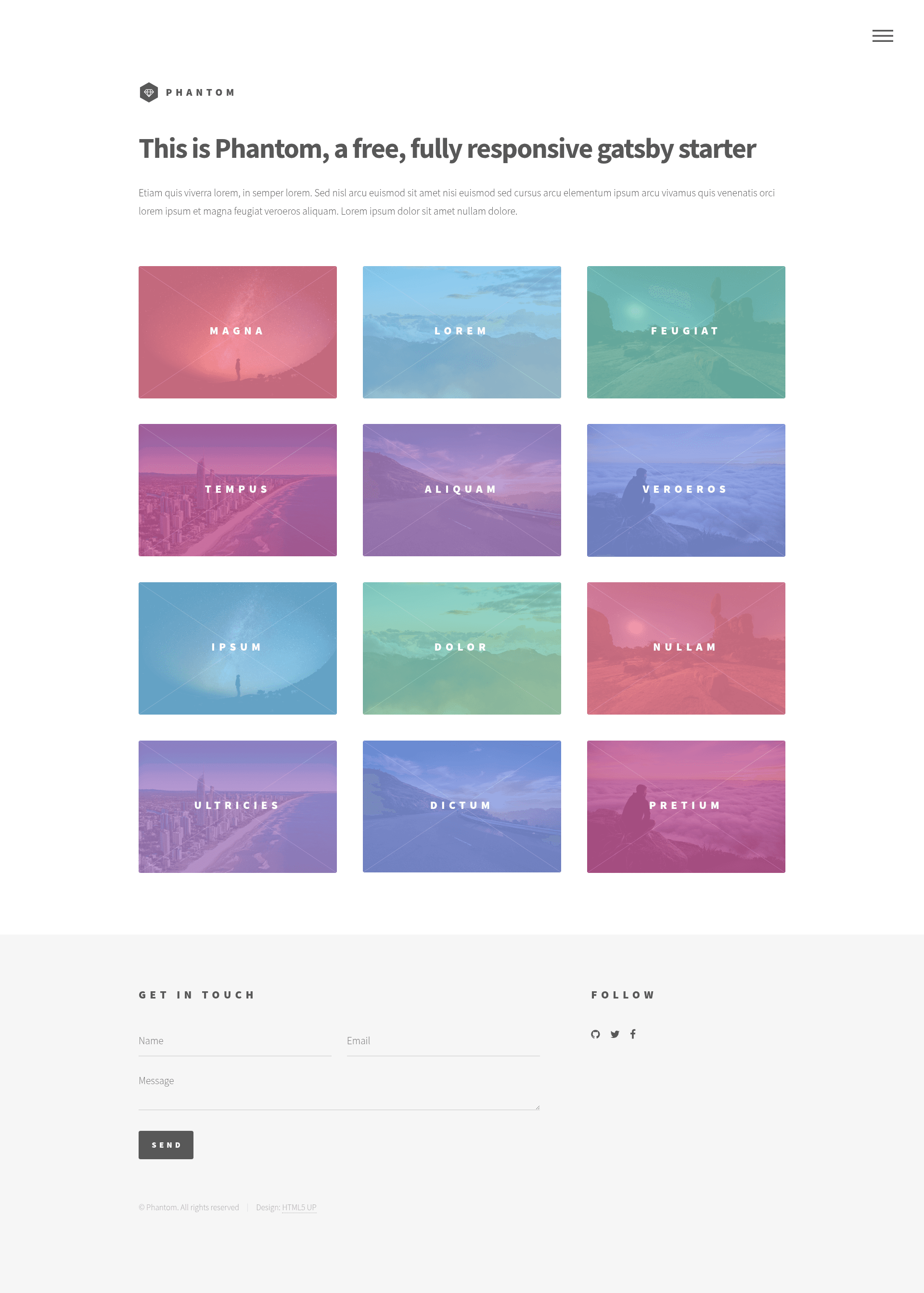
Gatsby Starter Phantom is a Gatsby.js v4 starter template based on the Phantom design by HTML5 UP. It takes a Gatsby project scaffold as input and produces a fully styled static portfolio website with configurable metadata and social links. The template is created by Anubhav Srivastava and published on GitHub under the MIT License.
Key Features
- Gatsby v4 — built on Gatsby.js version 4, giving you React-based static site generation, performance optimizations, and the full Gatsby build pipeline.
- Phantom design by HTML5 UP — the template faithfully reproduces the Phantom layout, a tiled-grid portfolio design with a sidebar, originally created by HTML5 UP.
- config.js customization — edit the single config file to set the site title, heading, subheading, and social link icons and URLs without touching component code.
- Social links — pre-built social link entries (such as fa-github) that you populate from config.js to display in the sidebar.
- GitHub Pages deployment — includes a default npm script using the gh-pages module; running npm run deploy publishes the built site to GitHub Pages.
- Path-prefix support — config.js includes a pathPrefix value for hosting on a domain subpath (for example, https://theanubhav.com/somePath/); remove it when hosting at the root.
- Screenshots included — the repo contains sample demo and screenshot images in src/assets/img for reference during development.
Who is it for?
- Front-end developers — developers who want a Gatsby project preconfigured with a complete visual design and one-command deployment to GitHub Pages.
- Portfolio owners — individuals who want a minimalist, tiled portfolio layout to showcase projects without writing all CSS from scratch.
- HTML5 UP fans — users familiar with HTML5 UP templates who want to bring a Phantom-based design into the Gatsby ecosystem.
What can you do with Gatsby Starter Phantom?
- Personal portfolio: display projects and skills using the grid layout, with social links in the sidebar.
- Agency or studio site: customize the heading and subheading to present a small business, then deploy to GitHub Pages for free hosting.
- Gatsby learning: use the starter as an annotated example to understand Gatsby components, configuration, and deployment scripts.
How does Gatsby Starter Phantom work?
The template is installed via the Gatsby CLI, customized through config.js, and deployed with a single npm run deploy command. After installing the Gatsby CLI globally, run gatsby new with the starter's GitHub URL, then npm install and gatsby develop to run locally. For production, npm run deploy publishes the built site to GitHub Pages using the gh-pages module.
Pricing
Gatsby Starter Phantom is free and open-source, released under the MIT License as stated in the repository's LICENSE file.
Alternatives
- gatsby-starter-grayscale — another HTML5 UP-based Gatsby starter by the same author.
- gatsby-starter-identity — a single-page Gatsby starter based on the HTML5 UP Identity design.
- gatsby-starter-overflow — a Gatsby starter that uses the Overflow template from HTML5 UP.
- gatsby-starter-multiverse — a Gatsby starter based on the Multiverse design from HTML5 UP.
FAQ
How do I install Gatsby Starter Phantom?
Install the Gatsby CLI globally, then run gatsby new with the URL https://github.com/anubhavsrivastava/gatsby-starter-phantom. After that, cd into the directory and run npm install and gatsby develop.
How do I customize the content?
Edit config.js to change the site title, heading, subheading, and social links. Social links are defined as entries with an icon name (like fa-github), a name, and a URL.
How do I deploy to GitHub Pages?
Run npm run deploy from the project root. The package.json includes a default script that uses the gh-pages module to publish the built site to GitHub Pages.
Is Gatsby Starter Phantom free?
Yes, it is open-source and released under the MIT License. You can use it for personal and commercial projects without paying a license fee.