Template details
Gatsby Starter Photo Book
A Gatsby starter for sharing photosets with infinite scroll and postcard views.
About this template
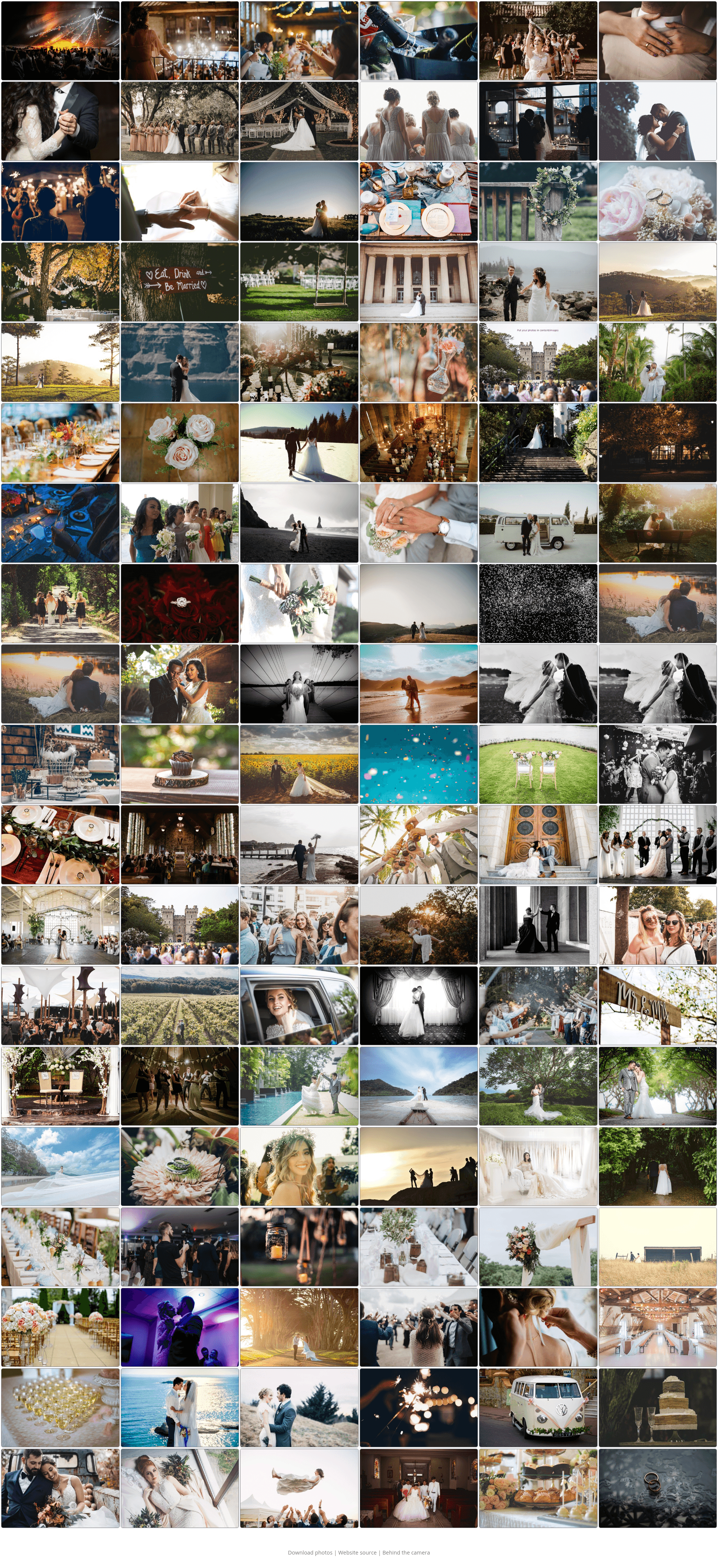
Gatsby Starter Photo Book is a Gatsby-based boilerplate for sharing photosets as a fast, responsive website with an infinite-scroll CSS Grid gallery and a postcard-style photo viewer.
What is Gatsby Starter Photo Book?
Gatsby Starter Photo Book is a static-site boilerplate created by Atte (GitHub user baobabKoodaa) and forked from his Gatsby Starter Infinite Scroll. It takes a folder of images and generates a website with two views: a thumbnail gallery laid out on CSS Grid, and a "postcard" view for each photo with a fullscreen toggle. The starter runs on Gatsby v4, requires Node v16 and gatsby-cli v4, and outputs pre-rendered pages that work without JavaScript. It was originally built to share the author's wedding photos, and the demo uses Unsplash images.
Key Features
- Infinite scroll gallery — Thumbnails are generated automatically and arranged in a CSS Grid; the scroll loads more items before you reach the bottom, fetches metadata roughly 20 items at a time, and degrades to pagination when JavaScript is disabled.
- Postcard view — Each photo gets a dedicated page with a tracedSVG placeholder, a fade-over transition when the full image downloads, and prefetching of the next two and previous one images for near-instant navigation.
- Non-JS fallback — The gallery, postcard page, and scroll behavior all work without JavaScript; generated URLs like
/images/58serve pre-rendered pages, while JS users get an SPA-style navigation between them. - Row-based ordering — The gallery presents images left-to-right rather than masonry column order, which keeps photo order predictable for viewers scanning horizontally.
- Responsive small-screen design — On phones the postcard view reduces decoration and overlays buttons, and a fullscreen toggle compensates for a known Chrome-on-Android address-bar quirk.
- Crop helper workflow — You can set the thumbnail aspect ratio and crop mode (NORTH, CENTER, or ATTENTION) in
gatsby-node.js; naming a photocat_crophelper.jpglets you pre-crop it by hand and the starter crops from that copy. - Performance-first prefetching — Transparent images are inserted over the current photo after it loads so the browser fetches the correct srcSet size for the next and previous images, avoiding the bandwidth competition that standard link prefetching can cause.
Who should use Gatsby Starter Photo Book?
- Photographers — Share a large photoset (like event or wedding galleries) on a fast static site without a CMS or backend.
- Developers — Use it as a reference for advanced Gatsby image prefetching, non-JS fallbacks, and fade transitions, or as a base for a custom photo site.
- Hobbyists and families — Publish a personal photo book by dropping images into the project, adjusting the aspect ratio, and deploying to any static host like Netlify (the live demo is hosted there).
What can you do with Gatsby Starter Photo Book?
- Wedding and event sharing: Publish hundreds of photos in an infinitely scrolling gallery where each photo opens into a postcard-style view with a fullscreen toggle.
- Portfolio site: Use the gallery as a photography portfolio with a responsive layout that works on mobile and desktop.
- Performance experiments: Study the custom prefetching and corner-case handling to learn how to optimize image-heavy Gatsby sites beyond the built-in optimizations.
How does Gatsby Starter Photo Book work?
The starter expects Node v16 and gatsby-cli v4 installed globally. After running npm install, you run gatsby develop to test locally; at build time Gatsby processes the images in the folder, generates thumbnails and multiple sized copies, and pre-renders each gallery and postcard page. The infinite scroll fetches metadata in batches of 20 and the first batch is embedded in the initial page load.
FAQ
Does the gallery work without JavaScript?
Yes, the core views work without JS. The infinite scroll degrades to pagination, and photos are accessible through pre-rendered pages at paths like /images/58. Some advanced behavior, such as the scroll-position memory when returning from postcard view, falls back to simpler behavior.
What are the known issues?
There are two documented issues: on Chrome for Android the address bar can appear or hide, causing an empty strip that the photo doesn't fill (a fullscreen toggle works around it), and a rare corner-case handler may attempt to fetch nonexistent pages, which is harmless and has its errors suppressed.
What is the crop helper?
If many of your photos aren't the aspect ratio you set in gatsby-node.js, you can pre-crop them approximately and name the copy with _crophelper (for example, cat_crophelper.jpg). The starter crops from that copy to save manual exact-crop time.
What are the prerequisites for using this starter?
You need Node v16 (nvm is recommended) and gatsby-cli v4 installed globally with npm install -g gatsby-cli@latest-v4. Then install dependencies with npm install and run gatsby develop.