Template details
Hallo Hugo
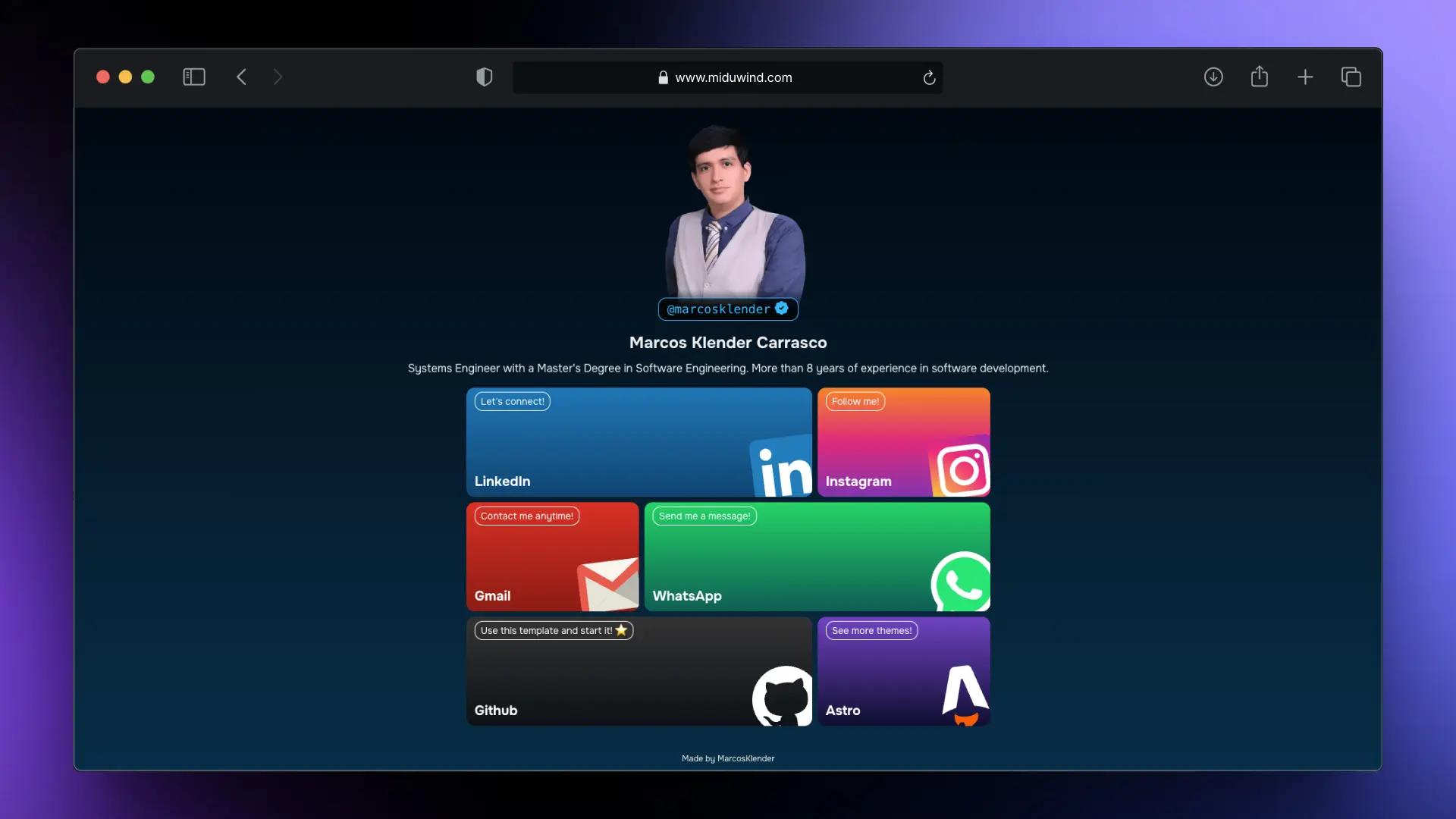
Hallo is a single-page Hugo theme to introduce yourself with a portrait, introduction, and icon links.
About this template
Hallo Hugo is a single-page Hugo theme for introducing yourself with a portrait, a short introduction, and configurable icon links to your social profiles, e-mail, and other resources.
What is Hallo Hugo?
Hallo Hugo is an open-source theme for the Hugo static site generator, maintained by EmielH and distributed under a license in the repository's LICENSE file. It takes a Hugo site configuration and optional custom partials as input, and produces a single-page personal introduction site that fills the full height of the browser window. The theme is designed for the "about me" or link-in-bio use case, with the introduction always occupying 100% of the viewport height and any additional content placed below the fold.
Key Features
- Single-page layout — The introduction fills the full height of the screen, and optional extra content like a contact form appears below the fold.
- Configurable portrait — Place your own image at files such as
static/images/portrait.jpgand the theme uses it automatically without editing theme files. - Custom introduction text — Override the default introduction by creating
layouts/partials/introduction.htmlin your site, leaving the theme untouched. - Icon link system — Add links via
params.linksinconfig.toml, choosing from FontAwesome free brands, solid sets, and the Academicon set, with support for custom icon sets and origins. - Internationalisation (i18n) — Ships with English and Dutch (nl) language files, and you can add your own translations in the site's
i18nfolder. - Configurable color scheme — Define background, foreground, and hover colors using the
params.colorssection (e.g.,background = "#81c6ff"), though Hugo Basic requires extra steps to transpile SCSS. - Custom greeting text — Replace the default translation of "Hello" by setting the
greetingparameter inconfig.toml. - Google Analytics support — When you set the
googleAnalyticsparameter, the tracking code is added for production builds but not for development environments likehugo serve.
Who is it for?
- Developers building a personal Hugo site — Use Hallo as a quick starting point for an "about me" page that needs a portrait, bio, and links to profiles without writing HTML and CSS from scratch.
- Academics or researchers — Add icon links to Google Scholar or ORCID using the Academicon set, and present a short introduction with a professional look.
- Freelancers and consultants — Showcase a single-page introduction with links to a portfolio, LinkedIn, e-mail, and a contact form placed below the fold.
What can you do with Hallo Hugo?
- Link-in-bio pages — Create a mobile-friendly page that lists links to your various social media channels and websites, using FontAwesome brand icons.
- Personal landing pages — Combine a portrait, greeting text, and a short introduction to serve as a minimal personal homepage.
- Conference speaker or event pages — Point audiences to your bio, schedule, and talk materials through a clean single page.
How does the installation work?
Installation follows Hugo's standard theme workflow: add the repository as a submodule under themes/hallo, set theme = "hallo" in config.toml (or use the -t hallo flag with hugo server), and place your content in the partials and config. To update, run git submodule update --remote --rebase inside the project. The theme's README also explains how to clone the theme directly if your site is not under git.
Pros and cons
- Simple single-page design — Requires minimal configuration and lets you override most content from your site's own partials.
- Flexible linking — Supports FontAwesome brands, solid icons, and Academicon icons, so you can link to social media, e-mail, or academic profiles.
- Hugo Basic limitation — Custom colors need Hugo Extended because the SCSS must be transpiled; if you use Hugo Basic you must generate and commit a
resourcesfolder.
Pricing
Hallo Hugo is free and open-source, with a license file in the repository.
FAQ
Does Hallo Hugo support custom colors?
Yes, you can set background, foreground, and hover colors under [params.colors] in config.toml. However, because the theme's SCSS needs transpiling, you must use Hugo Extended or follow the workaround described in the README if your hosting environment only has Hugo Basic.
Which icon sets are supported?
The theme supports FontAwesome's free brands and solid sets, as well as the Academicon set. In config.toml you can specify icon and iconset, and use iconorigin for Academicon icons such as google-scholar.
Can I add extra content like a contact form?
Yes, create layouts/partials/content.html in your site, and the theme will place that content below the fold. To link to it from an icon, give an element an id (e.g., id="info") and set a link's url to #info.
Does the theme support multiple languages?
Yes, Hallo includes translation files for English and Dutch and uses Hugo's i18n system. Set defaultContentLanguage in config.toml to switch, or add your own translations in your site's i18n folder.