Template details
Hello World Next.js Plugin
A Hello World plugin for Dashibase, built with NextJS
About this template
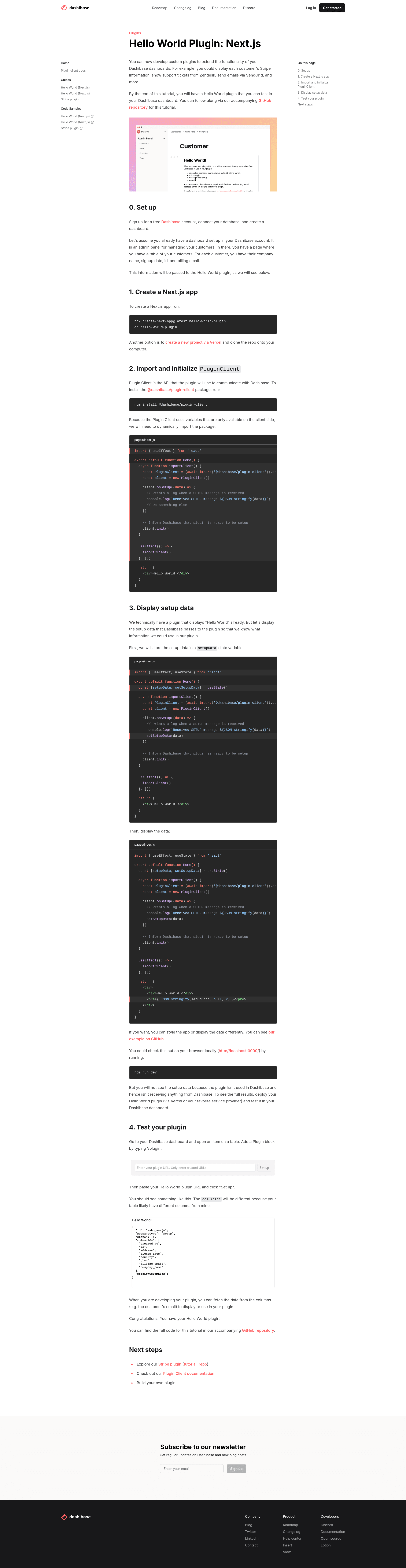
Hello World plugin using Next.js is a boilerplate example plugin for Dashibase that demonstrates how a custom plugin receives setup data from a Dashibase dashboard and displays it in a web app built with Next.js. This template is meant for developers who want to extend Dashibase's Notion-like internal admin dashboards with their own functionality, such as pulling customer data from Stripe, showing Zendesk support tickets, or sending emails through SendGrid.
What is the Hello World Next.js plugin?
The Hello World Next.js plugin is a minimal starter project maintained by Dashibase that shows what data is available to a plugin and how to render that data with the Next.js framework. It accepts setup data passed from a Dashibase dashboard item when a Plugin block is added, and its output is a page that prints that setup data so developers can inspect its structure. The repository has 7 stars on GitHub and is documented through the Hello World Next.js plugin tutorial and the Plugin API reference on dashibase.com.
Key Features
- Next.js framework — The plugin is built with Next.js, the React-based production framework, and can be deployed to Vercel using the one-click Deploy with Vercel button.
- Setup data inspection — The app displays the setup data Dashibase sends, helping developers see exactly which fields are available for their plugin logic.
- Plugin block integration — The project wires into Dashibase's '/plugin' block flow, where users paste the deployed plugin URL and click Set up.
- Reference examples — The README links to a Stripe customer plugin that uses setup data to pull a customer's email column and combine it with Stripe API calls.
- Free dashboard setup — Dashibase offers free sign-up for creating a dashboard and adding a table from your database before plugging in this plugin.
- Author support — Questions can be directed to Dashibase on Twitter or by email, and the repo includes links to official documentation.
Who is it for?
- Plugin developers — They will use this template to learn the structure of a Dashibase plugin, figure out what data payload to expect, and then fork it into production-ready integrations for Stripe, Zendesk, SendGrid, and similar services.
- Dashboard builders — They can deploy the Hello World plugin to test the Plugin block workflow in their existing Dashibase dashboard and verify that plugins work with their table data.
- Teams creating internal tools — They can treat this Hello World as the scaffold for any custom block they want to show against a single row in an internal admin dashboard.
What can you do with the Hello World Next.js plugin?
- Inspect plugin data: Deploy the plugin and add it to a Dashibase item to see the setup data payload rendered on the page, useful for debugging what your own plugin would receive.
- Extend to external services: Use the setup data structure shown in this example to build a plugin that reads an email field from a customers table and sends that data to Stripe, Zendesk, or SendGrid.
- Learn the plugin workflow: Follow the three-step guide (create dashboard, deploy repo, add plugin URL) to experience the full lifecycle of a Dashibase plugin.
How does the Hello World Next.js plugin work?
The plugin workflow starts with a free Dashibase dashboard connected to a database table. After forking and deploying this repository to Vercel, you open a table item in Dashibase, type '/plugin' to insert a Plugin block, paste the deployed URL, and click "Set up." The Hello World app then receives and displays the setup data that Dashibase sends to the plugin, which you can use to select fields such as pulling an email column from a customers table.
FAQ
What is Dashibase?
Dashibase is a platform for building internal admin dashboards with a Notion-like interface. It connects to your database tables and lets you add plugin blocks to individual items so you can embed custom functionality.
How do I install this plugin on my dashboard?
Deploy this repository to Vercel using the Deploy with Vercel button. Then open any item in a table in your Dashibase dashboard, type '/plugin', paste the deployed URL, and click "Set up."
What data does the plugin receive from Dashibase?
The plugin receives setup data, which the Hello World app prints on the screen. This data can include table fields and other context, for example letting you pull the email column of a customer record for use with another API.
Is this plugin free to use?
The plugin code is open source and can be deployed through the provided Vercel button. Dashibase offers free sign-up to create a dashboard and add a table from your database.