Template details
Hexo Theme Minos
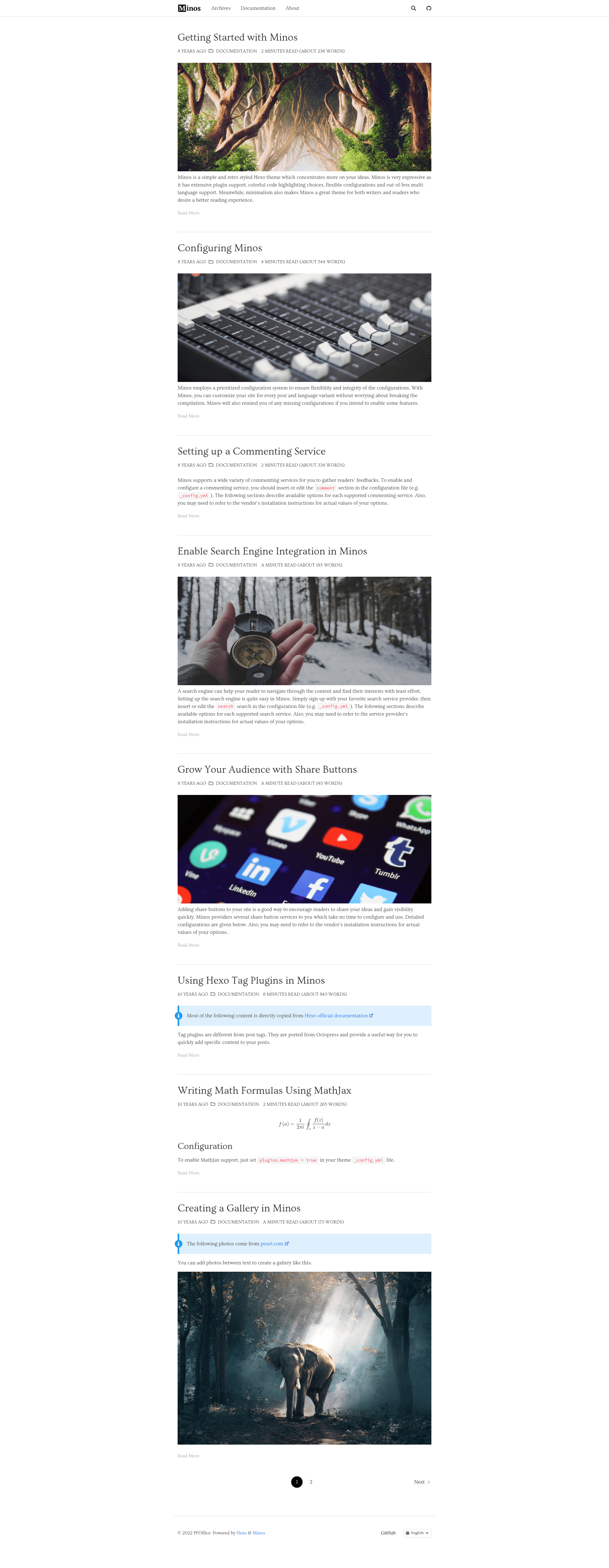
A simple and retro styled Hexo theme, concentrating more on your ideas.
About this template
Hexo Theme Minos is a simple, retro-styled theme for the Hexo static site generator (framework: Hexo, templates: Ejs, styling: Sass) that focuses on letting your ideas take center stage while providing extensive plugin integrations and per-page/per-language configuration.
What is Hexo Theme Minos?
Hexo Theme Minos is a free, MIT-licensed theme for Hexo, a static site generator, created by ppoffice. It takes your Hexo blog content (Markdown posts and pages) and renders it as a responsive, minimalist website with a retro aesthetic. The theme is built with Hexo 3.6.0, Ejs templates, and Sass stylesheets, and is distributed through GitHub with a live preview and documentation.
Key Features
- Extensive Plugin Support — Includes out-of-the-box integrations for 8 comment plugins (Changyan, Disqus, Facebook Comments, Gitment, Isso, LiveRe, Valine, Youyan), 2 search plugins (Insight Search, Google Custom Search), 2 sharing plugins (AddThis, ShareThis), plus Hexo Tag Plugin, lightGallery, Justified Gallery, and MathJax.
- Rich Code Highlight Theme Choices — Directly imports highlight.js themes, making more than 70 code highlight themes available for your code blocks.
- Elastic Theme Configuration — Allows per-page and per-language configuration overrides that merge with the global
_config.yml, demonstrated with_config.zh-cn.ymlfor Chinese translations and front-matter settings in individual posts. - Multi-language Support — Supports multiple translations on different pages in one site using the language folder approach or extra config files like
_config.<language>.yml, letting you choose a preferred language for each page. - Responsive Layout — The layout adapts across multiple viewports so readers on any modern browsing device get a consistent experience.
Who is it for?
- Bloggers and writers who want a clean, retro-styled theme for their Hexo-powered personal blog to showcase long-form articles without visual clutter.
- Developers already using Hexo who need a theme with deep plugin support — Disqus or Valine comments, Google Custom Search, and MathJax for math-heavy posts — without writing custom integrations.
- Multilingual content creators who publish posts in different languages and need per-page language configuration to keep navigation and templates localized.
What can you do with Hexo Theme Minos?
- Personal bloggers: customize the navbar menu per post or per language (e.g., a Chinese-language menu for Chinese posts) using the per-page config merge.
- Technical writers: render code with any of 70+ highlight.js themes and use MathJax for mathematical formulas in technical documentation.
- Site owners: add commenting via one of 8 supported comment systems, social sharing via AddThis or ShareThis, and image galleries via lightGallery or Justified Gallery.
How does Hexo Theme Minos work?
Install the theme by cloning its GitHub repository into your Hexo site's themes folder (git clone https://github.com/ppoffice/hexo-theme-minos.git themes/minos). Once started, Minos reminds you of any missing dependencies and configuration files. Then you configure it through _config.yml and optional per-language config files, or set overrides in individual post front-matter.
FAQ
Is Hexo Theme Minos free?
Yes, Hexo Theme Minos is open-source under the MIT License. You can download it from GitHub and use it for personal or commercial projects without charge, and you can modify it as long as you preserve the license notice.
What Hexo version does Minos require?
The project is built with Hexo 3.6.0, so it is designed for the Hexo 3.x series. It is always best to check the documentation for the specific version compatibility and any minimum requirements.
Can I use Minos with a language other than English?
Yes. Minos supports multiple languages through translation files in the languages folder and per-language config files such as _config.zh-cn.yml. You can add your own translation by contributing to the project's languages directory.
Does Minos support comments?
Yes. Minos includes built-in support for eight comment plugins: Changyan, Disqus, Facebook comments, Gitment, Isso, LiveRe, Valine, and Youyan. You can enable one of them in your configuration.
What are the styling and templating technologies?
Minos uses Ejs for templating and Sass for styling, and it pulls in highlight.js for code syntax highlighting with over 70 selectable themes.