Template details
Hexo Theme Replica
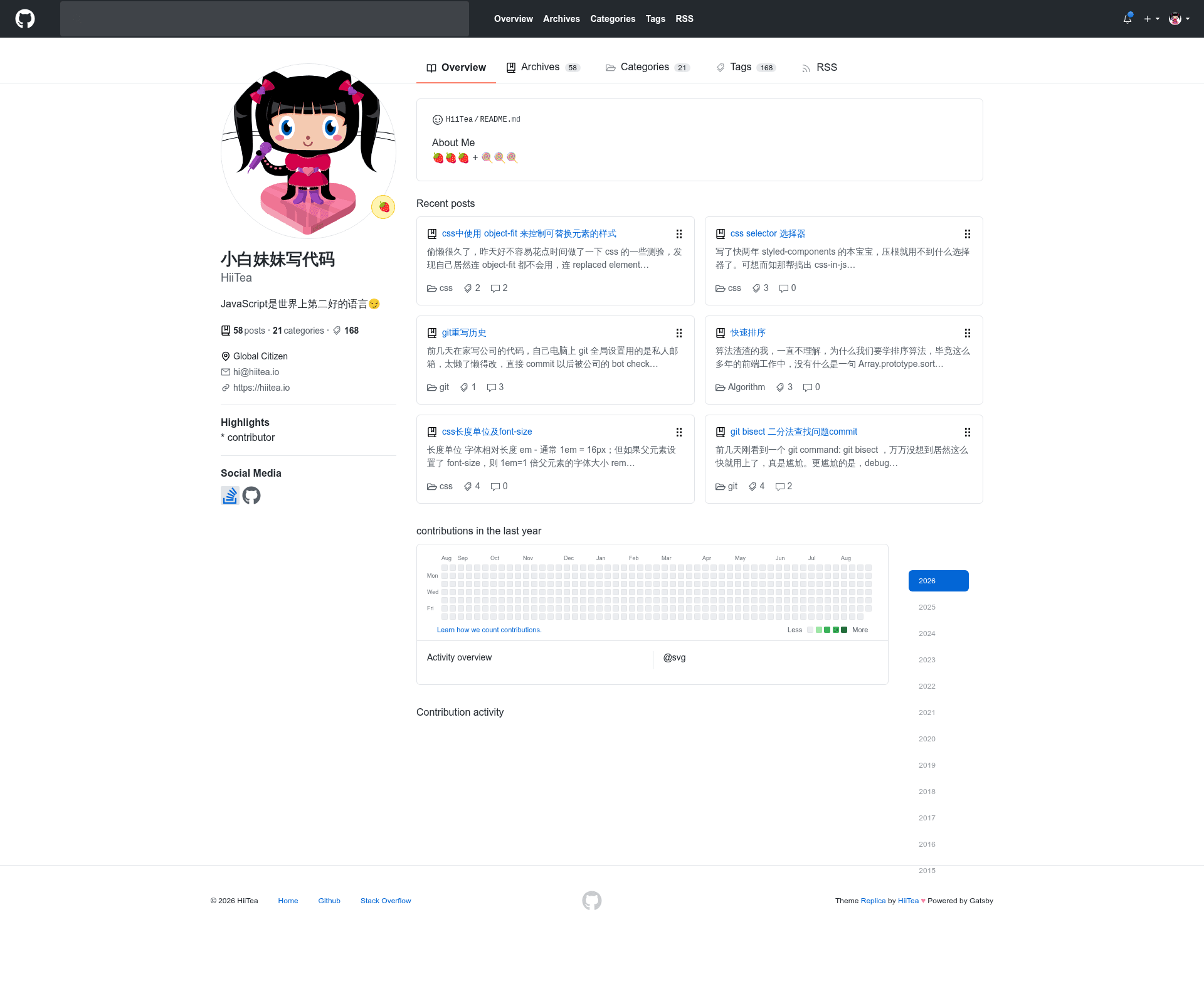
A Hexo blog theme that reproduces GitHub's visual style, with pre-2017 and 2017 UI versions.
About this template
Hexo Theme Replica is a Hexo blog theme that clones GitHub's user interface, letting developers publish a blog that looks like a GitHub repository profile. It offers two visual variants: v1.0 reproduces the pre-2017 GitHub UI with a grey navbar, and v2.0 uses the black navbar from GitHub's 2017 redesign. The theme is free, MIT-licensed, and maintained by Hiitea (sabrinaluo), with a demo at https://sabrinaluo.github.io/tech.
What is Hexo Theme Replica?
Hexo Theme Replica is a theme for the Hexo static site generator, which takes Markdown posts and renders them into a static blog with GitHub-inspired styling. It runs entirely within Hexo's standard theming system, so you install it by cloning the repository into your themes/replica directory and setting theme: replica in the root _config.yml. The theme's source uses Stylus for styling, and all configuration is done through Hexo's config file, not by editing theme files directly.
Key Features
- GitHub UI reproduction — The theme mirrors GitHub's navigation bar, typography, and overall page structure; v1.0 has the grey navbar from before 2017, while v2.0 has the black navbar from 2017.
- Two version branches — Both versions are maintained as git branches, so you can switch between them with
git checkout 1.0or stay on the default v2.0. - Analytics integrations — Predefined config keys for Google Analytics (via a UA-XXXXXXXX-X tracking ID) and Baidu Tongji (using a baidutongji code).
- Commenting support — Disqus is integrated through a Disqus ID; Duoshuo (多说) was previously supported but the service ended in June 2017.
- Search widget — Google Custom Search Engine (CSE) can be added via the
gcsconfig key. - Author profile panel — Shows an avatar, location, email, and social links for GitHub, Weibo, and LinkedIn, all set from the root config.
- GitHub-style details — Uses the octocat mascot and can point your favicon to GitHub's own favicon URL.
- Root-config customization — The README explicitly recommends configuring the site through your blog's root
_config.ymlrather than editingthemes/replica/_config.yml.
Who is it for?
- GitHub-obsessed developers — Developers who want their blog to visually match their GitHub profile and repositories, creating a consistent personal brand.
- Existing Hexo bloggers — Anyone already using Hexo who wants a GitHub-styled theme without migrating to another static site generator.
- Code-focused technical writers — Writers publishing code-heavy tutorials who want a familiar, developer-friendly interface that resembles GitHub.
What can you do with Hexo Theme Replica?
- Publish a GitHub-lookalike blog — Set
theme: replicain the root_config.ymland your existing Hexo posts automatically render with GitHub's navbar, layout, and sidebar. - Switch between two GitHub eras — Run
git checkout 1.0insidethemes/replicato get the grey-navbar pre-2017 UI, or remain on v2.0 for the black-navbar 2017 look. - Add comments, analytics, and search — Fill in the Disqus ID, GA tracking code, Baidu Tongji code, and Google CSE ID in the root config to enable each widget.
- Create category and tag pages — Add
categories/index.mdandtags/index.mdunder yoursourcefolder with the front-matter documented in the README to make taxonomy pages.
How does Hexo Theme Replica work?
Installation follows Hexo's normal theme workflow. First, clone the theme with git clone git@github.com:sabrinaluo/hexo-theme-replica.git themes/replica (or the HTTPS equivalent). Second, set theme: replica in your site's root _config.yml and edit the configuration block for avatar, social links, location, email, analytics, and comments. Third, run your normal Hexo generate/deploy commands. To update later, run git pull in the theme folder; to switch version, run git checkout 1.0 or git checkout -b 1.0 origin/1.0.
Pros and cons
Pros:
- Free under the MIT License.
- One-line theme activation plus a git clone for installation.
- Two visual options covering GitHub's 2017 redesign.
Cons:
- v2.0 is described in the README as "lack of maintenance," so updates may be infrequent.
- The Duoshuo widget is non-functional because the Duoshuo service shut down in June 2017.
Pricing
Hexo Theme Replica is free. It is released under the MIT License, and no paid tiers or premium features are mentioned.
FAQ
How do I install Hexo Theme Replica?
Run git clone git@github.com:sabrinaluo/hexo-theme-replica.git themes/replica (or the HTTPS form) from your Hexo site root, then set theme: replica in your root _config.yml. After that, configure the sample settings like avatar, social links, and analytics IDs in the same root file.
What is the difference between v1.0 and v2.0?
v1.0 replicates GitHub's UI before 2017, which uses a grey navbar. v2.0 replicates the 2017 GitHub UI, which uses a black navbar. The default branch is v2.0, and you can switch to v1.0 with git checkout 1.0.
How can I set up categories and tags?
Create two files under your source folder: categories/index.md with front-matter title: categories and a date, and tags/index.md with title: tags and a date. Use the exact template shown in the README (e.g., date: 2016-01-21 18:46:15).
Which analytics and comment services are supported?
The theme supports Google Analytics, Baidu Tongji, Disqus, and Google Custom Search Engine. Duoshuo (多说) was previously supported but the service stopped in June 2017, so that widget no longer functions.
Is there a Gatsby version?
Yes, the README links to a companion theme at https://github.com/sabrinaluo/gatsby-theme-replica for users of the Gatsby static site generator, though the features may differ from this Hexo theme.