Template details
Hexo Theme Vivia
A clean and minimalist theme for Hexo.
About this template
Hexo Theme Vivia is a clean, minimalist open-source theme for the Hexo static site generator, forked from the official Landscape theme and distributed as an npm package.
What is Hexo Theme Vivia?
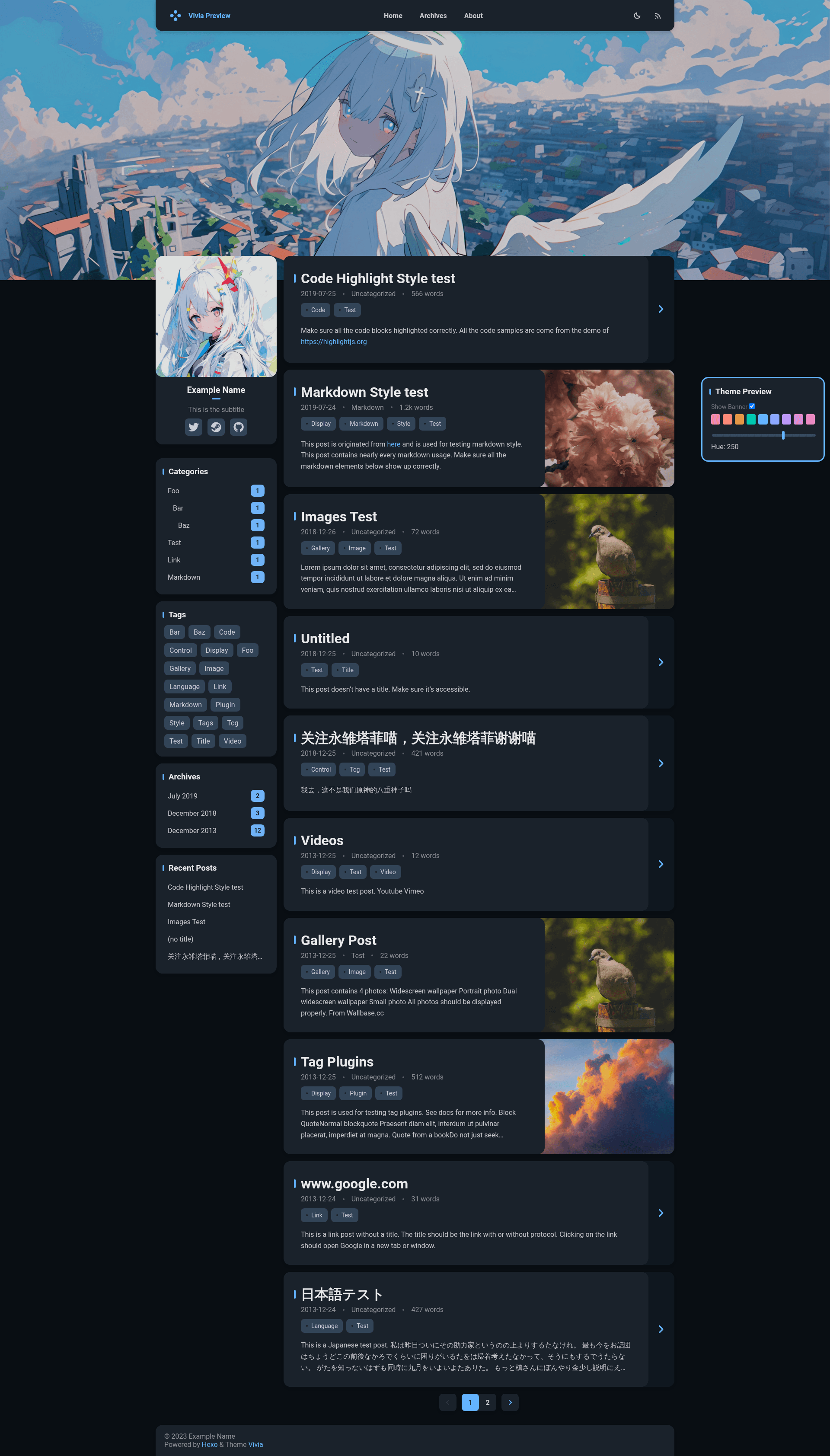
Hexo Theme Vivia is a responsive blog theme designed for Hexo, the Node.js-based static blog framework. It takes standard Hexo Markdown content and renders it as a modern blog with light and dark modes, a customizable banner, and comment support. The theme is created by saicaca, is published on npm as hexo-theme-vivia, and its source is hosted on GitHub with 525 stars.
The project is no longer actively maintained; the author recommends the new Astro version called Fuwari for new projects. Vivia is a work in progress, with search and table-of-contents widgets still on the to-do list.
Key Features
- Light and dark mode — Toggleable appearance that automatically adapts the whole blog layout, as shown on the live demo.
- Custom theme color — Pick a color accent from the configuration file to personalize links, buttons, and highlights.
- Custom banner — Replace the default page header image with your own via the config file.
- Responsive design — The layout adjusts to mobile and desktop screens without extra configuration.
- Comment integrations — Built-in support for Valine and Twikoo comment systems; other providers are listed as not yet implemented.
- npm installation — Install with a single command:
npm install hexo-theme-vivia, then copyexample_config.vivia.ymlto_config.vivia.yml. - Archive page support — Works with Hexo's archive generator; requires setting
archive_generator.per_page: 0so the archive page shows more than ten articles.
Who should use Hexo Theme Vivia?
Bloggers who already use Hexo and want a clean, minimal design without switching platforms. Developers who like tweaking Stylus-based themes can easily customize colors, banners, and layout details in the config file. Users who want a simple personal blog with fast static hosting and built-in comment options (Valine or Twikoo) will find the setup straightforward.
What can you do with Hexo Theme Vivia?
- Personal bloggers: Publish Markdown posts and pages, with automatic archive and about-page support after running
hexo new page about. - Developers testing themes: Install via Git into the themes/vivia directory, then run
hexo config theme viviato activate it. - Minimalist writers: Use the clean layout and dark mode for distraction-free reading; the custom banner gives each page a distinct visual identity.
How does Hexo Theme Vivia work?
Install the theme via npm or Git, copy the example configuration file to your Hexo root as _config.vivia.yml, edit it to your preferences, and switch the active theme with hexo config theme vivia. Finally, create an about page with hexo new page about and set the archive generator to show all posts. The theme then renders your existing Hexo content with the selected styling and comment systems.
FAQ
Is Hexo Theme Vivia free?
Yes, the theme is open-source and released under the MIT license, as shown by the GitHub license badge.
Is Hexo Theme Vivia still maintained?
No. The repository states it is no longer actively maintained, and the author recommends the new Astro version, Fuwari, for anyone interested in this design.
Does Hexo Theme Vivia support search?
No. Search is listed as an unimplemented feature on the project's to-do list; the theme does not include a search widget yet.
Which comment systems can I use?
The theme supports Valine and Twikoo out of the box. Other comment providers are listed on the to-do list as "Others" and are not yet implemented.
What are the installation options?
You can install via npm (npm install hexo-theme-vivia) or by cloning the GitHub repository into themes/vivia. Git installation also requires installing the dependencies colorjs.io, stylus, and hexo-symbols-count-time.