Template details
neopost
A minimalist Hugo theme for neocities-style personal blogs with customizable color themes and multilingual support.
About this template
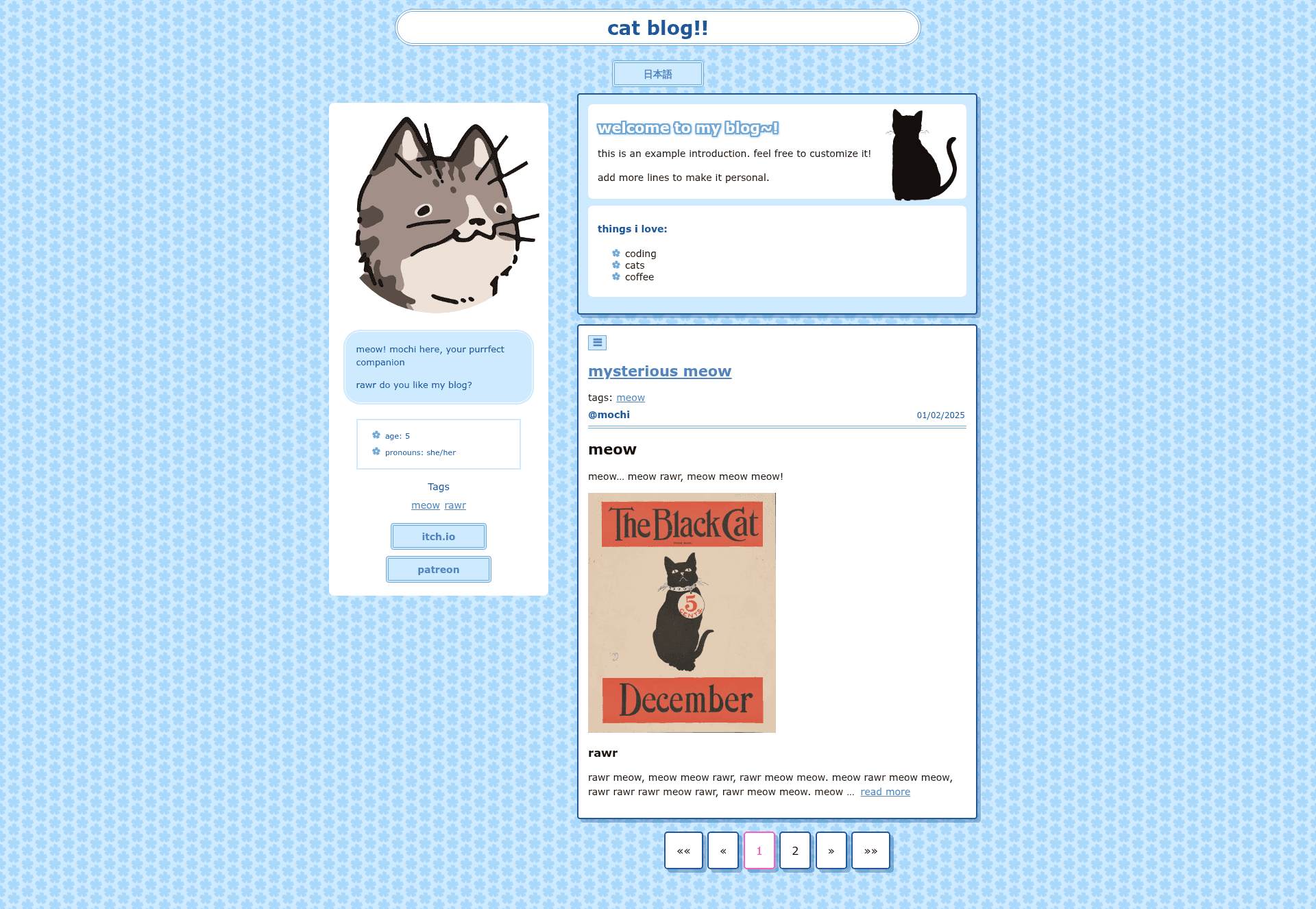
neopost is a Hugo theme for building a neocities-inspired personal blog, offering six preset color themes, custom theme support, and markdown-based content archetypes for posts, a sidebar, and a welcome header.
What is neopost?
neopost is an open-source Hugo theme (GPL-3.0) that turns a Hugo static site into a personal blog with the minimalist, retro-neocities look. It takes markdown content from your content directory and generates a static website with a main post feed, per-post pages, a sidebar, and a welcome header. Configuration is done entirely through hugo.yaml: set theme: "neopost" and choose a color via params.theme. The theme was created by salatine, and a live example is available at neopost.neocities.org.
Key Features
- Preset color themes — six built-in themes are available: light-blue, dark-blue, light-green, light-yellow, light-pink, and light-purple, switchable through the
themeparameter inparams. - Custom theme support — define your own color schemes in
/data/custom_themes.yamland reference them by name; if a name conflicts with a built-in theme, the built-in theme is prioritized. - Multilingual content — because neopost is a Hugo theme, it works with Hugo's built-in multilingual support to serve posts and site text in multiple languages via standard markdown files.
- Post tags and filtering — each post can have tags, and the main page supports filtering by tag so readers can easily find specific topics.
- Sidebar archetype — create a sidebar with
hugo new --kind sidebar sidebarand edit the multiple markdown files undercontent/sidebar/to add a bio and personal info. - Welcome header — generate an introduction block above the post list with
hugo new --kind welcome-header welcome-header, then editcontent/welcome-header/_index.mdto customize it. - GPL-3.0 licensed — the theme is free to use, modify, and redistribute under the GNU General Public License v3.
Who is it for?
- Personal bloggers who want a retro neocities look with the modern tooling of Hugo's static site generator.
- Neocities users looking for a ready-made theme to deploy a personal site on Neocities, with an example site at neopost.neocities.org to reference.
- Developers and tinkerers who enjoy customizing themes — you can add custom color schemes, edit sidebar markdown, and control everything through a simple YAML configuration.
- Hugo learners seeking a small, understandable theme: the included example site (with images mostly from the Library of Congress) demonstrates how to wire up posts, sidebar, and welcome header.
What can you do with neopost?
- Start a personal blog — create new posts with
hugo new content/posts/new-post.md, and they appear on the main page plus as individual pages. - Build a personal homepage — customize the welcome header and sidebar markdown to introduce yourself, share a bio, or display links.
- Match your aesthetic — switch
params.themeamong the six preset colors, or write your own theme in/data/custom_themes.yamlfor a completely custom look. - Publish a multilingual site — use Hugo's i18n support with neopost's markdown-based content to serve posts in multiple languages.
How does neopost work?
Start by creating a new Hugo site (hugo new site my-site), clone the neopost repository into themes/neopost, and set theme: "neopost" in your hugo.yaml. For a quick start, copy the provided example site into your project root with cp -r themes/neopost/example/. . and run hugo serve to preview it locally. From there, add content using the built-in archetypes for posts, sidebar, and welcome header.
FAQ
Is neopost free?
Yes, neopost is open-source software licensed under GPL-3.0, meaning you can use, modify, and redistribute it freely.
How do I change the color theme?
In hugo.yaml, set params.theme to one of the built-in names: light-blue, dark-blue, light-green, light-yellow, light-pink, or light-purple. You can also create a custom theme in /data/custom_themes.yaml and use its name; built-in themes take precedence if names conflict.
Can I add more content types?
neopost provides three content archetypes: posts (content/posts), sidebar (content/sidebar), and welcome header (content/welcome-header). Since it's Hugo, you can also create your own custom content types, but the theme is specifically designed for these three.
Does neopost require JavaScript?
No, neopost is a server-side rendered static theme with no JavaScript dependencies, so it loads fast and works on any static host, including Neocities.