Template details
Hexo Theme Yilia Pro
A simple and elegant Hexo theme forked from Yilia with extra widgets, comment systems, and analytics.
About this template
Hexo Theme Yilia Pro is a Hexo blog theme — an optimized continuation of the original Yilia theme — that adds configurable widgets, multiple comment options, and analytics while keeping the minimalist, high-performance design Yilia is known for.
What is Hexo Theme Yilia Pro?
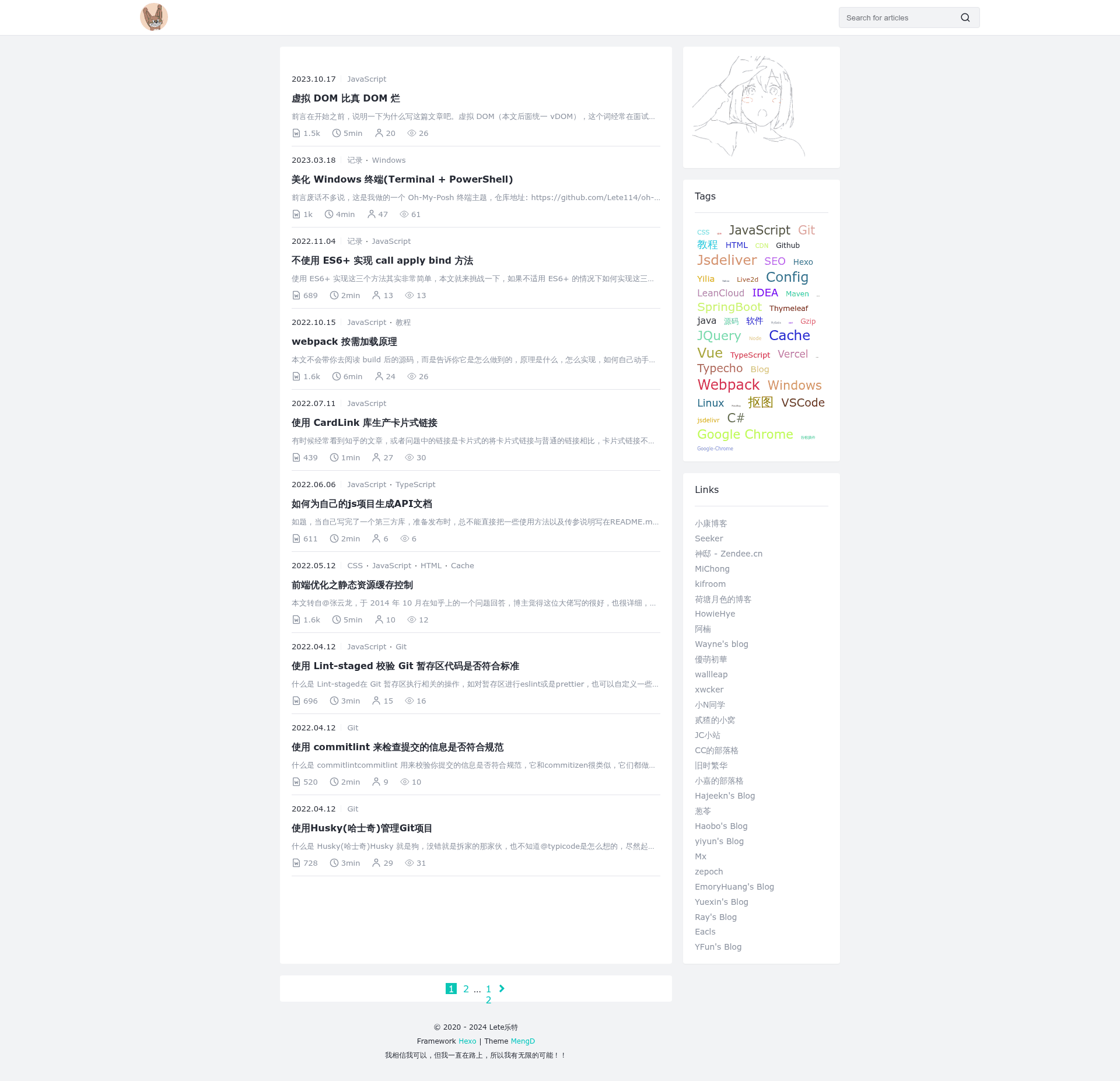
Hexo Theme Yilia Pro is a static blog theme for the Hexo site generator. It takes Markdown posts and standard Hexo configuration as input and produces a fast, static website with a sidebar, article list, tags, archives, and custom pages. The theme was created by Lete乐特 (Lete114) in September 2020 as an updated fork of the Yilia theme developed by litten in September 2014. It is installed by cloning the repository into the themes folder and setting theme: Yilia-Pro in Hexo's root _config.yml.
Key Features
- Code block themes — Choose from six built-in highlight styles (default, darker, pale night, light, ocean, mac, mac light) or disable highlighting entirely via the
highlight_themesetting. - Word count and reading time — Enable
wordcountandmin2readto display character counts and estimated reading duration on each post. - Page view statistics — Integrates busuanzi (不蒜子) to show site-wide and per-post views, with a separate option to show reading counts.
- Valine comment system — Native Valine integration using LeanCloud storage, with QQ avatar auto-fill, custom emoji, and IP recording options; an Artalk self-hosted comment option is also included but disabled by default.
- Custom title switching — The browser tab title changes to a leave message when the visitor switches away and returns when they come back, with customizable strings.
- Analytics support — Add Baidu Analytics and Google Analytics tracking IDs directly in the theme config.
- Custom CSS/JS injection — The
importsection lets you link external stylesheets, scripts, and inline style blocks without editing template files. - Theming system — A
themesblock exposes colors for the accent, links, scrollbar, selection, footer text, and separate desktop/mobile background image URLs. - 404 page — A built-in error page with background image, music tag, and auto-redirect timer.
- ICP filing and CDN badges — Configurable footer badges for Chinese ICP registration and CDN acceleration (e.g. upyun).
Who is it for?
- Chinese and international Hexo bloggers who want Yilia's clean layout but need modern features like word count, comment systems, and analytics without hand-coding.
- Developers and customization enthusiasts — The theme offers an unusually large YAML configuration surface (title icons, colors, custom CSS/JS, menu links) for tailoring the site without touching the templates.
- Bloggers migrating from the original Yilia — The layout and menu structure remain familiar, while extra features are additive and clearly documented in the README.
- Bloggers who want a "说说" (microblog) page — The Artitalk integration enables a LeanCloud-backed status wall with its own config section.
What can you do with it?
- Launch a personal blog quickly: Clone the theme, adjust the
menu,author,avatar, andsubnavsettings, and you have a complete blog with tag archives, an "all articles" smart menu, and a table of contents (three modes: off, per-post, always on). - Add a book / resource navigation page: Use the
friendsblock and smart menu to link to external sites, creating a lightweight link page. - Set up a "说" (shuo shuo) wall: Configure Artitalk with your LeanCloud app ID and key to let visitors see and post short messages, with custom emoji packs.
- Make code-heavy posts readable: Pick a code block theme and enable line numbers; wrap posts with mathematical formulas by enabling MathJax globally or per post.
How does it work?
- Clone the repository into
themes/Yilia-Pro. - In the Hexo root
_config.yml, settheme: Yilia-Pro. - Edit the theme's
_config.ymlto set your author name, avatar, menu links, and optional features like busuanzi, Valine, analytics, and custom CSS/JS. - Run
hexo gandhexo sto generate and preview the static site.
Alternatives
- hexo-theme-yilia — The original theme by litten that Yilia Pro extends; it offers a similar look but fewer built-in integrations.
- hexo-theme-butterfly — Another popular Hexo theme with a richer set of widgets, nested menus, and multiple comment system options.
FAQ
Is hexo-theme-yilia-pro free?
Yes, it is an open-source Hexo theme published on GitHub. You can clone it and use it on as many sites as you like, but the repository does not display a formal license, so check the project page if you need to redistribute it.
Does it support comment systems other than Valine?
The current release only includes Valine (LeanCloud-backed) and an optional Artalk system that is disabled by default. The README notes that other comment systems have been removed, with plans to add more in the future.
How do I enable the ICP filing badge?
Set the ICP section in the theme config: set enable: true, and provide your filing text and URL. The badge will appear in the footer.
Can I change the code block theme?
Yes. Set highlight_theme in the theme config to one of default, darker, pale night, light, ocean, mac, mac light, or false to disable highlighting.
Does the theme support Chinese analytics?
Yes, it has built-in support for Baidu Analytics (with a config field for the tracking ID) and Google Analytics.