Template details
Hexo Theme Random
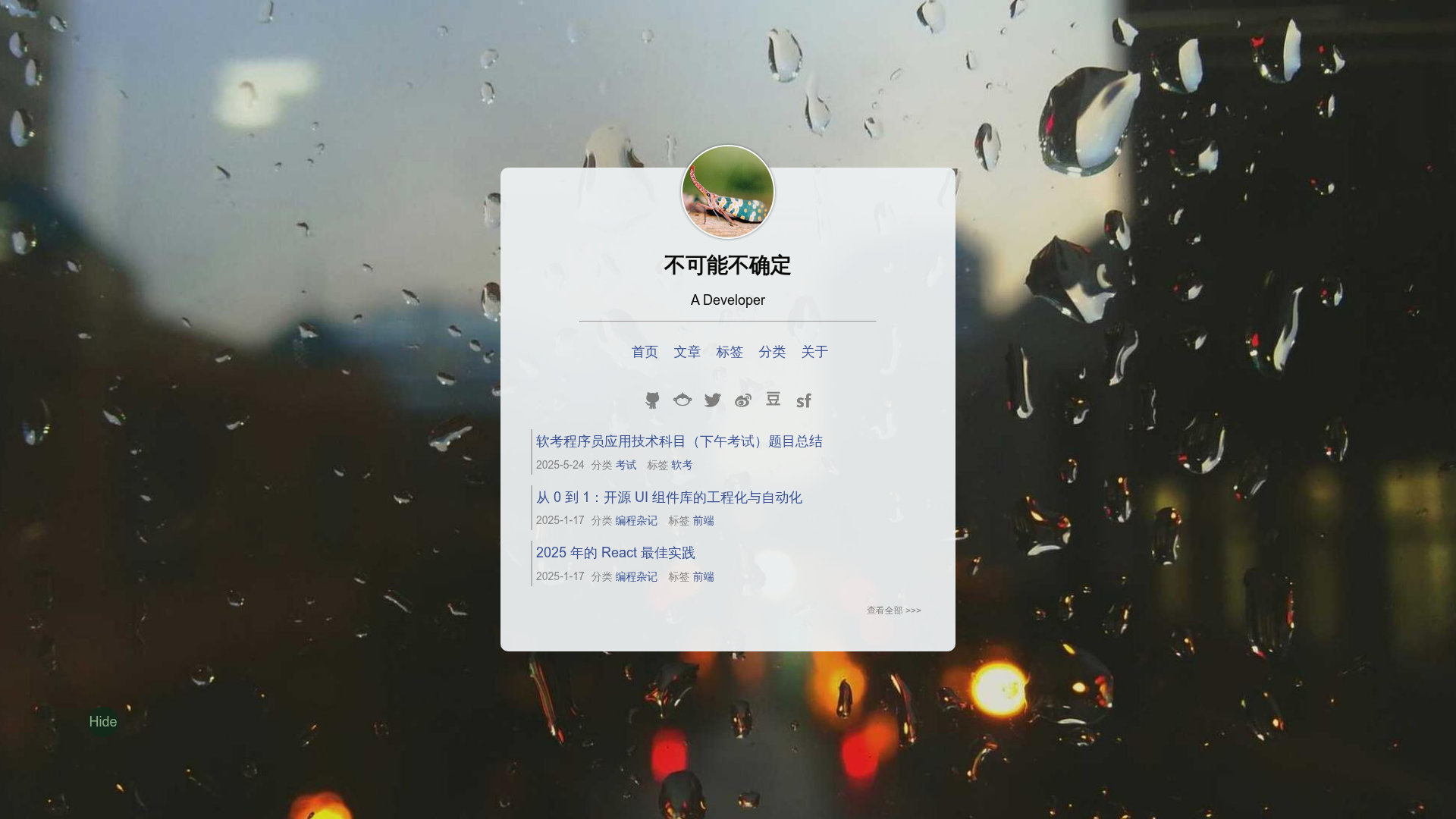
A hexo theme with random fullscreen background image.
About this template
Hexo Theme Random is a theme for the Hexo static site generator that rotates a random fullscreen background image on every page, using the Vegas background player. It suits bloggers who want an image-first layout with no article excerpts and no pagination in the post list.
What is Hexo Theme Random?
Hexo Theme Random is a theme for the Hexo static site generator that uses a random fullscreen image as the background of every page. It takes a standard Hexo blog and produces a visual-first site where the background is the primary design element. The theme is published by GitHub user Stiekel and includes both English and Chinese documentation, plus a live demo link.
Key features
- Hexo-native install — Clone the repository into
themes/randomfrom the blog root, then settheme: randomin the Hexo main_config.yml. - Random Unsplash backgrounds — The default image source is Unsplash, with
unsplashConfigoptions for gravity (north,east,south,west,center), blur, and greyscale. - Custom background URLs — The
backgroundImageslist accepts your own URLs; the__width__and__height__placeholders are replaced with the browser viewport dimensions when the image is loaded. - Vegas slideshow controls —
vegasConfigconfigures transition effects (such asslideLeft2,slideRight2,flash2), delay, timer, shuffle, and the number of preloaded images. - Per-page background toggle —
turnoffBackgroundImagedisables backgrounds independently for the homepage (index), listing pages (post_list), and posts (post);backgroundColorsets a custom hex color. - Social icons auto-replaced — The
socialconfig block converts text links into icons for GitHub, Twitter, Weibo, DouBan, and additional sites like Facebook, Dribbble, LinkedIn, Zhihu, and Quora are supported on request. - Comment and analytics integrations — Supports Disqus, Valine, gitalk, Google Analytics, Baidu Tongji, Uyan, and JiaThis through keys in the theme or site config.
- Tags and categories pages — Create them with
hexo new page tagsorhexo new page categories, then settype: "tags"ortype: "categories"in the front matter.
Who is it for?
Hexo Theme Random is aimed at Hexo bloggers who want a minimal, image-focused design. It fits users who prefer fullscreen backgrounds over text excerpts, and who do not need pagination on listing pages. Developers can also use it as a base for a custom single-column blog, since it already wires up common comment engines, analytics, and social links.
Use cases
- Photographers and visual artists: Display their own work by filling
backgroundImageswith image URLs, and turn off backgrounds on post pages to keep text readable. - Minimalist writers: Publish posts and let the archive, tags, and category pages show only titles and dates, without excerpts or pagination.
- Chinese and English bloggers: Use the provided Chinese README for setup guidance while configuring social and analytics services from the English docs.
How does it work?
Install the theme by running git clone https://github.com/stiekel/hexo-theme-random.git themes/random in the blog root, then change the theme value in the Hexo main config file to random. After that, edit theme/random/_config.yml to set menu links, social icons, background image sources, and third-party service keys.
FAQ
Does the theme support comment systems?
Yes. It supports Disqus, Valine, and gitalk. Configure the corresponding key (e.g. disqus_shortname, or the valine block with LeanCloud appId and appKey) in the theme or site config.
Can I use my own background images instead of Unsplash?
Yes. Replace the URLs in the backgroundImages list with your own image links. Use __width__ and __height__ placeholders in the URL if your image server can crop to those dimensions.
How do I create a tags or categories page?
Run hexo new page tags and modify source/tags/index.md to set type: "tags". Do the same for categories with hexo new page categories and type: "categories" in the front matter.
Can I turn off the background image on specific pages?
Yes. Set turnoffBackgroundImage in the config, with index, post_list, and post as boolean keys to control the homepage, listing pages, and post pages individually.