Template details
Horizon Flow
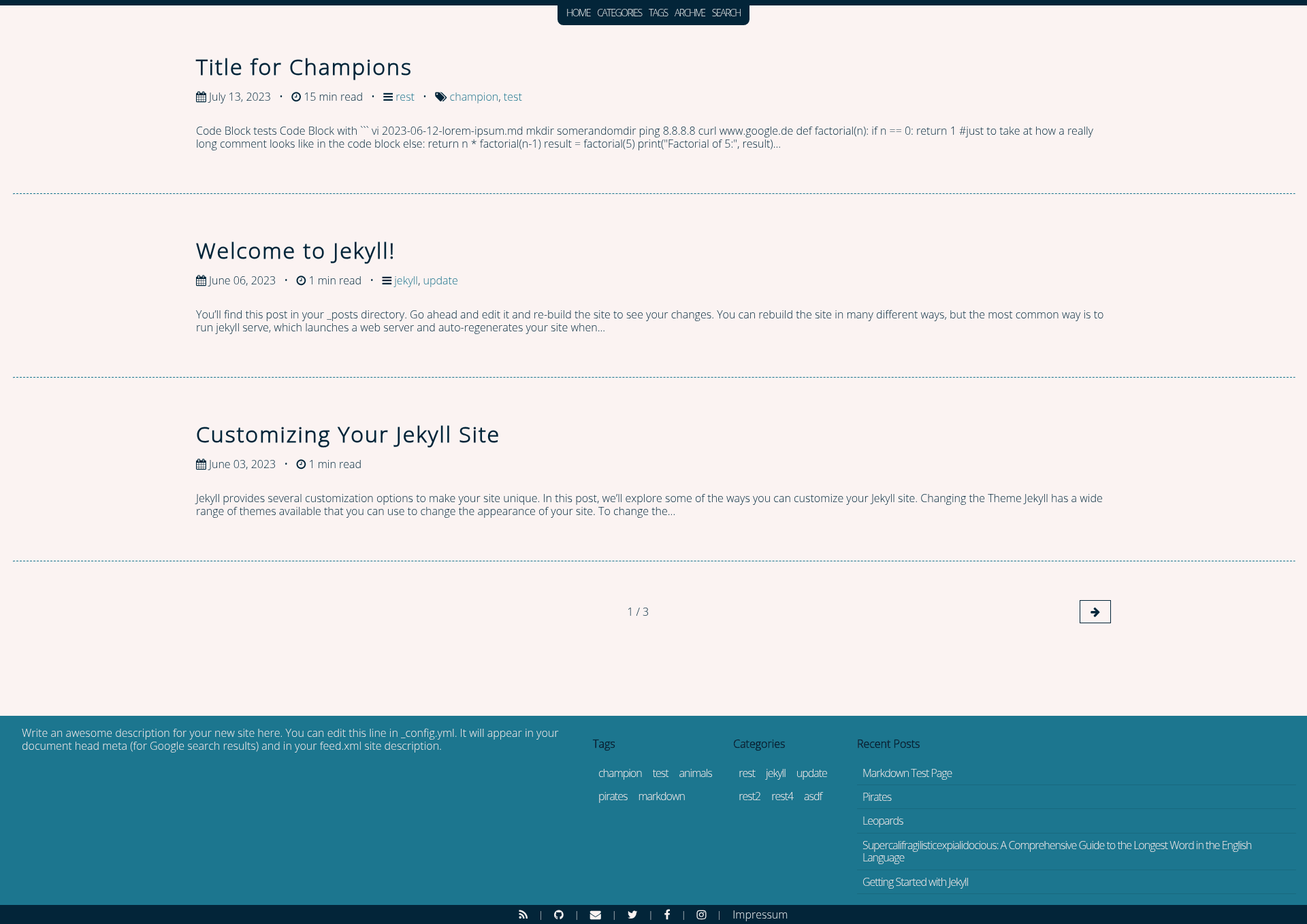
A mobile-friendly Jekyll blog theme with a fixed navigation header, configurable footer sidebar, tags, categories, archive, and search.
About this template
Horizon Flow is a mobile-friendly Jekyll theme for blogs, providing a fixed navigation header, a configurable footer sidebar, and built-in tags, categories, archive, and search pages.
What is Horizon Flow?
Horizon Flow is a Jekyll theme created by developer papierkorp, inspired by the So Simple theme by mmistakes. It takes a Jekyll site's posts and pages as input and renders a complete blog with a fixed masthead, footer, and optional sidebar. It runs on Jekyll 3.6 and newer and is installable as a Ruby gem or as a remote theme on GitHub Pages. The theme is open source under the MIT License.
Key Features
- Custom Navigation — Define navigation links in
_config.ymlundernavigation, with each entry having a title and URL. - Footer with Font Awesome icons — Add social links and local pages to the footer using
footer_links, each with a title, URL, and an icon class from Font Awesome v4. - Footer Sidebar — Display up to five elements above the footer (description, categories, tags, recent posts, and two custom content blocks), each with configurable column counts and enable flags.
- JavaScript-free by default — The theme ships with no JavaScript except on the optional search page and optional comments; the TOC is rendered at build time with jekyll-toc and shown after clicking a hamburger button.
- Search page — Uses a generated
search.jsoncontaining each post's title, first 50 words of summary, URL, category, tags, keywords, and date. - GitHub Issues comments — Optional server-free comments where each post maps to a GitHub Issue via a
comments_idfront matter value and anissues_repoconfig. - Configurable labels — Override UI strings such as "min read", "Last Modified at:", and archive/tag/category headings via
_data/configurable_lables.yaml. - Page layouts — Includes layouts for default, post, archive, home, categories, search, and tags; archive, categories, and tags layouts let you set column counts from 0 to 5.
Who is it for?
- Jekyll bloggers — publish posts and get a clean, responsive layout with read time, tags, categories, and a built-in table of contents per post.
- GitHub Pages users — use the
remote_theme: papierkorp/jekyll-theme-horizon-flowline in_config.ymlto host the site for free with no build server. - Developers who prefer minimal front-end JavaScript — the core theme renders without JS; only the optional search and comments features add script tags.
- Technical writers — take advantage of the post layout's support for almost all Markdown elements and the optional permanent TOC on the right side (
display_toc2).
What can you do with Horizon Flow?
- Personal blogs: Write posts in Markdown and get an SEO-friendly blog with jekyll-seo-tag, jekyll-feed, and jekyll-sitemap already wired in.
- Tech tutorials: Organize posts by tags and categories, enable a table of contents for long posts, and let readers jump to sections without page reloads.
- Portfolio or hobby site: Use the
postlayout for custom pages and the configurable footer sidebar to show recent posts, your bio, or custom HTML content.
How does Horizon Flow work?
Horizon Flow follows standard Jekyll workflows: add the gem to your Gemfile, set theme (or remote_theme for GitHub Pages) in _config.yml, run bundle install, rename index.md to index.html, and configure navigation and footer links. Posts placed in the _posts folder are rendered into the home layout for the blog listing, and each post gets a TOC generated at build time via jekyll-toc. Optional search and comments require a generated JSON file and per-post GitHub Issue IDs respectively.
Pros and cons
- Pros:
- MIT licensed and free to use.
- No JavaScript required for core blog display.
- SEO plugins included by default.
- Highly customizable via
_config.ymland a labels file.
- Cons:
- The footer sidebar shows nothing unless you set an
arrangementlist in_config.yml. - Comments require manually creating a GitHub Issue per post and adding its ID in front matter.
- The footer sidebar shows nothing unless you set an
Pricing
Horizon Flow is free and open source under the MIT License; there are no paid tiers.
Alternatives
- So Simple by mmistakes — the theme Horizon Flow was inspired by and partially copied its README from.
FAQ
Is Horizon Flow free?
Yes, Horizon Flow is released under the MIT License, so you can use it for personal or commercial projects, modify it, and redistribute it.
Does Horizon Flow work with GitHub Pages?
Yes, you can use it as a remote theme by setting remote_theme: papierkorp/jekyll-theme-horizon-flow in _config.yml instead of theme:.
Do I need JavaScript to use Horizon Flow?
No, the theme's core rendering is JavaScript-free. JavaScript is only used for the optional search page and the optional GitHub Issues-based comments.
How do I enable comments in Horizon Flow?
Set issues_repo in _config.yml to your username/repository, then add comments_id: <issue-number> to each post's front matter after opening a GitHub Issue for that post.
How do I change the footer sidebar content?
Define a footer_sidebar block in _config.yml with an arrangement list (e.g., description, tags, categories, recentposts) and enable individual elements with enabled: true and optional count and columns values.