Template details
HPSTR
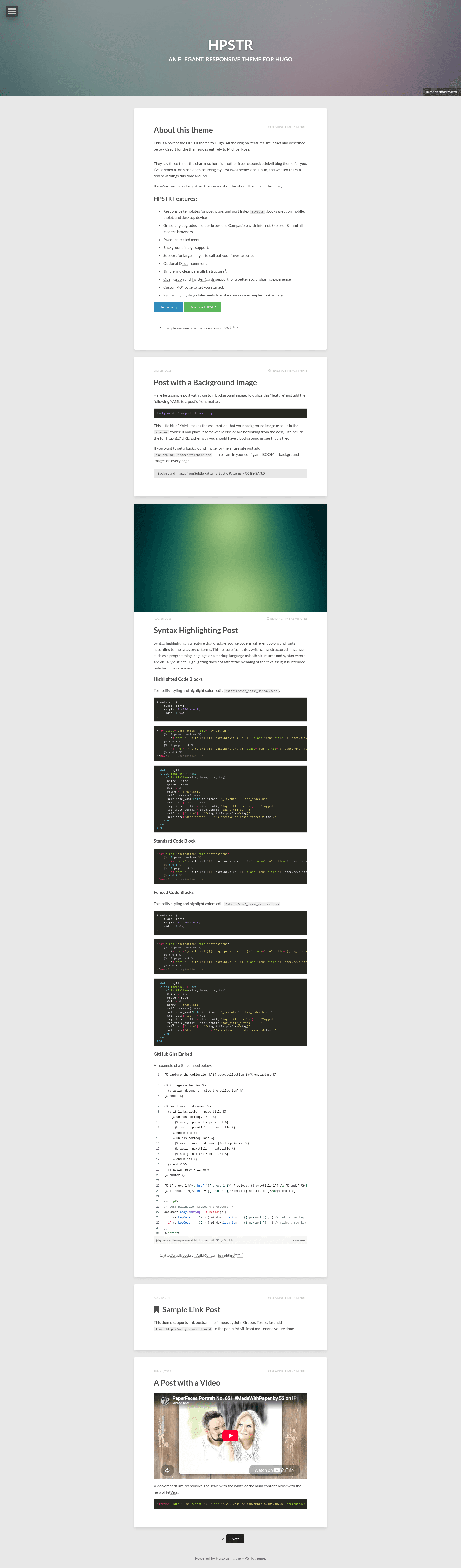
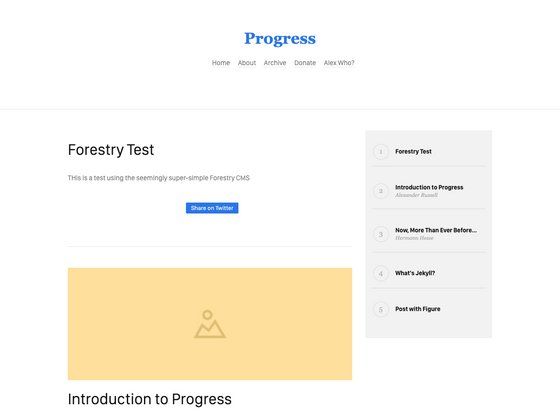
Responsive Hugo blog theme ported from the HPSTR Jekyll theme, with animated menu and social sharing support.
About this template
HPSTR is an open-source Hugo theme ported from the Jekyll HPSTR theme by Michael Rose, giving Hugo users a responsive blog layout with animated navigation and social sharing support.
What is HPSTR?
HPSTR is a Hugo blog theme that takes Markdown content files and renders them into a responsive front-end with layouts for posts, pages, and post indexes. It is a direct port of the popular HPSTR Jekyll theme, so it preserves all original features while running on Hugo instead of Jekyll. The port is maintained by dldx on GitHub, and the repository currently has 18 stars. The design and features credit goes to the original author, Michael Rose.
Key Features
- Responsive templates — Dedicated layouts for single posts, standalone pages, and the post index page; they adapt to mobile, tablet, and desktop screen sizes.
- Browser compatibility — Gracefully degrades in older browsers and is compatible with Internet Explorer 8 and up, plus all modern browsers.
- Animated menu — A navigation menu that animates when opened or closed, instead of relying on plain static links.
- Background image support — Lets the site owner set a full-page background image for the entire theme.
- Large feature images — Posts can have a large call-out image at the top, helping favorite posts stand out in the index.
- Disqus comments — Optional comment integration via Disqus; activate it by adding a Disqus shortname to the Hugo config.
- Open Graph and Twitter Cards — Built-in meta tags for richer link previews when pages are shared on Facebook, Twitter, and similar services.
- Custom 404 page — Includes a ready-made error page so visitors see a friendly message instead of a blank error.
- Syntax highlighting stylesheets — Provided CSS to make code blocks in posts look clean and colorful.
- Clear permalinks — Simple and readable URL structure for pages and posts.
Who is it for?
- Hugo bloggers — Anyone who wants a ready-made, responsive blog theme without designing the HTML and CSS themselves; just drop in Markdown content and publish.
- Jekyll users switching to Hugo — People who know the original HPSTR Jekyll theme and want to keep the same visual style after migrating their site to Hugo.
- Developers learning Hugo — A small, well-structured theme to study how a Hugo site organizes layouts, partials, and configuration for multiple page types.
What can you do with HPSTR?
- Run a personal blog — Write posts in Markdown and HPSTR renders them into styled pages with an automatic post index listing.
- Share articles on social media — With Open Graph and Twitter Cards enabled, links to your posts display a title, description, and image when shared.
- Add discussion to posts — Connect Disqus to give readers a comment section on every post without building a comment system from scratch.
How does HPSTR work?
After installing Hugo, create a themes directory, clone the repository with git clone https://github.com/dldx/hpstr-hugo-theme.git hpstr, then set the theme name to "hpstr" in the Hugo site config. The theme's layout files handle the rest, including the post index, single posts, pages, and the 404 page. The demo page also links to a theme setup guide for further configuration.
FAQ
Is HPSTR free?
Yes. HPSTR is an open-source theme and the GitHub repository is publicly available to clone or download for free.
Does HPSTR support comments?
Yes. HPSTR integrates optional Disqus comments. Add a Disqus shortname to the Hugo configuration and comment threads will appear on your posts.
Who made HPSTR?
The original HPSTR theme was created by Michael Rose for Jekyll. The Hugo port is maintained by dldx, with all design credit going to the original author.
How do I install HPSTR?
With Git installed, run mkdir themes, then cd themes, then git clone https://github.com/dldx/hpstr-hugo-theme.git hpstr. Or download the zip from the repository page and extract it into the themes folder.
Does HPSTR work with older browsers?
Yes. The theme is designed to degrade gracefully and is compatible with Internet Explorer 8 and all modern browsers.