Template details
Said Yes!
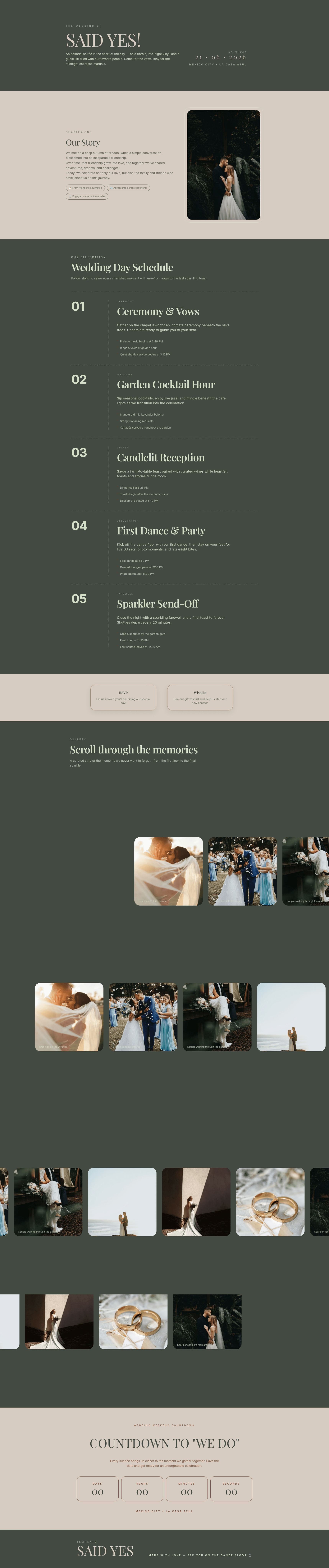
A simple Astro template for a wedding invitation using GSAP animations.
About this template
Said Yes! is an Astro starter project for building a wedding invitation website with GSAP animations. It is a minimal, code-first template that shows how to structure an invitation and animate its sections using the GreenSock Animation Platform (GSAP). The project is built on Astro, a static site generator, and is distributed as a public repository on GitHub.
What is Said Yes!?
Said Yes! is a simple Astro project that demonstrates how to create a basic wedding invitation using GSAP. As input, you work directly in Astro components and edit the invitation content and styles; as output, the build command generates a fully static website in the ./dist/ directory. The project runs on the Astro framework and is maintained as an open-source template in a GitHub repository.
Key Features
- Astro framework — The template is built with Astro, a static site generator that outputs plain HTML, CSS, and JavaScript, so the final invitation is easy to deploy anywhere.
- GSAP animations — The project integrates GreenSock (GSAP) to animate elements of the invitation, providing a working example you can extend.
- Bun package manager — All scripts are written for the bun runtime:
bun install,bun dev,bun build, andbun preview. - Local dev server — Running
bun devstarts a development server atlocalhost:4321. - Production build —
bun buildcompiles the site into the./dist/folder, ready for deployment to any static hosting service. - Preview command —
bun previewlets you inspect the production build locally before going live. - Astro CLI access — The project supports standard Astro CLI commands like
astro addandastro check.
Who is it for?
Said Yes! is aimed at couples who want a self-hosted wedding website without using a paid builder, as well as developers looking for a small Astro + GSAP starting point. A wedding invitation designer can use it to quickly spin up a demo for a client and customize the content in Astro components. A front-end developer can study how to integrate GSAP with an Astro page and adapt the pattern to other projects.
What can you do with it?
- Couples planning a wedding — Replace the sample invitation copy with your event date, venue, and schedule, then deploy the generated static site to any web host.
- Event organizers — Adapt the invitation structure for other celebrations such as anniversaries, showers, or birthday parties by editing the Astro components.
- Developers learning Astro + GSAP — Use the project as a reference implementation to see how GSAP is loaded and applied inside an Astro page.
How does it work?
After cloning the repository, run bun install to set up dependencies, then bun dev to launch the local server at localhost:4321. Edit the Astro components to change your invitation details, and when you are ready, run bun build to generate the static site in ./dist/. Finally, bun preview lets you review the production build before deploying.
FAQ
Is Said Yes! free to use?
Yes, Said Yes! is an open-source Astro template hosted on GitHub. You can clone, modify, and use it for your own wedding invitation or any similar announcement event.
What tech stack does Said Yes! use?
The template is built with Astro and uses GSAP for animations. All commands are written for the bun package manager, though you can adapt them to npm or other runtimes.
How do I run Said Yes! locally?
Install dependencies with bun install, then start the development server with bun dev. The site will be available at localhost:4321. To create a production build, run bun build and preview it with bun preview.
Can I deploy Said Yes! to any static host?
Yes, because bun build outputs a static site in the ./dist/ folder. You can upload that folder to any static hosting service such as Netlify, Vercel, GitHub Pages, or an ordinary web server.
Do I need to know Astro or GSAP to use it?
Basic familiarity with Astro components helps, but the template is simple enough to follow by example. You can edit text and styles directly in the Astro files, and the GSAP usage is presented as a straightforward demo.