Template details
Hugo Grayscale
A multi-section single-page Hugo theme for landing pages, ported from the Start Bootstrap Grayscale theme.
About this template
Hugo Grayscale is an open-source Hugo theme that builds a multi-section single-page landing site from markdown content, ported from the Start Bootstrap Grayscale template.
What is Hugo Grayscale?
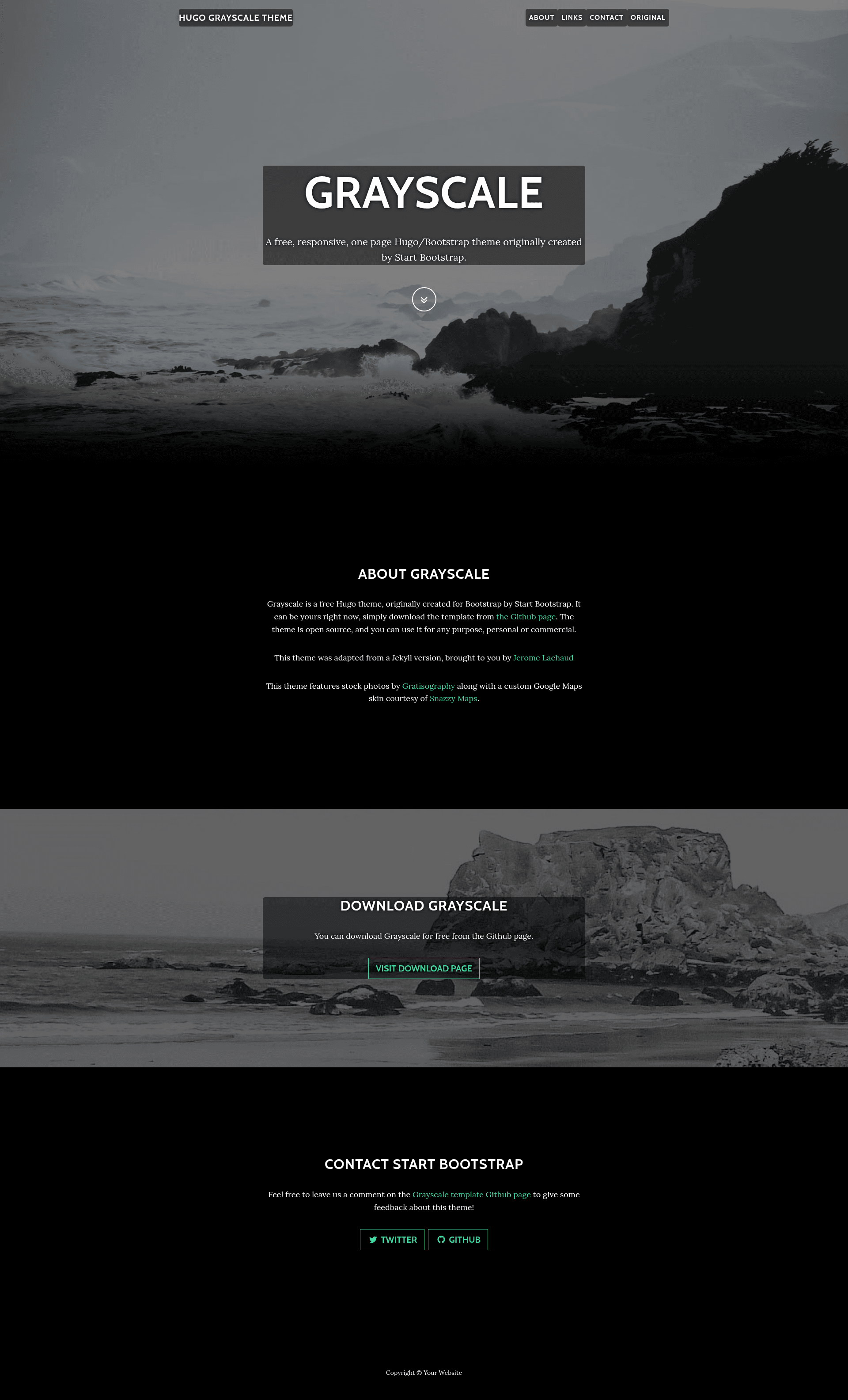
Hugo Grayscale is a single-page theme for the Hugo static site generator, intended to serve as a landing page. It takes markdown files from the content/sections directory and renders them as stacked, visually separated sections on one HTML page, with a fixed navbar linking to each section. The theme is maintained on GitHub by runningstream and can be previewed at https://runningstream.github.io/hugograyscale/.
Key Features
- Single-page sectioned layout — All content appears on one page; each markdown file in content/sections becomes a section ordered by its weight front matter value.
- Start Bootstrap Grayscale port — Converts the popular startbootstrap-grayscale HTML/CSS theme into a Hugo theme while keeping the original color scheme and section design.
- Markdown-based content — Sections, titles, and ordering are defined via front matter (title, weight, improvecontrast) rather than editing HTML templates.
- Built-in section structure — The theme ships with sections for navbar, intro (with background image), about (black background), download (with background image), and contact (black background).
- Custom shortcodes — Includes a big-button shortcode for call-to-action buttons and a socialhandles shortcode for Twitter and GitHub links, demonstrated in the exampleSite.
- Fixed image conventions — Intro and download background images are read from static/img/section0-bg.jpg and static/img/section2-bg.jpg, with aspect ratios configured in grayscale.css (1.33333 and 4.625).
- Site configuration support — Author name and email plus Twitter handle from the site config appear in the page's meta tags.
Who is it for?
Hugo Grayscale suits developers and site owners who want a clean one-page site without managing multiple pages or templates. It is particularly suited to personal landing pages, product showcases, and project homepages where a download link and contact block are needed.
- Hugo users — Get a pre-built single-page theme and add content through markdown front matter.
- Independent developers / freelancers — Present services or projects with intro, about, download, and contact in one scroll.
- Open-source maintainers — Create a simple homepage with a download button and social links for their repository.
What can you do with it?
- Product landing page: Combine the intro and download sections to announce a product and direct visitors to a download or purchase page.
- Personal portfolio: Use the about and contact sections to display a short bio and ways to reach you, with a background image on the intro.
- Event or conference site: Repurpose the sections to present event info, schedule highlights, and speaker contact details entirely in markdown.
How does it work?
To use Hugo Grayscale, copy the theme into your Hugo site's themes folder and set the theme name to grayscale in the site config or pass -t grayscale when building. Structure content by creating a headless section index (content/sections/index.md) that marks the directory as headless, then add one markdown file per section with title and weight front matter. Run Hugo to generate the static one-page site.
FAQ
Is Hugo Grayscale free?
Yes, the theme is open source and publicly available on GitHub. The repository does not mention any paid license or premium tier, and you can use it for personal or commercial projects.
Does this theme create multiple pages?
No. Hugo Grayscale generates only one page, so the RSS feed contains no items and the sitemap lists just the homepage. It is designed specifically as a single-page landing theme.
How do I change the background images?
Replace the files static/img/section0-bg.jpg and static/img/section2-bg.jpg with your own images. Match the aspect ratios used by the default images (1.33333 and 4.625) for consistent layout, and note the filenames are referenced in grayscale.css.
What shortcodes are provided?
The theme includes a big-button shortcode for creating prominent call-to-action buttons and a socialhandles shortcode that wraps Twitter and GitHub user links. Examples are available in the exampleSite content directory.
Do I need to know HTML?
No, all page content is written in markdown files with front matter. Familiarity with Hugo's directory structure and front matter is helpful, but you do not need to edit templates unless you want to customize the theme.