Template details
Personal Web
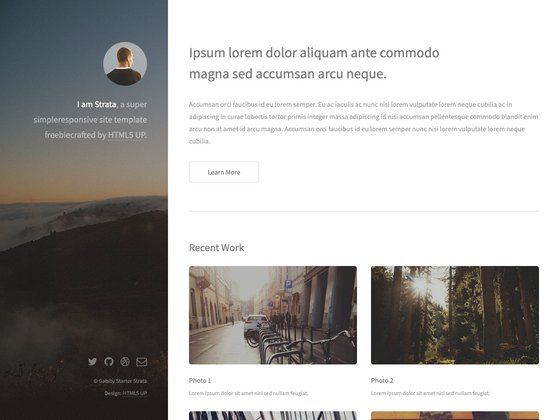
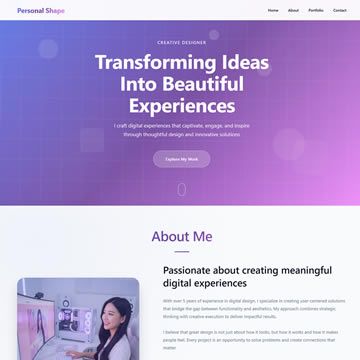
Hugo template for freelancers to build a personal website with portfolio and blog sections.
About this template
Personal Web is a Hugo static-site template for building a personal website with portfolio and blog sections, aimed at freelancers who want to showcase their work. It turns Markdown content for projects and articles into static HTML pages that can be hosted on any static web host. The theme was created by bjacquemet and is available on GitHub under the Unlicense license.
What is Personal Web?
Personal Web is a Hugo template that generates a personal website combining a portfolio of work and a blog. It takes Markdown content for project case studies and articles as input and outputs static HTML pages, so no server-side processing is required. The template is distributed on GitHub by bjacquemet and is licensed under the Unlicense, placing it in the public domain.
Key Features
- Hugo-based static generation — Built on the Hugo static site generator; content is written in Markdown and rendered to fast-loading HTML pages with no server-side dependencies.
- Portfolio and blog sections — Includes page templates for a portfolio grid and a blog with individual article pages, so freelancers can display work and share updates from one site.
- Custom SVG icon system — Users can add their own SVG icons by duplicating the theme's svg.html into the site root and editing it; an optional svgs.sketch file and the svgo optimizer help with crafting new icons.
- ExampleSite starter content — The repository ships with an exampleSite folder containing sample configuration and content you can copy to start building immediately.
- Two installation methods — Install by running
git cloneinto the themes directory or by adding the repository as a git submodule, for easier version tracking. - Local preview server — Hugo's built-in development server serves the site at localhost:1313 when you run
hugo server, giving instant feedback during development. - Live demo — A working demo is hosted at personal-web-example.netlify.com, showing exactly how the finished portfolio and blog look.
- Public-domain licensing — Released under the Unlicense, so there are no restrictions on commercial or personal use, modification, or redistribution.
Who is it for?
- Freelancers — Use the portfolio section to display past projects and the blog to publish articles about their services, building a professional online presence without a custom build.
- Hugo developers — Developers already using Hugo can drop Personal Web into their themes folder and adapt the template files to match their preferred site structure.
- Designers — Designers who need a clean base can replace the default styling and add their own SVG icons through the documented override procedure.
What can you do with Personal Web?
- Freelance professionals: create a portfolio of project case studies with descriptions and images, then add a blog to share articles that demonstrate expertise.
- Independent developers: quickly deploy a personal site to Netlify or similar static hosting by cloning the theme and filling in your own content in the exampleSite.
- Personal branding: establish a simple web presence that separates your work (portfolio) from your thoughts (blog) without needing a content management system.
How does Personal Web work?
Install the theme into a Hugo site, then start the server. The workflow is:
- Clone the repository or add it as a git submodule in the themes directory.
- Copy the exampleSite content as a starting point or configure your own content.
- Run
hugo serverto preview at localhost:1313. - For custom icons, override the svg.html file in your root directory.
Pricing
Free — the theme is released under the Unlicense, which puts it in the public domain.
FAQ
Is Personal Web free?
Yes. Personal Web is released under the Unlicense, meaning it is public domain. You can use, modify, and distribute it for personal or commercial projects without paying anything or providing attribution.
How do I install Personal Web?
Run git clone https://github.com/bjacquemet/personal-web inside your Hugo site's themes directory, or add it as a submodule with git submodule add https://github.com/bjacquemet/personal-web.git. Then follow the exampleSite folder for configuration.
How do I preview the site locally?
From your Hugo site's root directory, run hugo server. The site will be available at http://localhost:1313 in your browser.
Can I add my own SVG icons?
Yes. Copy the theme's svg.html into your site's root directory to override it, then edit the file. A svgs.sketch file is included for designing icons, and you can optimize the resulting SVGs with the svgo tool.
Where is the demo of this theme?
The demo site is hosted at personal-web-example.netlify.com, which shows the portfolio and blog pages in action.