Template details
HugoTeX
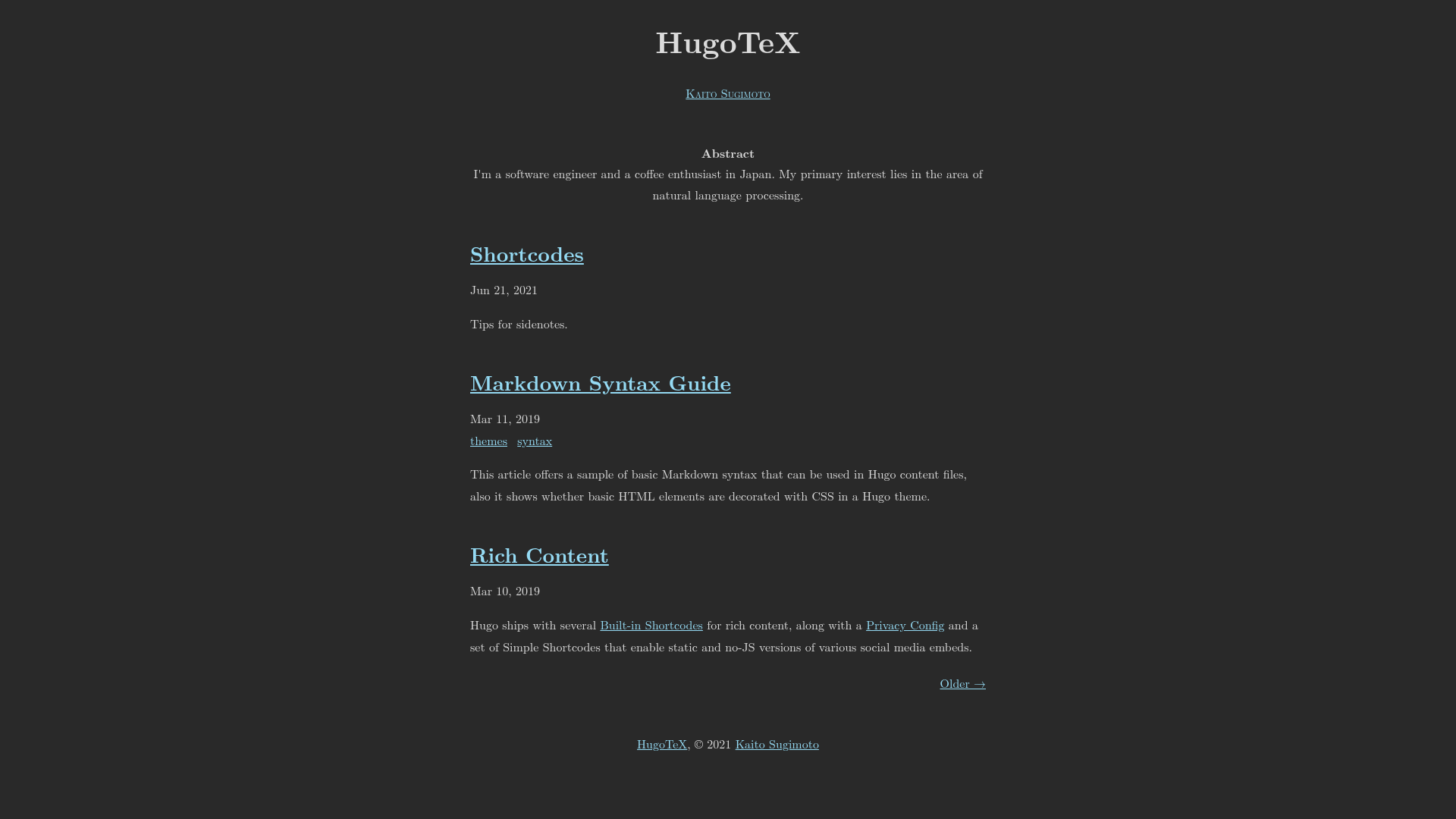
A LaTeX-inspired Hugo theme for elegant technical writing and academic content, featuring server-side KaTeX math rendering and zero client-side JavaScript.
About this template
HugoTeX is a free, MIT-licensed Hugo theme that applies LaTeX's classic document typography to static sites for academic writing, technical blogging, and math-heavy content.
What is HugoTeX?
HugoTeX is a Hugo theme, requiring Hugo 0.158.0 or newer, that turns Markdown content — prose, code blocks, and mathematical notation — into a static HTML site styled like a LaTeX document. Inline math in single dollar signs and display math in double dollar signs are typeset at build time, so no math JavaScript is shipped to the browser. The theme is maintained by the HugoTeX team on GitHub, powers the live demo at hugotex.pages.dev, and bases its styling on LaTeX.css and latex-css.
Key Features
HugoTeX concentrates its feature set on print-style typography and on doing heavy work at build time rather than in the browser.
- Server-side math rendering — KaTeX output is produced with Hugo's built-in
transform.ToMathduring the build; pages load with zero client-side math JavaScript and stay fully readable with JavaScript disabled. - LaTeX-style typography — a document look powered by LaTeX.css, including sidenotes that sit in the right margin on desktop and collapse behind a clickable reference number on mobile.
- Automatic dark mode — follows the visitor's
prefers-color-scheme; settingdarkmode = trueorlightmode = truein hugo.toml forces dark or light mode. - Article abstracts — the text before the Hugo
morecomment divider renders automatically as an academic-style abstract at the top of each article. - SEO and social metadata — built-in OpenGraph and Twitter Card support plus a canonical URL on every page, with a description fallback chain from front matter to abstract to author bio to site description.
- Dual-theme syntax highlighting — Chroma styles such as
paraiso-darkandmonokai; a separate DarkStyle under[Params.SyntaxHighlighting]can differ from the light style in[markup.highlight]. - Flexible installation — the theme can be added as a git submodule, as a Hugo Module, or by cloning it directly into the
themesdirectory. - Favicon pipeline — supports a multi-size
ico(16, 32, and 48 px), ansvgfor modern browsers, and a 180x180pngused as both fallback and Apple touch icon.
Who is it for?
HugoTeX targets writers whose content mixes prose, code, and mathematics, plus any Hugo user who wants LaTeX-like page styling.
- Researchers and academics — write papers and lecture notes with LaTeX-quality output and formal abstracts, all in Markdown.
- Technical bloggers — publish tutorials and documentation that combine Chroma syntax highlighting with typeset inline and display math.
- Science communicators and math educators — present complex equations such as
$E = mc^2$with proper typesetting supported by KaTeX. - Hugo users generally — get a professional, print-like reading experience without running a client-side JavaScript framework.
What can you do with HugoTeX?
HugoTeX supports four concrete workflows, all running on a standard Hugo installation.
- Academics: structure each post so the summary before the
moredivider becomes a formal abstract, with equations processed at build time. - Technical bloggers: publish mixed code-and-math posts with dual-theme highlighting and rich OpenGraph and Twitter Card previews.
- Math educators: host block equations in double-dollar delimiters that render instantly and remain legible on slower mobile connections.
- Documentation teams: install the theme as a Hugo Module, set per-page canonical URLs and descriptions, and extend branding through
assets/css/custom.css.
How does HugoTeX work?
To try it, clone the repository, enter exampleSite, and run hugo server -t ../.. to preview the demo at localhost:1313. In an existing project, add the theme as a submodule, set theme = "HugoTeX" in hugo.toml, and enable the Goldmark passthrough extension with single-dollar inline and double-dollar block delimiters so math renders through transform.ToMath on every build.
Alternatives
- hugo-theme-texify — another LaTeX-inspired Hugo theme, listed on the HugoTeX page under Similar Projects.
FAQ
Is HugoTeX free?
Yes. HugoTeX is released under the MIT License, so it can be used, modified, and redistributed freely, including in commercial projects.
What version of Hugo does HugoTeX require?
HugoTeX requires Hugo 0.158.0 or newer. The quick start also assumes Git is installed, since the recommended installation method adds the theme as a git submodule.
Does HugoTeX render math without JavaScript?
Yes. Math is typeset server-side with KaTeX through Hugo's transform.ToMath, so equations render even with JavaScript disabled and add no render-blocking client-side scripts.
How do I enable math notation in HugoTeX?
Enable the Goldmark passthrough extension in hugo.toml with inline $ and block $$ delimiters, and set enableInlineShortcodes = true. Once configured, write LaTeX-style math directly in Markdown and it is processed at build time.
How do I force light or dark mode?
Omit both mode parameters to follow the user's prefers-color-scheme automatically. Set darkmode = true to force dark mode, or lightmode = true to force light mode, in the [Params] section of hugo.toml.