Template details
Inkblotty
Responsive Hugo blog theme ported from the Inkblot WordPress theme with TOC, Disqus comments, related posts, and social share buttons.
About this template
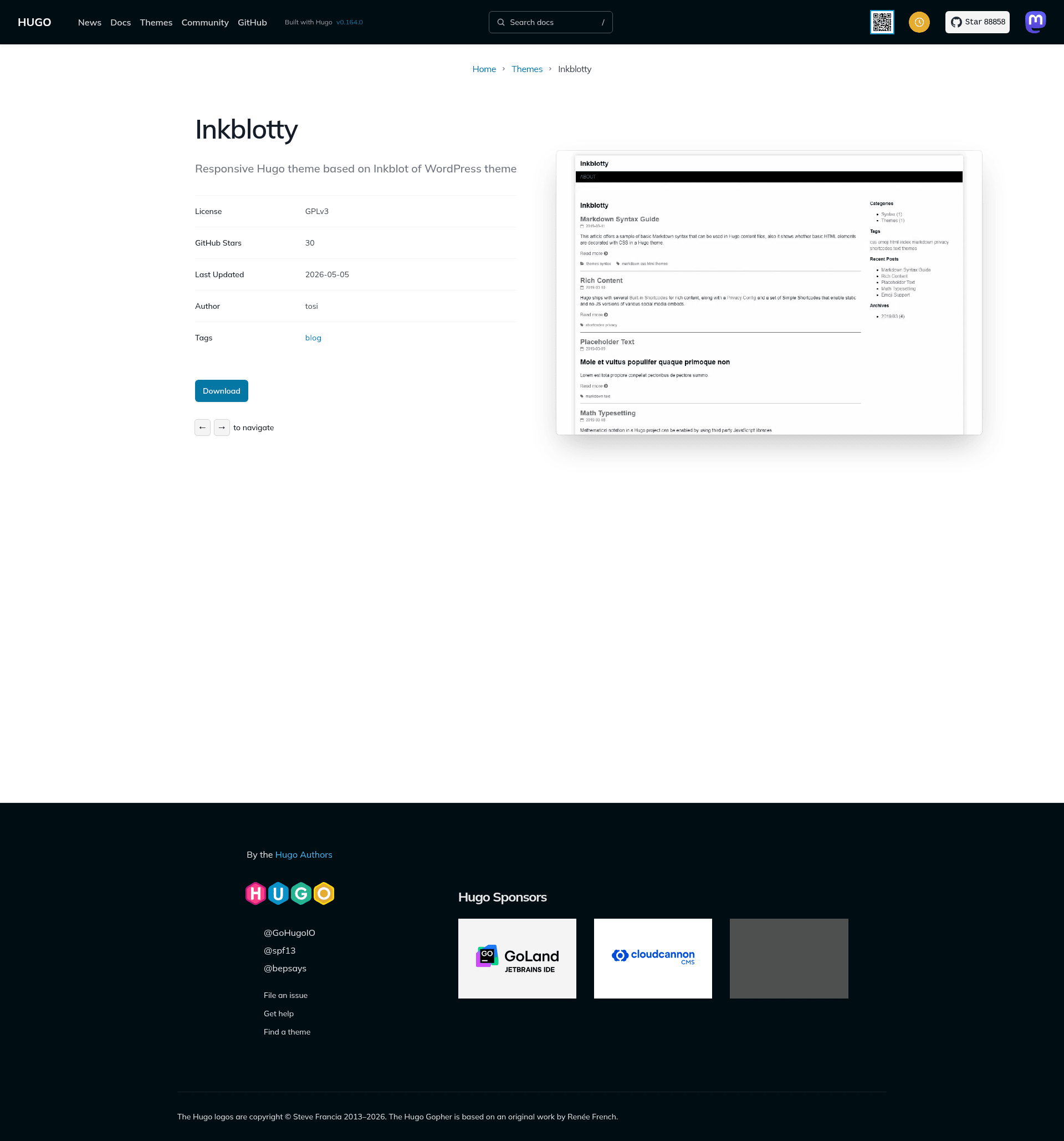
Inkblotty is a responsive Hugo theme for blogs, ported from the Inkblot WordPress theme, that turns a standard Hugo site into a feature-rich blog with article summaries, a sidebar, and social sharing.
What is Inkblotty?
Inkblotty is a Hugo theme created by tosi29 that adapts the Inkblot WordPress theme's design to the Hugo static site generator. It takes Markdown content files with front matter and renders a blog-oriented responsive HTML site, producing article pages, an article list with summaries, a sidebar, and built-in metadata feeds. The theme is free and open source, distributed via GitHub, with a live demo hosted on Netlify.
Key Features
- Responsive design — The layout adapts to mobile and desktop viewports, making the blog readable on any screen size.
- Social share buttons — Article pages include share buttons for Facebook, Twitter, and Hatena Bookmark, letting readers post links to their networks.
- Disqus comments — Site owners can enable Disqus by adding their shortname to the configuration, giving posts a comment section.
- Related posts — Each article page shows related posts, encouraging readers to explore more content.
- Table of contents — Authors can display a TOC either by setting
toc: truein a page's front matter or by inserting the toc shortcode within the body. - Article list summaries — The homepage lists posts as summaries with a "Read more" link, so readers can scan multiple entries quickly.
- Sidebar widgets — The sidebar shows a category list, tag cloud, recent posts, and an archive list to help site navigation.
- Built-in integrations — Google Analytics, sitemap XML, RSS, and Open Graph / Twitter Card metadata are included without extra plugins.
Who is it for?
- Hugo bloggers — Anyone running a Hugo site who wants a traditional blog layout with a sidebar and article tooling out of the box.
- Writers who use front matter — Authors who can set
toc: truein their Markdown front matter to auto-generate a table of contents for long posts. - Developers maintaining personal sites — Users who want to avoid assembling separate plugins for analytics, comments, share buttons, and related posts, since Inkblotty bundles these features together.
What can you do with Inkblotty?
- Personal blogs — Publish chronological posts with summaries, tags, categories, and archives, all rendered as static HTML with Hugo.
- Content-heavy articles — Use the table of contents shortcode or front matter flag to help readers navigate long tutorials and essays.
- Audience engagement — Activate Disqus comments and social share buttons to let readers discuss and share each post.
How does Inkblotty work?
To use the theme, clone the repository into your Hugo site's themes directory (or download and extract the zip) and set theme = "inkblotty" in the site's config.toml. After configuration, Hugo builds the site as a set of static files; the theme's templates read front matter for features such as TOC and sidebar widgets. The repository includes an exampleSite/config.toml as a reference for the required settings.
FAQ
Is Inkblotty free?
Yes, Inkblotty is an open-source Hugo theme distributed on GitHub, so it can be downloaded, used, and modified without charge.
How do I enable the table of contents?
You can set toc: true in a page's front matter to show the TOC near the top, or insert the toc shortcode manually at the desired position in the article body. The heading levels included are controlled by the markup.tableOfContents settings in config.toml.
Does Inkblotty support comments?
Yes, comments are provided through Disqus. You need to configure your Disqus shortname in the theme's settings.
Which share buttons are available?
Inkblotty includes share buttons for Facebook, Twitter, and Hatena Bookmark on article pages. Hatena Bookmark is a Japanese social bookmarking service, so the set is especially suited for audiences that use it.