Template details
iOS Ref
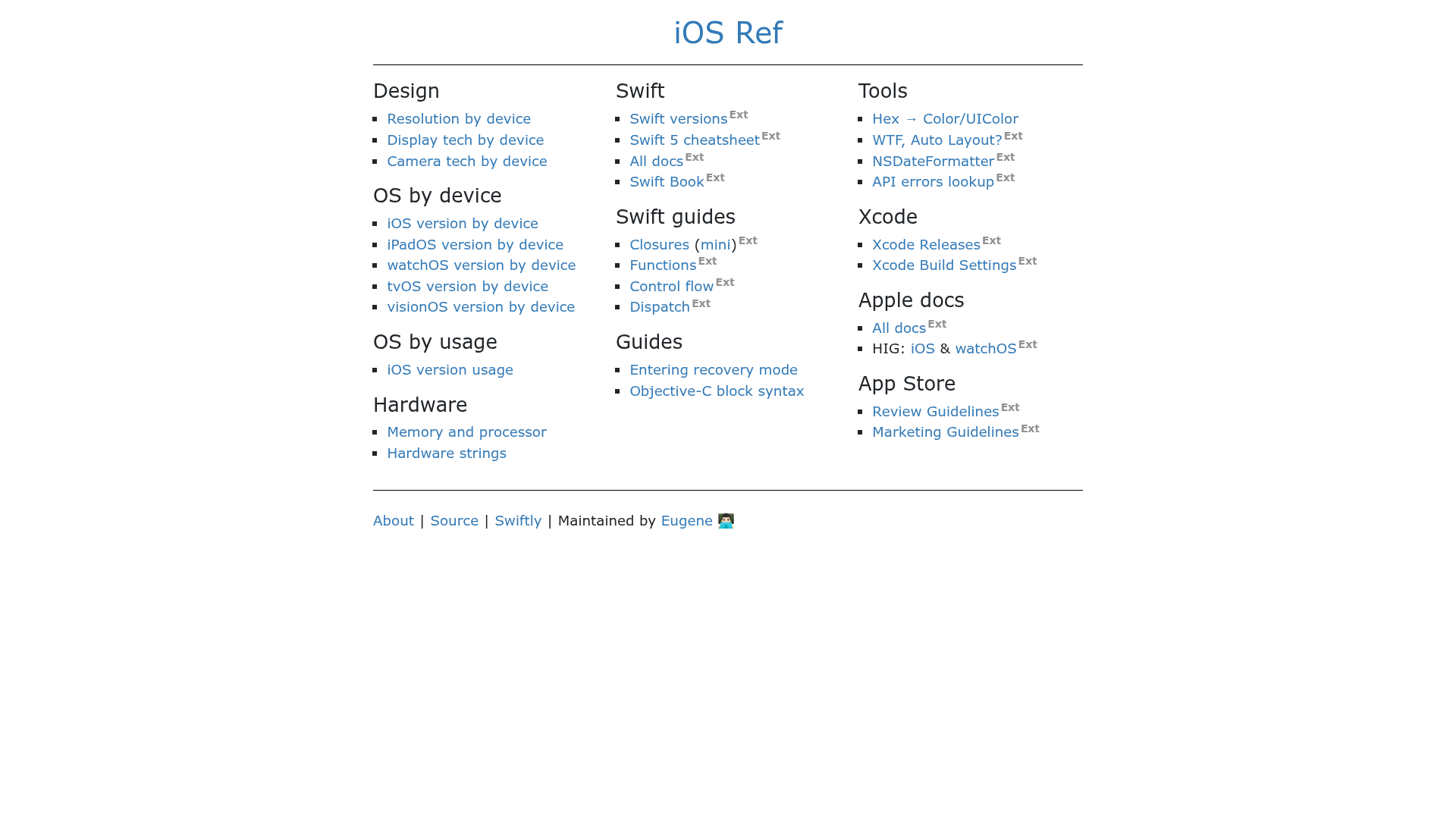
A one-stop quick reference site for iOS, iPadOS, watchOS, and tvOS developers.
About this template
iOS Ref is a Jekyll-built, GitHub Pages-hosted quick reference website for iOS, iPadOS, watchOS, and tvOS developers that organizes Apple platform documentation as browsable markdown pages. The project lives as an open-source GitHub repository, with contributions accepted through issues and pull requests, and changes merged into the main branch deploy automatically.
What is iOS Ref?
iOS Ref is an open-source reference website for Apple platform developers, covering iOS, iPadOS, watchOS, and tvOS. It takes markdown content from the _subpages folder and generates a static searchable site via Jekyll, hosted on GitHub Pages. The repository is maintained on GitHub, and every merge to the main branch triggers an automatic deployment to https://iosref.com.
Key Features
- Multi-platform coverage — iOS, iPadOS, watchOS, and tvOS topics are consolidated in one place, so developers can flip between platform references without leaving the site.
- Jekyll static site — The site is built entirely from markdown files with Jekyll, meaning no server-side processing or database; it serves as plain HTML from GitHub Pages.
- Automatic deployment — Pushing or merging changes into the
mainbranch rebuilds and publishes the site automatically, so contributions go live without manual steps. - Dual licensing — The repository code is MIT-licensed, while the
_subpagescontent folder and the website content are licensed under CC BY-SA 4.0, clarifying how reuse and attribution work. - Local development workflow — Anyone can build the site locally by installing the pinned Ruby version (via rbenv), running
bundle install, and startingbundle exec jekyll serve; the site appears at http://127.0.0.1:4000/. - Open contribution model — Suggestions are filed as GitHub issues, proposed changes come through pull requests, and all contributors must follow the project's code of conduct and licensing terms.
Who is it for?
iOS Ref is aimed at developers who work with Apple platforms and need a fast, easily editable reference. iOS developers can use it to look up API names and platform behaviors while coding. iPadOS and watchOS developers benefit from having a consolidated reference instead of navigating Apple's separate documentation sets. Contributors who want to fix inaccuracies or expand coverage can edit the markdown files and submit pull requests.
What can you do with iOS Ref?
- Quick API lookup — Search or browse the site to find framework and platform references without leaving the tab.
- Self-host an offline copy — Fork the repository and run it locally with Jekyll, giving you a cached, always-available reference.
- Contribute corrections — Edit a markdown page and open a pull request to fix an error or add missing details; merged changes deploy to the live site automatically.
How does iOS Ref work?
The site content lives as markdown files in the _subpages folder of the repository. Jekyll processes those files into a static website hosted on GitHub Pages. The contribution workflow is a standard GitHub flow: fork the repo, edit markdown, submit a pull request, and maintainers merge it — after that, the site rebuilds automatically. For local work, the project pins a Ruby version (.ruby-version) and uses Bundler to install dependencies, then bundle exec jekyll serve runs a development server.
FAQ
Is iOS Ref free?
Yes, the site and repository are open source. The code is licensed under MIT, and the content pages are licensed under CC BY-SA 4.0, so there is no cost to view, use, or contribute.
What platforms does iOS Ref cover?
The site covers iOS, iPadOS, watchOS, and tvOS. The repository metadata also lists topics for iphone and ipados, indicating device-specific references within the same content set.
How can I contribute to iOS Ref?
You can open an issue in the GitHub repository for suggestions or create a pull request with edits to the markdown files. Every contributor must follow the project's code of conduct and agree to the licensing terms before contributions are accepted.
Does iOS Ref require a specific Ruby version?
Yes, the project includes a .ruby-version file that pins the required Ruby version. The setup instructions recommend installing that version using a tool like rbenv before running bundle install.
Where is the site hosted?
The live site is hosted on GitHub Pages at https://iosref.com. Any changes merged into the main branch trigger an automatic deployment that updates the hosted site.