Template details
J1 Template
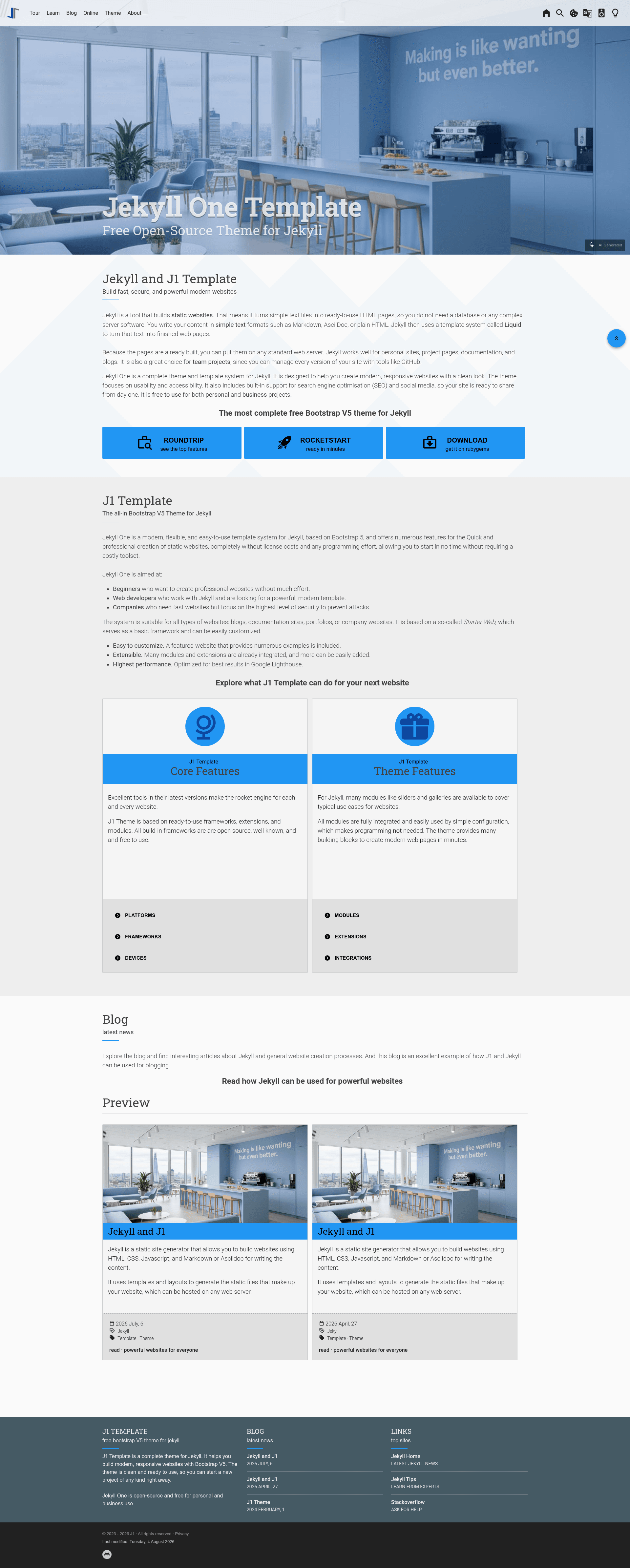
Open-source Jekyll 4 + Bootstrap 5 starter template with a built-in example site, CLI tools, and modules for search, comments, and galleries.
About this template
J1 Template is an open-source static site starter that combines the Jekyll 4 site generator with Bootstrap 5 to build fast, responsive websites from a ready-made scaffold. It ships with a built-in example site, a command-line interface named j1, and dozens of bundled modules for search, comments, galleries, and more.
What is J1 Template?
J1 Template is a Jekyll theme and project starter published under the jekyll-one-org GitHub organization. It takes content written in Asciidoc (Asciidoctor) or Markdown (Kramdown) and produces a fully static HTML site with a live development server, full-text search index, and automatic page generation. The template runs on any x64-based Windows, Linux, or OSX machine with Ruby 2.7+ and NodeJS 14.x+ installed.
Key Features
- Full Bootstrap V5 support — The template's design system is built on Bootstrap 5, with responsive text, responsive HTML tables, and desktop plus mobile navigation included out of the box.
- Full-text search with Lunr — A client-side search engine generates a JSON index at build time and requires no external search service.
- Asciidoc and Markdown content — Write pages and posts in either Asciidoctor or Kramdown Markdown; Asciidoctor plugins and extensions are bundled.
- Built-in modules — Includes Lightbox, Gallery, Carousel, Video (HTML/YouTube/Vimeo/Dailymotion), Masonry, TOC, Clipboard, Floating Action Buttons, and an Animate on Scroll module.
- Comment and analytics integrations — Hyvor and Disqus comment providers are supported, as is Google Analytics.
- Deployment ready — Can be deployed to GitHub Pages (source only), Netlify, or Heroku with no extra configuration.
- J1 CLI — The bundled
j1command handles project generation, setup, running, resetting, and rebuilding, so you do not need to learn npm or Jekyll's command line.
Who is it for?
- Static site developers who want a pre-configured Jekyll environment with Bootstrap theming and common modules already integrated.
- Technical writers and documentation teams who need to publish docs in Asciidoc or Markdown with navigation, search, and code highlighting (Rouge).
- Small businesses and individuals who want a fast, low-maintenance website that can be hosted for free on GitHub Pages or Netlify.
- Bloggers who want a responsive blog scaffold with blog post navigation and comment support.
What can you do with J1 Template?
- Build a company or personal website — Use the built-in web skeleton and building blocks to create a modern homepage, about page, and contact sections in minutes.
- Create a documentation portal — Combine Markdown/Asciidoc content, TOC, code highlighters, and full-text search to ship a searchable knowledge base.
- Set up a portfolio or gallery — Use the Gallery, Lightbox, Masonry, and Carousel modules to present images and videos with royalty-free assets included.
- Prototype a blog — The scaffold includes pagination, blog post navigation, and comment provider integration, so you can publish posts immediately.
How does J1 Template work?
The workflow is: install the Ruby Gem (gem install j1-template --no-document --user-install), create a project with j1 generate my-starter, run j1 setup once to initialize folders and build dependencies, then launch the site with j1 site. The CLI also provides j1 reset to return the project to a factory state and j1 rebuild to regenerate all pages from scratch.
What are the system requirements?
Supported operating systems are Windows 10 build 1903 and later, Windows WSL 2, Linux with kernel 4.15 or newer, and OSX 10.10.5 or later — but only on 64-bit (x64) CPUs. Required runtimes: Ruby version 2.7 or higher, NodeJS version 14.x (below 15.x), and Jekyll 4.2.x. A C/C++ development environment may be needed to compile platform-specific libraries on Linux or OSX.
FAQ
Is J1 Template free?
Yes. J1 Template is open source, and the modules it bundles are free to use for private and professional projects, according to the page. No license fees are mentioned.
Does J1 Template support 32-bit systems?
No. The template explicitly states that 32-bit (x32) versions are not supported on any platform.
What content formats can I write in?
You can write pages and posts in Asciidoc (rendered by Asciidoctor) or Markdown (rendered by Kramdown). The template also supports Jupyter Notebooks when Python is installed.