Template details
Jakarta.ee
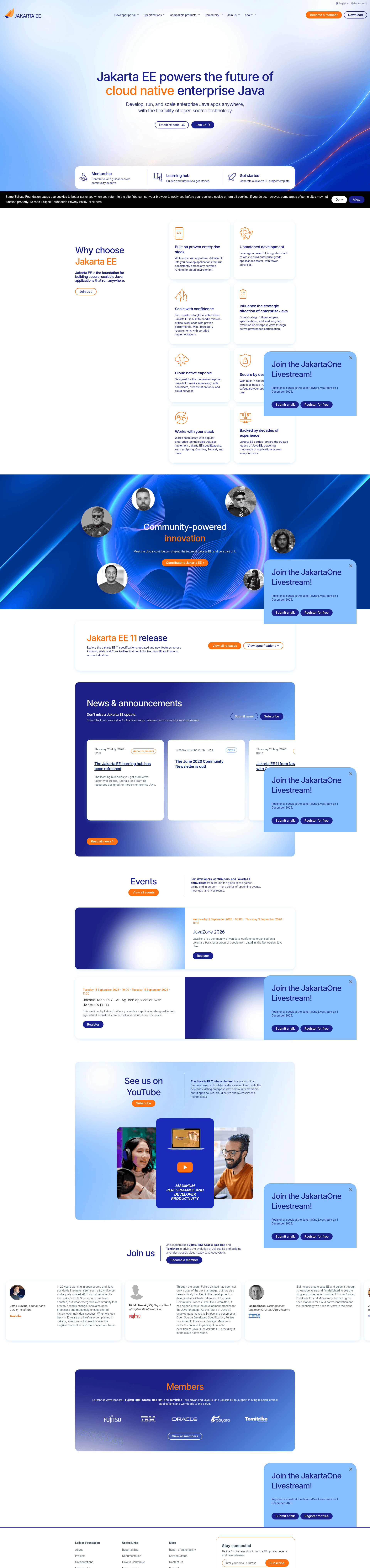
Open-source Hugo website template that powers jakarta.ee, the Eclipse Foundation's cloud native Java site, with news, blogs, specs, and member content.
About this template
Jakarta.ee is an open-source Hugo 0.144.2 website template — the actual production repository, maintained by the Eclipse Foundation, that generates the official https://jakarta.ee site for the Jakarta EE cloud native Java platform, released under the Eclipse Public License v. 2.0.
What is Jakarta.ee?
Jakarta.ee is the production source code for the Jakarta EE website rather than a demo theme: one GitHub repository combines a Hugo 0.144.2 static site, an npm-based asset pipeline, and Netlify deployment. It takes markdown content pages, YAML data files, and front-matter metadata as input, and outputs a static website with sections for specifications, news, blogs, membership testimonials, and compatible product listings. The repository is authored by Christopher Guindon of the Eclipse Foundation and builds on the Eclipse Foundation's Solstice Hugo theme and solstice-assets design system.
Key Features
- Hugo static site generator — The site runs on Hugo 0.144.2 with an npm build pipeline: install dependencies with
npm install -ci, build assets withnpm run production, then serve locally withhugo server. - Netlify deployment — The site is powered by Netlify, and the repository README displays a Netlify deploy-status badge tied to the jakartaee site.
- Specification section generator — A
npm run specificationscommand fetches and copies pages into the Specification section of the site. - Contributor list generator — The
npm run generate_contributor_listscript produces the contributors JSON used on release pages and requires aGH_TOKENenvironment variable to authenticate against GitHub. - News publishing workflow — New entries are folders under
content/newscontaining an_index.mdfile and abanner.png; front matter fields include title, date, publishDate, type, news/tags, authors, image, and summary, and publishDate controls when future-dated entries appear in the news index. - Blog publishing workflow — Blog posts live in folders under
content/blogswith anindex.md, an optional images folder, and a banner.png; the section also supports external blog feeds, added by filing an issue on the JakartaBlogs repository. - Membership testimonial rotation — Each testimonial of roughly 400 characters is stored as its own YAML file in
data/membership/testimonials/, and the membership page rotates through them. - Compatible products directory — Product listings in
data/compatible_products.ymlrecord name, vendor, logo image, download URL, and per-version TCK result URLs.
Who should use Jakarta.ee?
- Eclipse Foundation staff and Jakarta EE Working Group members — maintain the live website by editing markdown content, YAML data files, and approving community submissions through pull requests.
- Jakarta EE committers and contributors — publish release announcements, technical blog posts, and membership testimonials without ever modifying site theme code.
- Hugo site developers — use this repository as a working reference for a multi-section Hugo site that combines Netlify deployment, a GitHub Pages output branch, npm asset scripts, and a human content-approval workflow.
- Product vendors — list compatible Jakarta EE products and link each product version directly to its official TCK certification result.
What can you do with Jakarta.ee?
- Release managers: announce a Jakarta EE release by adding a news entry — a folder with
_index.mdand a banner image — so it shows up in the announcements area on the front page. - Technical bloggers: write a post in
content/blogs, submit a pull request for approval, or request inclusion of an external blog through the JakartaBlogs repository. - Working Group representatives: add a membership testimonial with a pull request that introduces one YAML file containing a quote of up to 450 characters plus the author and organization.
- Compatibility program participants: register a compatible product with version numbers, TCK result URLs, and download links in
data/compatible_products.yml.
How does Jakarta.ee work?
After cloning the repository, contributors run npm install -ci, then npm run production to build assets, and finally hugo server for local development. Content is authored as markdown with YAML front matter, and the Eclipse Foundation Marketing Manager approves new news and blog entries through the pull request process. Because the site was originally a GitHub Pages organization site, generated Hugo output is committed to the master branch while all source edits target the src branch; a Travis CI job reconciles the two.
Pros and cons
- Pro: The entire site pipeline — content model, build scripts, and deployment configuration — is open source and auditable under the EPL-2.0 license.
- Pro: Content contributors never need to touch Hugo layout files; every content type has a documented folder structure.
- Con: The dual-branch workflow adds friction: pull requests must always target the
srcbranch, nevermaster, becausemasterholds the generated site output.
Pricing
Jakarta.ee is free and open source. The code is released under the Eclipse Public License Version 2.0 (EPL-2.0).
FAQ
Is the Jakarta.ee website free to use?
Yes. The entire repository is open source under the Eclipse Public License v. 2.0 (EPL-2.0), so the site code — including its Hugo layouts, npm build scripts, and content model — can be studied, reused, and adapted by any organization building a Hugo-based website.
How do I contribute to the Jakarta.ee website?
Fork the jakartaee/jakarta.ee repository, create a feature branch, commit changes with the -s sign-off flag, and open a pull request. All pull requests must target the src branch; the master branch contains the Hugo build output and is updated automatically by a Travis CI job.
How do I add a news entry to jakarta.ee?
Create a new folder under content/news, add an _index.md file with front matter containing a title, date, publishDate, type, news/tags, authors, image, and summary, and include a banner.png for the card image. The Eclipse Foundation Marketing Manager approves the entry during the pull request review.
How do I add a blog post?
Create a folder under content/blogs with an index.md containing title, date, and summary front matter, plus any content images and a banner.png. External blog sources can be added by filing an issue on the JakartaBlogs repository using its add-blog template.
Why does the contributor list script need a GH_TOKEN?
The npm run generate_contributor_list script reads contributor data from GitHub and requires authentication. Run it with the token supplied inline, for example GH_TOKEN=your-token-here npm run generate_contributor_list.